
CSS 表格边框折叠
cssweb developmentfront end technology更新于 2025/1/17 15:40:17
CSS border-collapse 属性用于指定 <table> 元素是共享边框还是独立边框。它可以采用两个值:separate 和 collect。
语法
CSS border-collapse 属性的语法如下 −
Selector {
   border-collapse: /*value*/
}
以下示例演示了 CSS border-collapse −
示例
<!DOCTYPE html>
<html>
<head>
<style>
#cdemo {
   border-collapse: collapse;
}
#sdemo {
   border-collapse: separate;
}
table {
   display: inline-table;
   margin: 30px;
}
th,td {
   border: 3px ridge orange;
}
td {
   border-color: red;
}
caption {
   box-shadow: 0px -5px 4px 3px green;
}
</style>
</head>
<body>
<h2>Employee Records</h2>
<table id="sdemo">
<caption> Employee Details (Separate Border) </caption>
<tr>
<th>Employee</th>
<th>Department</th>
</tr>
<tr>
<td>Tim</td>
<td>Operations</td>
</tr>
<tr>
<td>Nathan</td>
<td>Finance</td>
</tr>
<tr>
<td>John </td>
<td>Marketing</td>
</tr>
</table>
<table id="cdemo">
<caption> Employee Details (Collapse Border) </caption>
<tr>
<th>Employee</th>
<th>Department</th>
</tr>
<tr>
<td>Tim</td>
<td>Operations</td>
</tr>
<tr>
<td>Nathan</td>
<td>Finance</td>
</tr>
<tr>
<td>John </td>
<td>Marketing</td>
</tr>
</table>
</body>
</html>
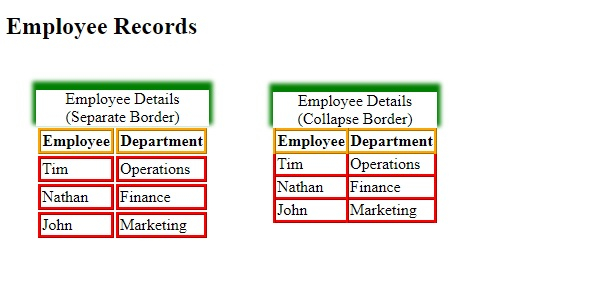
输出
这将给出以下输出 −
示例
<!DOCTYPE html>
<html>
<head>
<style>
table {
   border-collapse: separate;
   empty-cells: hide;
   display: inline-table;
   margin: 30px;
}
table+table {
   border-collapse: collapse;
   empty-cells: hide;
}
td {
   border: 3px ridge lightblue;
}
caption {
   box-shadow: 0px -5px 4px 3px grey;
}
</style>
</head>
<body>
<h2>Demo Tables</h2>
<table>
<caption>Demo caption</caption>
<tr>
<td>demo</td>
<td>demo</td>
</tr>
<tr>
<td>demo</td>
<td>demo</td>
</tr>
<tr>
<td>demo</td>
<td>demo</td>
<td></td>
</tr>
</table>
<table>
<caption>Demo caption</caption>
<tr>
<td>demo</td>
<td>demo</td>
</tr>
<tr>
<td>demo</td>
<td>demo</td>
</tr>
<tr>
<td>demo</td>
<td>demo</td>
<td></td>
</tr>
</table>
</body>
</html>
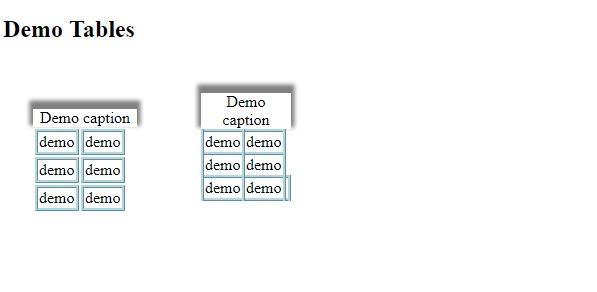
输出
这将给出以下输出 −
相关文章
有用资源
css 参考教程 - 该教程包含有关 css 的更多信息:https://www.cainiaomax.com/css/

