
CSS 中的相对定位
cssweb developmentfront end technology更新于 2025/1/14 6:36:17
我们可以在 CSS 中将元素的定位定义为相对定位,这样元素就能正常渲染。定位方法为相对的元素通过 CSS 定位属性(left、right、top 和 bottom)进行定位。
示例
让我们看一个 CSS 相对定位方法的示例 −
<!DOCTYPE html>
<html>
<head>
<style>
p {
   margin: 0;
}
div:first-child {
   position: relative;
   top:20px;
   background-color: orange;
   text-align: center;
}
</style>
</head>
<body>
<div>PostgreSQL</div>
<p>PostgreSQL is a powerful, open source object-relational database system.
It has more than 15 years of active development.................</p>
<div></div>
</body>
</html>
输出
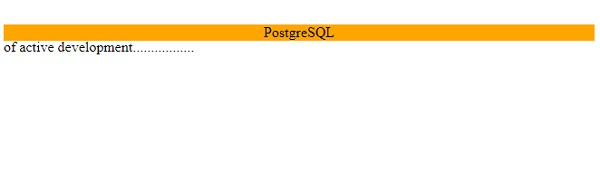
以下是上述代码的输出 −
示例
让我们看另一个定位方法的例子 −
<!DOCTYPE html>
<html>
<head>
<style>
div {
   border: 2px double #a43356;
   margin: 5px;
   padding: 5px;
}
#d1 {
   position: relative;
   height: 10em;
}
#d2 {
   position: absolute;
   width: 20%;
   bottom: 10px; /*relative to parent d1*/
}
#d3 {
   position: fixed;
   width: 30%;
   top:10em; /*relative to viewport*/
}
</style>
</head>
<body>
<div id="d1">PhoneGap is a software development framework by Adobe System, which is used to develop mobile applications. To develop apps using PhoneGap, the developer does not require to have knowledge of mobile programming language but only web-development languages like, HTML, CSS, and JScript.<mark>relative</mark>
<div id="d2"><mark>absolute</mark></div>
<div id="d3"><mark>fixed</mark></div>
</div>
</body>
</html>
输出
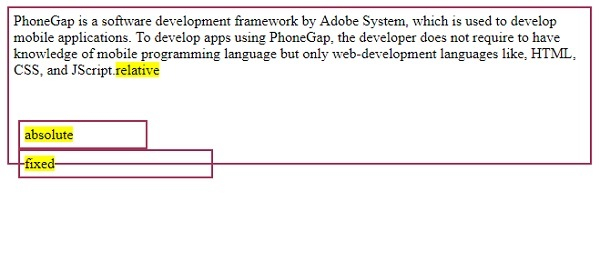
这将产生以下输出: −
相关文章
有用资源
css 参考教程 - 该教程包含有关 css 的更多信息:https://www.cainiaomax.com/css/

