
使用 CSS 设置背景图片
cssweb developmentfront end technology更新于 2025/1/17 16:12:17
CSS background-image 属性用于将图片设置为所选元素的背景。
语法
CSS background-image 属性的语法如下 −
Selector {
   background-image: /*value*/
}
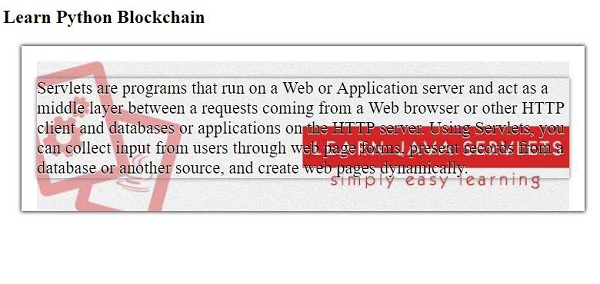
以下示例说明了 CSS background-image 属性 −
示例
<!DOCTYPE html>
<html>
<head>
<style>
#demo {
   margin: 24px;
   box-shadow: 0 0 5px black;
   padding: 20px;
   background-image: url("https://www.cainiaomax.com/servlets/images/servlets.jpg");
   background-origin: content-box;
   background-repeat: no-repeat;
   background-size: cover;
   text-shadow: 0 1px white;
   font-size: 1.4em;
}
p {
   box-shadow: 0 0 5px grey;
}
</style>
</head>
<body>
<h2>Learn Python Blockchain</h2>
<div id="demo">
<p>Servlets are programs that run on a Web or Application server and act as a middle layer between a requests coming from a Web browser or other HTTP client and databases or applications on the HTTP server.
Using Servlets, you can collect input from users through web page forms, present records from a database or another source, and create web pages dynamically.</p>
</div>
</body>
</html>
输出
这将给出以下输出 −
示例
<!DOCTYPE html>
<html>
<head>
<style>
div {
   height: 150px;
   width: 150px;
   background-image: url("https://www.cainiaomax.com/spring/images/spring-mini-logo.jpg");
   border: 2px solid brown;
}
div > div {
   height: 80px;
   width: 80px;
   margin-right: 50px;
   background-image: url("https://www.cainiaomax.com/images/hibernate.png");
}
h1 {
   background-image: url("https://www.cainiaomax.com/hibernate/images/hibernate-patterns.jpg");
   background-repeat: no-repeat;
   color: black;
}
</style>
</head>
<body>
<h1>Demo</h1>
<div>
<div></div>
</div>
</body>
</html>
输出
这将给出以下输出 −

相关文章
有用资源
css 参考教程 - 该教程包含有关 css 的更多信息:https://www.cainiaomax.com/css/

