
使用 CSS 的 z-index 属性在图层中堆叠元素
cssweb developmentfront end technology更新于 2025/1/8 13:00:17
使用 CSS 的 Z-Index 属性,开发人员可以将元素堆叠在一起。Z-Index 可以是正值或负值。
注意 − 如果重叠的元素未指定 z-index,则该元素将显示在文档中最后提及的元素。
让我们看一个 z-index 属性的示例 −
示例
<!DOCTYPE html>
<html>
<head>
<style>
p {
   background: url("https://www.cainiaomax.com/arangodb/images/arangodb.jpg");
   background-origin: content-box;
   background-repeat: no-repeat;
   background-size: cover;
   box-shadow: 0 0 3px black;
   padding: 20px;
   background-origin: border-box;
}
</style>
</head>
<body>
<h2>ArangoDB</h2>
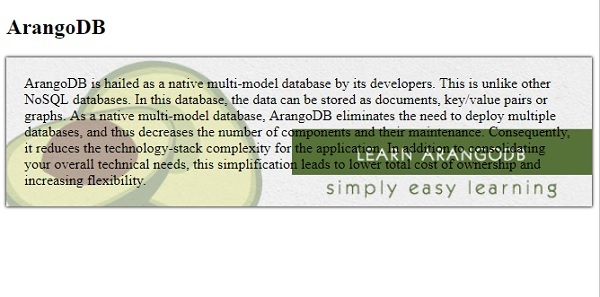
<p>ArangoDB is hailed as a native multi-model database by its developers. This is unlike other NoSQL databases. In this database, the data can be stored as documents, key/value pairs or graphs.
As a native multi-model database, ArangoDB eliminates the need to deploy multiple databases, and thus decreases the number of components and their maintenance. Consequently, it reduces the technology-stack complexity for the application. In addition to consolidating your overall technical needs, this simplification leads to lower total cost of ownership and increasing flexibility.</p>
</body>
</html>
输出
让我们看另一个 z-index 属性的例子 −
示例
<!DOCTYPE html>
<html>
<head>
<style>
p {
   margin: 0;
   position: absolute;
   top: 50%;
   left: 50%;
   transform: translate(-50%, -50%);
}
div{
   margin: auto;
   position: absolute;
   top:0;
   left: 0;
   right: 0;
   bottom: 0;
}
div:first-child {
   background-color: orange;
   width: 270px;
   height: 120px;
   z-index: -2;
}
div:last-child {
   width: 250px;
   height: 100px;
   z-index: -1;
   background-color: turquoise;
}
</style>
</head>
<body>
<div></div>
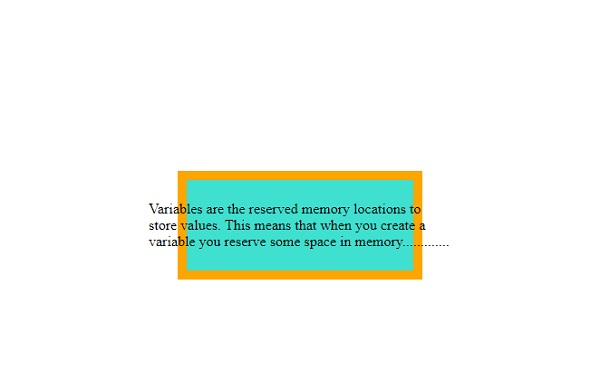
<p>Variables are the reserved memory locations to store values. This means that when you create a variable you reserve some space in memory.............</p>
<div></div>
</body>
</html>
输出
相关文章
有用资源
css 参考教程 - 该教程包含有关 css 的更多信息:https://www.cainiaomax.com/css/

