
CSS 中的 ::first-line 伪元素
cssweb developmentfront end technology更新于 2025/1/8 13:32:17
此 CSS 伪元素用于选取元素内容的第一行。但是,如果包含文本的宽度不固定,则行的长度可能会根据窗口大小而变化。
让我们看一个 CSS ::first-line 伪元素的示例 −
示例
<!DOCTYPE html>
<html>
<head>
<style>
p::first-line {
   background-color: lightgreen;
   color: white;
}
</style>
</head>
<body>
<h2>Lorem Ipsum</h2>
<p>Phasellus id ante turpis.Vestibulum luctus justo id odio iaculis condimentum. Vestibulum sapien mauris, feugiat id posuere vitae, condimentum blandit sapien.</p>
<div id="divDisplay"></div>
<script>
divDisplay.textContent = 'Current window width: '+window.innerWidth+'px';
window.addEventListener('resize', function() {
   divDisplay.textContent = 'Current window width: '+window.innerWidth+'px';
})
</script>
</body>
</html>
输出
最初,当窗口宽度大小为'606px'时−
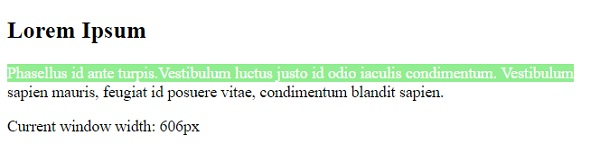
当窗口宽度增加时 −
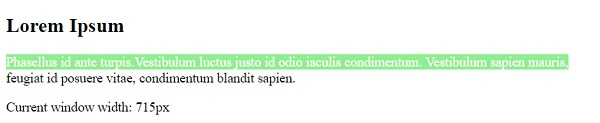
当包含元素的文本宽度固定且窗口大小调整时 −
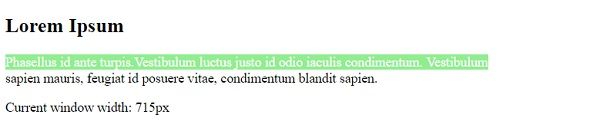
让我们看另一个 CSS ::first-line 伪元素的示例 −
示例
<!DOCTYPE html>
<html>
<head>
<style>
p::first-line {
   background-color: #FF8A00;
   color: white;
}
div{
   width: 420px;
}
</style>
</head>
<body>
<div>
<h2>Demo Heading</h2>
<p>This is demo text. This is demo text. This is demo text. This is demo text. This is demo text. This is demo text. This is demo text. This is demo text. </p>
<p>This is demo text. This is demo text. This is demo text. This is demo text. This is demo text. This is demo text. This is demo text. This is demo text. This is demo text. This is demo text. This is demo text. </p>
</div>
</body>
</html>
输出
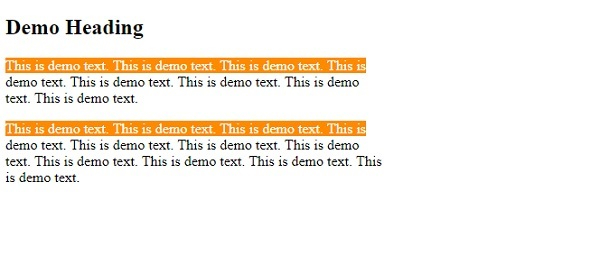
相关文章
有用资源
css 参考教程 - 该教程包含有关 css 的更多信息:https://www.cainiaomax.com/css/

