
CSS 中的标准链接样式
cssweb developmentfront end technology更新于 2025/2/2 10:20:17
我们可以根据需要设置链接样式。建议链接使用与普通文本不同的样式。不同链接状态下的默认链接样式如下 −
| Link State | Color |
|---|---|
| Active | #EE0000 |
| Focus | #5E9ED6 or a similar shade of blue outline in case of Windows and Mac, #F07746 outline for Linux while text color remains the same |
| Hover | #0000EE |
| Link | #0000EE |
| Visited | #551A8B |
注意 − 以上颜色可能会随着浏览器版本的更新而变化。为了确保功能正常,伪选择器的顺序如下::link、:visited、:hover、:active。
示例
以下示例展示了标准链接样式
<!DOCTYPE html>
<html>
<head>
<style>
* {
   text-align: center;
}
</style>
</head>
<body>
<h2>Learn JDBC</h2>
<a href="">Click here</a>
<br/><br/>
<a href="#">And here <img src="https://www.cainiaomax.com/jdbc/images/jdbc-mini-logo.jpg"></a>
</body>
</html>
输出
这将给出以下输出 −

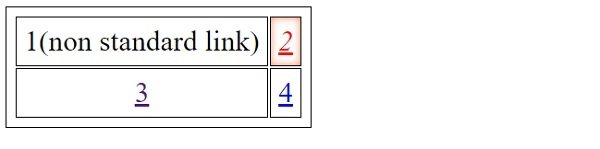
链接的活动状态显示在以下输出中 −

示例
<!DOCTYPE html>
<html>
<head>
<style>
#one {
   color: black;
   text-decoration: none;
}
#two {
   font-style: italic;
   box-shadow: inset 0 0 8px coral;
}
table, td {
   font-size: 1.4em;
   padding: 8px;
   text-align: center;
   border: thin solid;
}
</style>
</head>
<body>
<table>
<tr>
<td><a id="one" href="#">1</a>(non standard link)</td>
<td id="two"><a href="#">2</a></td>
</tr>
<tr>
<td><a href="">3</a></td>
<td><a href="#">4</a></td>
</tr>
</table>
</body>
</html>
输出
这将给出以下输出 −
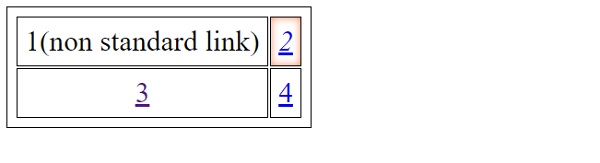
当我们点击"2"时,我们得到以下输出
相关文章
有用资源
css 参考教程 - 该教程包含有关 css 的更多信息:https://www.cainiaomax.com/css/

