
使用 CSS 进行文本转换
cssweb developmentfront end technology更新于 2025/2/2 9:48:17
CSS 的 text-transform 属性允许我们设置元素的文本大小写。它可以接受以下值:大写、小写、大写、全角、全角假名和无。
语法
CSS text-transform 属性的语法如下 −
Selector {
   text-transform: /*value*/
}
示例
以下示例说明了 CSS text-transform 属性 −
<!DOCTYPE html>
<html>
<head>
<style>
h2 {
   text-transform: uppercase;
}
.demo {
   text-transform: lowercase;
}
q {
   text-transform: capitalize;
   font-style: italic;
}
</style>
</head>
<body>
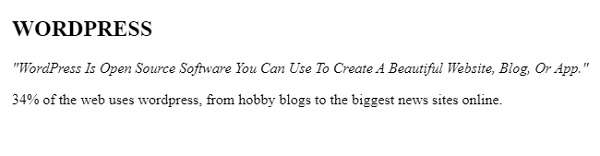
<h2>WordPress</h2>
<q>WordPress is open source software you can use to create a beautiful website, blog, or app.</q>
<p class="demo">34% of the web uses WordPress, from hobby blogs to the biggest news sites online.</p>
</body>
</html>
输出
这将给出以下输出 −
示例
<!DOCTYPE html>
<html>
<head>
<style>
div {
   background-color: lightgreen;
   margin: auto;
   text-align: center;
}
p {
   width: 80%;
   background-color: aquamarine;
   text-decoration: uppercase;
}
article {
   background-color: darksalmon;
   text-transform: lowercase;
}
</style>
</head>
<body>
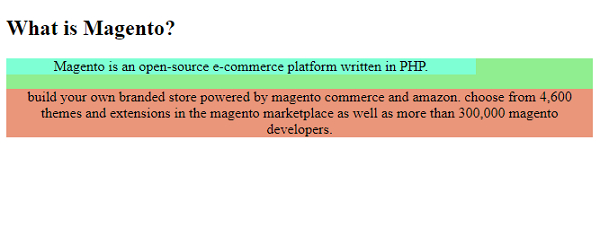
<h2>What is Magento?</h2>
<div>
<p>Magento is an open-source e-commerce platform written in PHP.</p>
<article>
Build your own branded store powered by Magento Commerce and Amazon. Choose from 4,600 themes and extensions in the Magento Marketplace as well as more than 300,000 Magento developers.
</article>
</div>
</body>
</html>
输出
这将给出以下输出 −
相关文章
有用资源
css 参考教程 - 该教程包含有关 css 的更多信息:https://www.cainiaomax.com/css/

