
CSS 中的 :first-child 伪类
cssweb developmentfront end technology更新于 2025/1/19 0:44:17
CSS :first-child 伪类用于选取某个元素的第一个子元素。
语法
以下是语法 −
:first-child{
    /*declarations*/
}
示例
我们来看一个 CSS first-child 伪类的示例 −
<!DOCTYPE html>
<html>
<head>
<style>
table {
   margin: auto;
   padding: 10px;
   border: hsl(54, 100%, 50%) solid 13px;
   border-radius: 6px;
   text-align: center;
}
td, th {
   border-left: 2px solid black;
   border-top: 3px solid black;
}
td:first-child, th:first-child {
   border-left: none;
}
th {
   background-color: lightblue;
   border-top: none;
}
caption {
   margin-top: 3px;
   background-color: purple;
   caption-side: bottom;
   color: white;
   border-radius: 20%;
}
</style>
</head>
<body>
<table>
<caption>MCA Syllabus</caption>
<tr>
<th colspan="4">Subjects</th>
</tr>
<tr>
<td>C</td>
<td>C++</td>
<td>Java</td>
<td>C#</td>
</tr>
<tr>
<td>MySQL</td>
<td>PostgreSQL</td>
<td>MongoDB</td>
<td>SQLite</td>
</tr>
</table>
</body>
</html>
输出
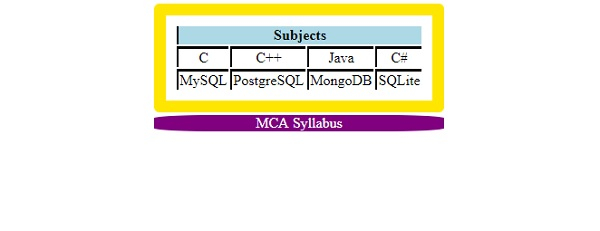
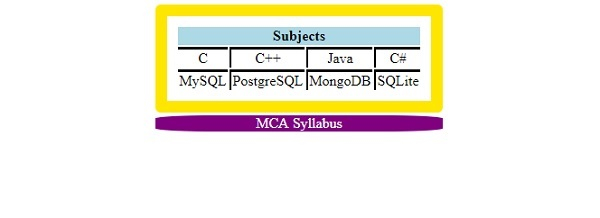
这将产生以下输出 −
使用 first-child 伪类选择器之前 −
使用 first-child 伪类选择器之后 −
示例
让我们看另一个 CSS first-child 伪类的示例 −
<!DOCTYPE html>
<html>
<head>
<style>
* {
   font-size: 1.1em;
   list-style: circle;
}
li:first-child {
   background-color: seashell;
   font-family: cursive;
}
li:nth-child(2) {
background-color: azure;
font-family: "Brush Script Std", serif;
}
li:last-child {
   background-color: springgreen;
   font-family: "Gigi", Arial;
}
</style>
</head>
<body>
<h2>Apache Spark</h2>
<ul>
<li>Apache Spark is a lightning-fast cluster computing technology, designed for fast computation. </li>
<li>It is based on Hadoop MapReduce.</li>
<li>It extends the MapReduce model to efficiently use it for more types of computations.
</li>
</ul>
</body>
</html>
输出
这将产生以下输出 −
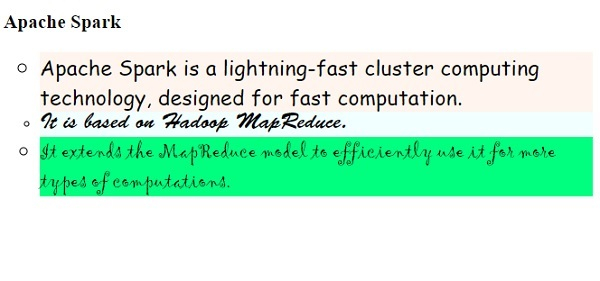
相关文章
有用资源
css 参考教程 - 该教程包含有关 css 的更多信息:https://www.cainiaomax.com/css/

