
理解 CSS 中的 clientHeight、offsetHeight 和 scrollHeight 属性
cssweb developmentfront end technology更新于 2024/9/5 17:48:17
clientHeight
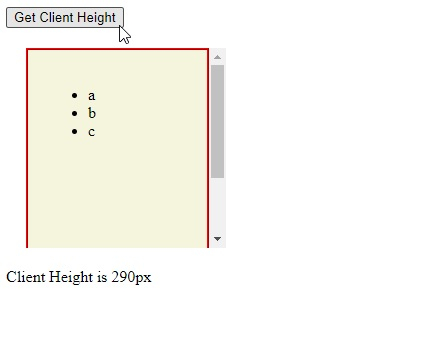
clientHeight 表示元素的高度,包括内边距 (padding)。请注意,边框 (border)、外边距 (margin) 和滚动条高度(如果已渲染)不包含在内。
offsetHeight
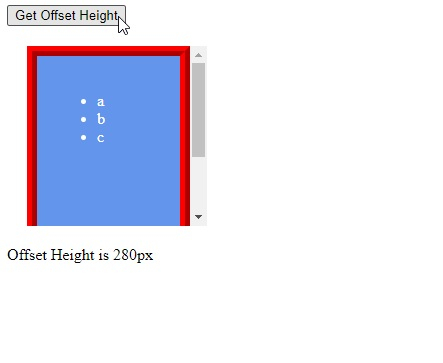
offsetHeight 表示元素的高度,包括垂直内边距 (padding)、顶部和底部边框 (margin)。
scrollHeight
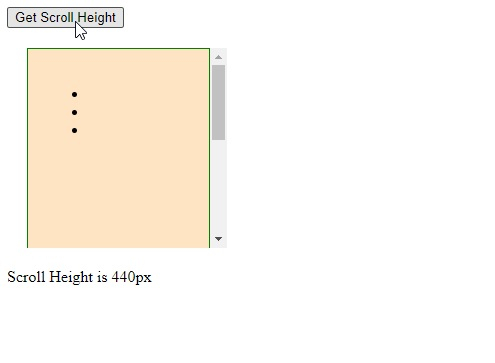
scrollHeight 表示元素的高度,包括垂直内边距 (padding) 和由于 overflow 属性而在屏幕上不可见的内容。
以下示例说明了 clientHeight、offsetHeight 和 scrollHeight。
示例 (clientHeight)
<!DOCTYPE html>
<html>
<head>
<style>
#parent {
   margin-top: 10px;
   height: 200px;
   width: 200px;
   overflow: auto;
   margin: 20px;
}
#demo {
   height: 250px;
   padding: 20px;
   background-color: beige;
   border: 2px ridge red;
}
</style>
</head>
<body>
<button onclick="getHeight()">Get Client Height</button>
<div id="parent">
<div id="demo">
<ul>
<li>a</li>
<li>b</li>
<li>c</li>
</ul>
</div>
</div>
<article id="display"></article>
<script>
function getHeight() {
   let myItem = document.getElementById("demo");
   let y = myItem.clientHeight;
   document.getElementById ("display").innerHTML = "Client Height is " + y + "px";
}
</script>
</body>
</html>
输出
这将产生以下结果 −
Example (offsetHeight)
<!DOCTYPE html>
<html>
<head>
<style>
#parent {
   height: 180px;
   width: 180px;
   overflow: auto;
   margin: 20px;
}
#demo {
   height: 220px;
   padding: 20px;
   background-color: cornflowerblue;
   border: 10px ridge red;
   color: white;
}
</style>
</head>
<body>
<button onclick="getHeight()">Get Offset Height</button>
<div id="parent">
<div id="demo">
<ul>
<li>a</li>
<li>b</li>
<li>c</li>
</ul>
</div>
</div>
<article id="display"></article>
<script>
function getHeight() {
   let myItem = document.getElementById("demo");
   let y = myItem.offsetHeight;
   document.getElementById ("display").innerHTML = "Offset Height is " + y + "px";
}
</script>
</body>
</html>
输出
这将产生以下结果 −
Example (scrollHeight)
<!DOCTYPE html>
<html>
<head>
<style>
#parent {
   margin-top: 10px;
   height: 200px;
   width: 200px;
   overflow: auto;
   margin: 20px;
}
#demo {
   height: 400px;
   padding: 20px;
   background-color: bisque;
   border: 1px solid green;
}
</style>
</head>
<body>
<button onclick="getHeight()">Get Scroll Height</button>
<div id="parent">
<div id="demo">
<ul>
<li></li>
<li></li>
<li></li>
</ul>
</div>
</div>
<article id="display"></article>
<script>
function getHeight() {
   let myItem = document.getElementById("demo");
   let y = myItem.scrollHeight;
   document.getElementById ("display").innerHTML = "Scroll Height is " + y + "px";
}
</script>
</body>
</html>
输出
这将产生以下结果 −
相关文章
有用资源
css 参考教程 - 该教程包含有关 css 的更多信息:https://www.cainiaomax.com/css/

