
使用 Python 实现 Windows 10 Toast 通知
pythonserver side programmingprogramming更新于 2025/10/28 11:24:17
我们可以使用 Python 为 Windows 中发生的事件创建通知程序。使用 win10toast 模块非常简单。如果您熟悉 Android 中的 Toast,那么理解使用 Python 实现 Toast 通知就是小菜一碟。我们可以在事件发生时生成通知。让我们看看。
在命令行中运行以下命令来安装 win10toast 模块
pip install win10toast
如果模块安装成功,则运行命令时将获得以下结果。
Collecting win10toast
Downloading https://files.pythonhosted.org/packages/d4/ba/95c0ea87d9bcad68b90d8cb130a313b939c88d8338a2fed7c11eaee972fe/win10toast-0.9-py2.py3-none-any.whl
Collecting pypiwin32 (from win10toast)
Downloading https://files.pythonhosted.org/packages/d0/1b/2f292bbd742e369a100c91faa0483172cd91a1a422a6692055ac920946c5/pypiwin32-223-py3-none-any.whl
Requirement already satisfied: setuptools in c:\users\hafeezulkareem\anaconda3\lib\site-packages (from win10toast) (40.8.0)
Requirement already satisfied: pywin32>=223 in c:\users\hafeezulkareem\anaconda3\lib\site-packages (from pypiwin32->win10toast) (223)
Installing collected packages: pypiwin32, win10toast
Successfully installed pypiwin32-223 win10toast-0.9
创建 Toast 通知的步骤
从 win10toast 导入 ToastNotifier 类。
实例化该类。
使用所需参数调用 show_toast('title', 'message', duration = time_in_sec, icon_path = 'path to .ico file') 方法。
如果成功,通知持续时间完成后,您将获得 True 作为输出。
让我们用一个简单的例子来看看。
示例
## 程序生成一个简单的 toast 通知程序
from win10toast import ToastNotifier
## 实例化类
notifier = ToastNotifier()
## 使用必需参数调用 show_toast() 方法 notifier.show_toast("Sample Notification", "You are learning at Tutorialspoint", duration = 25, icon_path = "globe.ico")
如果你运行上述程序,你将得到以下结果。
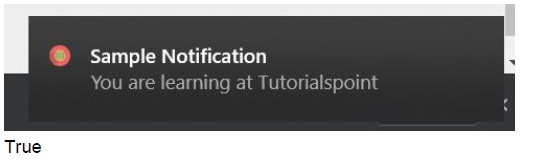
当系统发生事件时,你可以添加此通知程序。如果你对本教程有任何疑问,请在评论部分中提及。
相关文章
有用资源
python 参考教程 - 该教程包含有关 python 的更多信息:https://www.cainiaomax.com/python/

