Behave - Hooks(钩子)
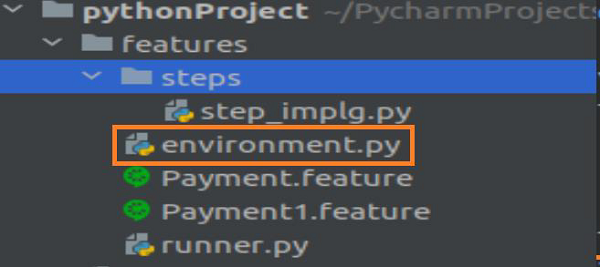
Behave 设置和拆卸功能是在名为 environment.py 的文件中实现的,该文件位于包含步骤文件夹的同一目录中。 设置功能包括——浏览器打开、数据库连接、配置等。
拆解功能包括关闭浏览器、终止数据库连接、逆向修改等。
environment.py 文件包含以下函数 −
before_feature(context, feature) − 在每个功能之前执行。
before_scenario(context, scenario) − 在每个场景之前执行。
before_step(context, step) − 在每一步之前执行。
before_tag(context, tag) − 在每个标签之前执行。
before_all(context) − 在一切之前执行。
after_feature(context, feature) − 执行发布每个功能。
after_scenario(context, scenario) − 执行每个场景的脚本。
after_step(context, step) − 执行发布的每一步。
after_tag(context, tag) − 执行发布每个标签。
after_all(context) − 执行发布所有内容。
上述函数在 Behave 中用作 hooks(钩子)。 项目结构应该如下 −
带有hooks(钩子)的特征文件(Payment.feature)
带有Payment.feature钩子的特征文件如下 −
Feature − Payment Process
Scenario − Verify transactions
         Given user makes a payment of 100 INR And user makes a payment of 10 Dollar
带有hooks(钩子)的特征文件(Payment1.feature)
下面给出的是带有 Payment1.feature 钩子的特征文件 −
Feature − Administration Process
Scenario − Verify admin transactions
         Given user is on admin screen
对应步骤实现文件
步骤实现文件如下 −
from behave import *
from parse_type import TypeBuilder
parse_amt = TypeBuilder.make_choice(["100", "10"])
register_type(Amt=parse_amt)
parse_curr = TypeBuilder.make_choice(["INR", "Dollar"])
register_type(Curn=parse_curr)
@given("user makes a payment of {n:Amt} {t:Curn}")
def step_payment(context, n, t):
   pass
@given('user is on admin screen')
def step_admin(context):
   pass
步骤 4 − environment.py文件中的hooks(钩子)
environment.py文件中的hooks(钩子)如下:
# before all
def before_all(context):
   print('Before all executed')
# before every scenario
def before_scenario(scenario, context):
   print('Before scenario executed')
# after every feature
def after_feature(scenario, context):
   print('After feature executed')
# after all
def after_all(context):
   print('After all executed')
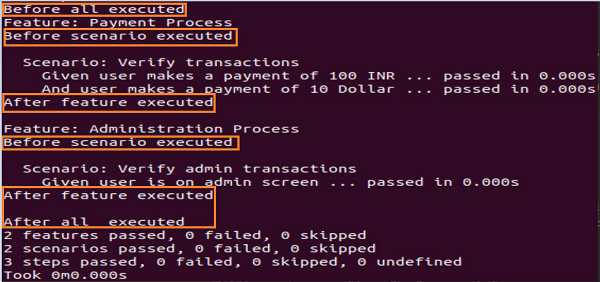
输出
运行特征文件后得到的输出如下 −