
Python 密码学 - 文件解密
在本章中,让我们讨论使用 Python 在密码学中解密文件。 请注意,对于解密过程,我们将遵循相同的过程,但我们将重点关注输入路径或加密的必要文件,而不是指定输出路径。
代码
下面是一个使用 Python 解密加密文件的示例代码 −
#!/usr/bin/python
# ---------------- READ ME ---------------------------------------------
# This Script is Created Only For Practise And Educational Purpose Only
# This Script Is Created For http://bitforestinfo.blogspot.in
# This Script is Written By
#
#
##################################################
######## Please Don't Remove Author Name #########
############### Thanks ###########################
##################################################
#
#
# =================Other Configuration================
# Usages :
usage = "usage: %prog [options] "
# Version
Version="%prog 0.0.1"
# ====================================================
# Import Modules
import optparse, sys,os
from toolkit import processor as ps
def main():
   parser = optparse.OptionParser(usage = usage,version = Version)
   parser.add_option(
      '-i','--input',type = 'string',dest = 'inputfile',
      help = "File Input Path For Encryption", default = None)

   parser.add_option(
      '-o','--output',type = "string",dest = 'outputfile',
      help = "File Output Path For Saving Encrypter Cipher",default = ".")

   parser.add_option(
      '-p','--password',type = "string",dest = 'password',
      help = "Provide Password For Encrypting File",default = None)
      (options, args) =  parser.parse_args()
      # Input Conditions Checkings
      if not options.inputfile or not os.path.isfile(options.inputfile):
         print " [Error] Please Specify Input File Path"
         exit(0)
      if not options.outputfile or not os.path.isdir(options.outputfile):
         print " [Error] Please Specify Output Path"
         exit(0)
      if not options.password:
         print " [Error] No
         exit(0)
      inputfile = options.inputfile
      outputfile = options.outputfile
      password = options.password
      work = "D"
      ps.FileCipher(inputfile,outputfile,password,work)
      return
if __name__ == '__main__':
   main()
你可以使用下面的命令来执行上面的代码 −
python pyfilecipher-decrypt.py -i encrypted_file_path -p password
输出
执行上面的命令可以观察到下面的代码 −
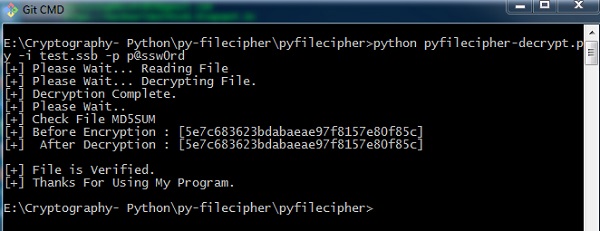
注意 − 输出指定了加密前和解密后的哈希值,这表明同一个文件已加密并且过程成功。

