
Dart 编程 - 单元测试
单元测试涉及测试应用程序的每个单元。它可以帮助开发人员测试小功能,而无需运行整个复杂应用程序。
名为"test"的 Dart 外部库 提供了一种编写和运行单元测试的标准方法。
Dart 单元测试涉及以下步骤 −
步骤 1:安装"test"包
要在当前项目中安装第三方包,您将需要 pubspec.yaml 文件。要安装 test 包,首先在 pubspec.yaml 文件中输入以下内容 −
dependencies:
test:
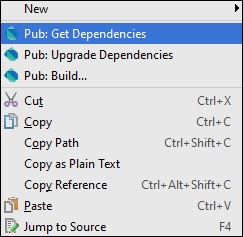
输入后,右键单击 pubspec.yaml 文件并获取依赖项。它将安装 "test" 包。下面是 WebStorm 编辑器中的屏幕截图。
也可以从 命令行 安装包。在终端 − 中输入以下内容
pub get
步骤 2:导入"test"包
import "package:test/test.dart";
步骤 3 编写测试
使用顶级函数 test() 指定测试,而使用 expect() 函数进行 测试断言。要使用这些方法,应将它们作为 pub 依赖项进行安装。
语法
test("Description of the test ", () {
   expect(actualValue , matchingValue)
});
group() 函数可用于对测试进行分组。每个组的描述都添加到其测试描述的开头。
语法
group("some_Group_Name", () {
   test("test_name_1", () {
      expect(actual, equals(exptected));
   });
   test("test_name_2", () {
      expect(actual, equals(expected));
   });
})
示例 1:通过的测试
以下示例定义了一个方法 Add()。此方法采用两个整数值并返回一个表示 sum 的整数。要测试此 add() 方法 −
步骤 1 − 导入 test 包,如下所示。
步骤 2 − 使用 test() 函数定义测试。在这里,test() 函数使用 expect() 函数来强制执行断言。
import 'package:test/test.dart';
// Import the test package

int Add(int x,int y)
// Function to be tested {
   return x+y;
}
void main() {
   // Define the test
   test("test to check add method",(){
      // Arrange
      var expected = 30;

      // Act
      var actual = Add(10,20);

      // Asset
      expect(actual,expected);
   });
}
它应该产生以下输出 −
00:00 +0: test to check add method
00:00 +1: All tests passed!
示例 2:失败的测试
下面定义的 subtract() 方法存在逻辑错误。以下 测试 可验证这一点。
import 'package:test/test.dart';
int Add(int x,int y){
   return x+y;
}
int Sub(int x,int y){
   return x-y-1;
}
void main(){
   test('test to check sub',(){
      var expected = 10;
      // Arrange

      var actual = Sub(30,20);
      // Act

      expect(actual,expected);
      // Assert
   });
   test("test to check add method",(){
      var expected = 30;
      // Arrange

      var actual = Add(10,20);
      // Act

      expect(actual,expected);
      // Asset
   });
}
输出 − 函数 add() 的测试用例通过,但 subtract() 的测试失败,如下所示。
00:00 +0: test to check sub
00:00 +0 -1: test to check sub
Expected: <10>
Actual: <9>
package:test  expect
bin\Test123.dart 18:5  main.<fn>

00:00 +0 -1: test to check add method
00:00 +1 -1: Some tests failed.
Unhandled exception:
Dummy exception to set exit code.
#0  _rootHandleUncaughtError.<anonymous closure> (dart:async/zone.dart:938)
#1  _microtaskLoop (dart:async/schedule_microtask.dart:41)
#2  _startMicrotaskLoop (dart:async/schedule_microtask.dart:50)
#3  _Timer._runTimers (dart:isolate-patch/timer_impl.dart:394)
#4  _Timer._handleMessage (dart:isolate-patch/timer_impl.dart:414)
#5  _RawReceivePortImpl._handleMessage (dart:isolate-patch/isolate_patch.dart:148)
分组测试用例
您可以对测试用例进行分组,以便为您的测试代码添加更多含义。如果您有许多测试用例,这有助于编写更简洁的代码。
在给定的代码中,我们正在为split()函数和trim函数编写一个测试用例。因此,我们在逻辑上将这些测试用例分组并将其称为String。
示例
import "package:test/test.dart";
void main() {
   group("String", () {
      test("test on split() method of string class", () {
         var string = "foo,bar,baz";
         expect(string.split(","), equals(["foo", "bar", "baz"]));
      });
      test("test on trim() method of string class", () {
         var string = "  foo ";
         expect(string.trim(), equals("foo"));
      });
   });
}
输出 − 输出将为每个测试用例附加组名,如下所示 −
00:00 +0: String test on split() method of string class
00:00 +1: String test on trim() method of string class
00:00 +2: All tests passed

