
连接数据库
修改设置
要让 Django 能够连接到您的数据库,您需要在 settings.py 文件中的 DATABASES 元组中指定数据库。
之前,它看起来像这样:
SQLite
my_tennis_club/my_tennis_club/settings.py:
.
.
DATABASES = {
    'default': {
        'ENGINE': 'django.db.backends.sqlite3',
        'NAME': BASE_DIR / 'db.sqlite3',
    }
}
.
现在,你应该把它改成这样:
PostgreSQL
my_tennis_club/my_tennis_club/settings.py:
.
.
DATABASES = {
    'default': {
        'ENGINE': 'django.db.backends.postgresql',
        'NAME': 'postgres',
        'USER': 'masteruser',
        'PASSWORD': '12345678',
        'HOST': 'w3-django-project.cdxmgq9zqqlr.us-east-1.rds.amazonaws.com',
        'PORT': '5432'
    }
}
.注意:这些值会因您的项目而异。
Engine(引擎)?
正如您在 settings.py 文件中看到的,我们插入的是 postgresql 而不是 sqlite。
Name(名称)?
该数据库没有名称,但您必须为其指定一个名称才能访问该数据库。
如果未指定名称,则提供程序会接受 'postgres' 作为数据库名称。
Username 和 Password(用户名和密码)?
请输入您创建数据库时指定的用户名和密码。
Host? Port?
如您在 settings.py 文件中所见,我们插入了 postgresql 而不是 sqlite,并插入了创建数据库时指定的用户名和密码。
HOST 和 PORT 位于 RDS 实例的"连接与安全"部分。它们分别被描述为"端点"和"端口"。
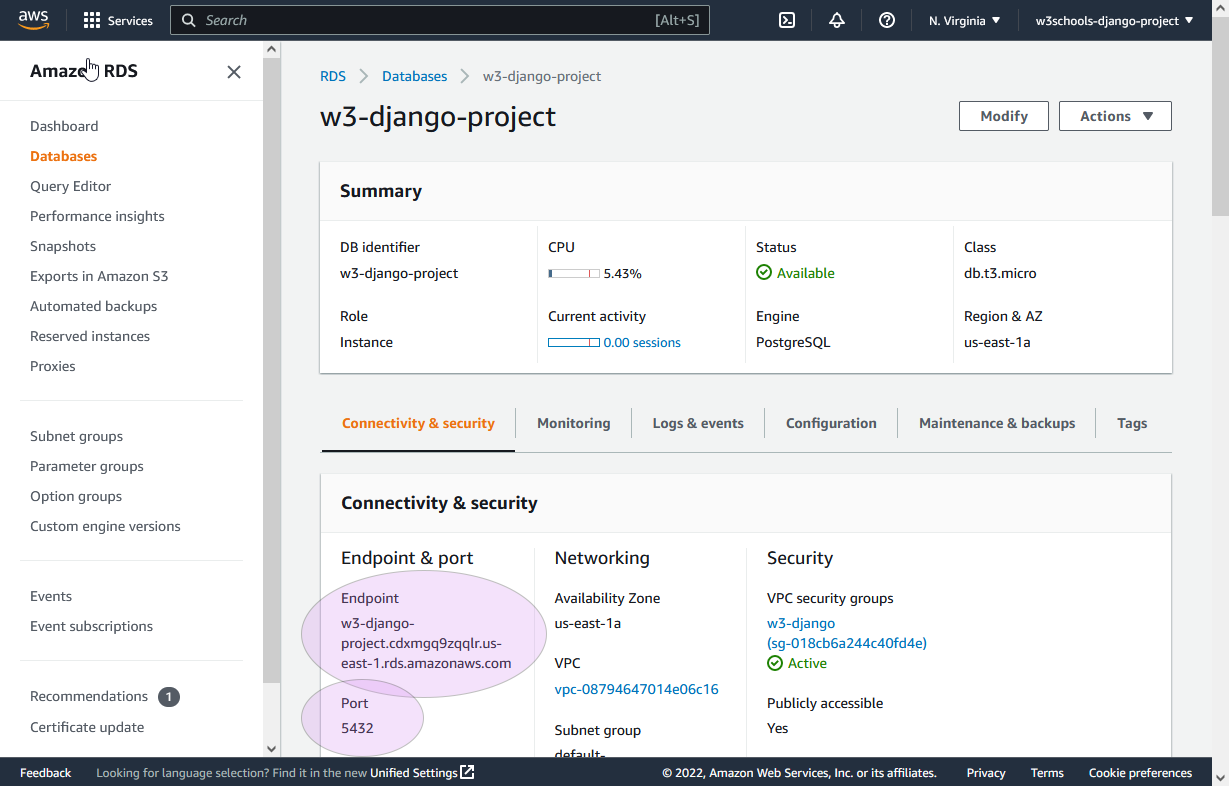
就我的项目而言,就是这个:
'HOST': 'w3-django-project.cdxmgq9zqqlr.us-east-1.rds.amazonaws.com'
'PORT': '5432'
Migrate(迁移)
在 settings.py 中完成更改后,我们必须在虚拟环境中运行迁移,更改才能生效:
python manage.py migrate
这将得到以下结果:
Operations to perform:
Apply all migrations: admin, auth, contenttypes, members, sessions
Running migrations:
Applying contenttypes.0001_initial... OK
Applying auth.0001_initial... OK
Applying admin.0001_initial... OK
Applying admin.0002_logentry_remove_auto_add... OK
Applying admin.0003_logentry_add_action_flag_choices... OK
Applying contenttypes.0002_remove_content_type_name... OK
Applying auth.0002_alter_permission_name_max_length... OK
Applying auth.0003_alter_user_email_max_length... OK
Applying auth.0004_alter_user_username_opts... OK
Applying auth.0005_alter_user_last_login_null... OK
Applying auth.0006_require_contenttypes_0002... OK
Applying auth.0007_alter_validators_add_error_messages... OK
Applying auth.0008_alter_user_username_max_length... OK
Applying auth.0009_alter_user_last_name_max_length... OK
Applying auth.0010_alter_group_name_max_length... OK
Applying auth.0011_update_proxy_permissions... OK
Applying auth.0012_alter_user_first_name_max_length... OK
Applying members.0001_initial... OK
Applying members.0002_members_delete_member... OK
Applying members.0003_rename_members_member... OK
Applying sessions.0001_initial... OK
现在,如果您运行该项目:
python manage.py runserver
在浏览器中查看:127.0.0.1:8000/。
您将看到项目首页,但如果您点击"成员"链接,您会发现没有任何成员。
这是因为数据库为空。在下一章中,我们将向数据库中添加成员。

