Flask – 将表单数据发送到模板
我们已经看到可以在 URL 规则中指定 http 方法。 触发函数接收到的Form数据可以以字典对象的形式收集起来,转发给模板渲染到相应的网页上。
在下面的示例中,'/' URL 呈现了一个包含表单的网页 (student.html)。 其中填写的数据被发布到触发result()函数的'/result' URL。
results() 函数收集字典对象中 request.form 中的表单数据,并将其发送到 result.html 进行渲染。
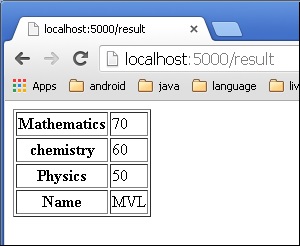
该模板动态呈现 form 数据的 HTML 表格。
下面是应用程序的 Python 代码 −
from flask import Flask, render_template, request
app = Flask(__name__)

@app.route('/')
def student():
   return render_template('student.html')

@app.route('/result',methods = ['POST', 'GET'])
def result():
   if request.method == 'POST':
      result = request.form
      return render_template("result.html",result = result)

if __name__ == '__main__':
   app.run(debug = True)
下面给出的是 student.html 的 HTML 脚本。
<html>
   <body>
      <form action = "http://localhost:5000/result" method = "POST">
         <p>Name <input type = "text" name = "Name" /></p>
         <p>Physics <input type = "text" name = "Physics" /></p>
         <p>Chemistry <input type = "text" name = "chemistry" /></p>
         <p>Maths <input type ="text" name = "Mathematics" /></p>
         <p><input type = "submit" value = "submit" /></p>
      </form>
   </body>
</html>
模板代码(result.html)如下 −
<!doctype html>
<html>
   <body>
      <table border = 1>
         {% for key, value in result.items() %}
            <tr>
               <th> {{ key }} </th>
               <td> {{ value }} </td>
            </tr>
         {% endfor %}
      </table>
   </body>
</html>
运行 Python 脚本并在浏览器中输入 URL http://localhost:5000/。
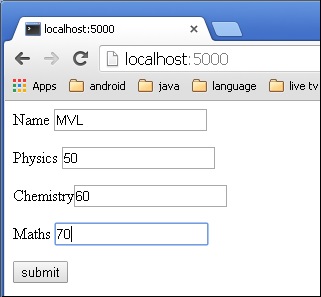
单击 Submit 按钮时,表单数据以 HTML 表格的形式呈现在result.html 上。