
进程间通信 - 信号
信号是向进程发出的通知,指示事件的发生。信号也称为软件中断,无法预测其发生,因此也称为异步事件。
信号可以用数字或名称指定,通常信号名称以 SIG 开头。可以使用命令 kill –l(l 表示列出信号名称)检查可用的信号,如下所示 −
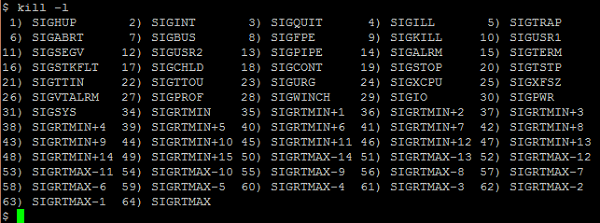
每当发出信号时(无论是编程信号还是系统生成的信号),都会执行默认操作。如果您不想执行默认操作,但希望在收到信号时执行自己的操作,该怎么办?所有信号都可以这样做吗?是的,可以处理信号,但不是所有信号都可以。如果您想忽略信号,这可能吗?是的,可以忽略信号。忽略信号意味着既不执行默认操作也不处理信号。可以忽略或处理几乎所有信号。不能忽略或处理/捕获的信号是 SIGSTOP 和 SIGKILL。
总之,对信号执行的操作如下 −
- 默认操作
- 处理信号
- 忽略信号
如上所述,可以通过改变默认操作的执行来处理信号。信号处理可以通过两种方式之一完成,即通过系统调用 signal() 和 sigaction()。
#include <signal.h>

typedef void (*sighandler_t) (int);
sighandler_t signal(int signum, sighandler_t handler);
如 signum 中所述,系统调用 signal() 将在生成信号时调用已注册的处理程序。处理程序可以是 SIG_IGN(忽略信号)、SIG_DFL(将信号设置回默认机制)或用户定义的信号处理程序或函数地址之一。
此系统调用成功时返回一个函数的地址,该函数接受一个整数参数并且没有返回值。如果发生错误,此调用将返回 SIG_ERR。
虽然使用 signal() 可以调用用户注册的相应信号处理程序,但无法进行微调,例如屏蔽应阻止的信号、修改信号的行为和其他功能。这可以使用 sigaction() 系统调用来实现。
#include <signal.h>

int sigaction(int signum, const struct sigaction *act, struct sigaction *oldact)
此系统调用用于检查或更改信号操作。如果 act 不为空,则从 act 安装信号 signum 的新操作。如果 oldact 不为空,则将先前的操作保存在 oldact 中。
sigaction 结构包含以下字段 −
字段 1 − sa_handler 或 sa_sigaction 中提到的处理程序。
void (*sa_handler)(int);
void (*sa_sigaction)(int, siginfo_t *, void *);
sa_handler 的处理程序根据正负号指定要执行的操作,并使用 SIG_DFL 表示默认操作或 SIG_IGN 忽略信号或指向信号处理函数的指针。
sa_sigaction 的处理程序将信号编号指定为第一个参数,将指向 siginfo_t 结构的指针指定为第二个参数,将指向用户上下文的指针(查看 getcontext() 或 setcontext() 了解更多详细信息)指定为第三个参数。
结构 siginfo_t 包含信号信息,例如要传递的信号编号、信号值、进程 ID、发送进程的实际用户 ID 等。
字段 2 − 要阻止的信号集。
int sa_mask;
此变量指定在信号处理程序执行期间应阻止的信号掩码。
字段 3 − 特殊标志。
int sa_flags;
此字段指定一组用于修改信号行为的标志。
字段 4 − 恢复处理程序。
void (*sa_restorer) (void);
此系统调用在成功时返回 0,在失败时返回 -1。
让我们考虑几个示例程序。
首先,让我们从一个生成异常的示例程序开始。在这个程序中,我们尝试执行除以零的运算,这会使系统生成异常。
/* signal_fpe.c */
#include<stdio.h>

int main() {
   int result;
   int v1, v2;
   v1 = 121;
   v2 = 0;
   result = v1/v2;
   printf("Result of Divide by Zero is %d
", result);
   return 0;
}
编译和执行步骤
浮点异常(核心转储)
因此,当我们尝试执行算术运算时,系统会生成一个浮点异常并进行核心转储,这是信号的默认操作。
现在,让我们修改代码以使用 signal() 系统调用来处理这个特定信号。
/* signal_fpe_handler.c */
#include<stdio.h>
#include<signal.h>
#include<stdlib.h>

void handler_dividebyzero(int signum);

int main() {
   int result;
   int v1, v2;
   void (*sigHandlerReturn)(int);
   sigHandlerReturn = signal(SIGFPE, handler_dividebyzero);
   if (sigHandlerReturn == SIG_ERR) {
      perror("Signal Error: ");
      return 1;
   }
   v1 = 121;
   v2 = 0;
   result = v1/v2;
   printf("Result of Divide by Zero is %d
", result);
   return 0;
}

void handler_dividebyzero(int signum) {
   if (signum == SIGFPE) {
      printf("Received SIGFPE, Divide by Zero Exception
");
      exit (0);
   }
   else
      printf("Received %d Signal
", signum);
      return;
}
编译和执行步骤
Received SIGFPE, Divide by Zero Exception
如前所述,信号由系统生成(在执行某些操作(例如除以零等)时),或者用户也可以通过编程生成信号。如果您想通过编程生成信号,请使用库函数 raise()。
现在,让我们使用另一个程序来演示如何处理和忽略信号。
假设我们已经使用 raise() 发出了信号,那么会发生什么?发出信号后,当前进程的执行将停止。那么停止的进程会发生什么?可能有两种情况 - 首先,在需要时继续执行。其次,终止(使用 kill 命令)进程。
要继续执行已停止的进程,请向该特定进程发送 SIGCONT。您还可以发出 fg(前台)或 bg(后台)命令来继续执行。在这里,命令只会重新启动最后一个进程的执行。如果停止了多个进程,则只会恢复最后一个进程。如果要恢复之前停止的进程,则恢复作业(使用 fg/bg)以及作业号。
以下程序用于使用 raise() 函数发出信号 SIGSTOP。用户按下 CTRL + Z(Control + Z)键也可以生成信号 SIGSTOP。发出此信号后,程序将停止执行。发送信号(SIGCONT)以继续执行。
在下面的例子中,我们使用命令 fg 恢复已停止的进程。
/* signal_raising.c */
#include<stdio.h>
#include<signal.h>
#include<stdlib.h>

int main() {
   printf("Testing SIGSTOP
");
   raise(SIGSTOP);
   return 0;
}
编译和执行步骤
Testing SIGSTOP
[1]+ Stopped ./a.out
./a.out
现在,通过从另一个终端发出 SIGCONT 来增强以前的程序,以继续执行已停止的进程。
/* signal_stop_continue.c */
#include<stdio.h>
#include<signal.h>
#include <sys/types.h>
#include <unistd.h>

void handler_sigtstp(int signum);

int main() {
   pid_t pid;
   printf("Testing SIGSTOP
");
   pid = getpid();
   printf("Open Another Terminal and issue following command
");
   printf("kill -SIGCONT %d or kill -CONT %d or kill -18 %d
", pid, pid, pid);
   raise(SIGSTOP);
   printf("Received signal SIGCONT
");
   return 0;
}
编译和执行步骤
Testing SIGSTOP
Open Another Terminal and issue following command
kill -SIGCONT 30379 or kill -CONT 30379 or kill -18 30379
[1]+ Stopped ./a.out

Received signal SIGCONT
[1]+ Done ./a.out
In another terminal
kill -SIGCONT 30379
到目前为止,我们已经看到了处理系统生成的信号的程序。现在,让我们看看通过程序生成的信号(使用 raise() 函数或通过 kill 命令)。此程序生成信号 SIGTSTP(终端停止),其默认操作是停止执行。但是,由于我们现在正在处理信号而不是默认操作,因此它将进入定义的处理程序。在本例中,我们只是打印消息并退出。
/* signal_raising_handling.c */
#include<stdio.h>
#include<signal.h>
#include<stdlib.h>

void handler_sigtstp(int signum);

int main() {
   void (*sigHandlerReturn)(int);
   sigHandlerReturn = signal(SIGTSTP, handler_sigtstp);
   if (sigHandlerReturn == SIG_ERR) {
      perror("Signal Error: ");
      return 1;
   }
   printf("Testing SIGTSTP
");
   raise(SIGTSTP);
   return 0;
}

void handler_sigtstp(int signum) {
   if (signum == SIGTSTP) {
      printf("Received SIGTSTP
");
      exit(0);
   }
   else
      printf("Received %d Signal
", signum);
      return;
}
编译和执行步骤
Testing SIGTSTP
Received SIGTSTP
我们已经看到了执行默认操作或处理信号的实例。现在,是时候忽略信号了。在此示例程序中,我们通过 SIG_IGN 注册要忽略的信号 SIGTSTP,然后发出信号 SIGTSTP(终端停止)。当生成信号 SIGTSTP 时,它将被忽略。
/* signal_raising_ignoring.c */
#include<stdio.h>
#include<signal.h>
#include<stdlib.h>

void handler_sigtstp(int signum);

int main() {
   void (*sigHandlerReturn)(int);
   sigHandlerReturn = signal(SIGTSTP, SIG_IGN);
   if (sigHandlerReturn == SIG_ERR) {
      perror("Signal Error: ");
      return 1;
   }
   printf("Testing SIGTSTP
");
   raise(SIGTSTP);
   printf("Signal SIGTSTP is ignored
");
   return 0;
}
编译和执行步骤
Testing SIGTSTP
Signal SIGTSTP is ignored
到目前为止,我们已经观察到我们有一个信号处理程序来处理一个信号。我们可以使用单个处理程序来处理多个信号吗?答案是肯定的。让我们用一个程序来考虑这个问题。
以下程序执行以下操作 −
步骤 1 − 注册一个处理程序 (handleSignals) 来捕获或处理信号 SIGINT (CTRL + C) 或 SIGQUIT (CTRL + \)
步骤 2 − 如果用户生成信号 SIGQUIT(通过 kill 命令或使用 CTRL + \ 的键盘控制),处理程序只会将消息打印为返回。
步骤 3 −如果用户第一次生成信号SIGINT(通过kill命令或键盘控制CTRL+C),则下次修改信号以执行默认操作(使用SIG_DFL)。
步骤4 − 如果用户第二次生成信号SIGINT,则执行默认操作,即程序终止。
/* Filename: sigHandler.c */
#include<stdio.h>
#include<unistd.h>
#include<signal.h>

void handleSignals(int signum);

int main(void) {
   void (*sigHandlerInterrupt)(int);
   void (*sigHandlerQuit)(int);
   void (*sigHandlerReturn)(int);
   sigHandlerInterrupt = sigHandlerQuit = handleSignals;
   sigHandlerReturn = signal(SIGINT, sigHandlerInterrupt);
   if (sigHandlerReturn == SIG_ERR) {
      perror("signal error: ");
      return 1;
   }
   sigHandlerReturn = signal(SIGQUIT, sigHandlerQuit);

   if (sigHandlerReturn == SIG_ERR) {
      perror("signal error: ");
      return 1;
   }
   while (1) {
      printf("
To terminate this program, perform the following:
");
      printf("1. Open another terminal
");
      printf("2. Issue command: kill %d or issue CTRL+C 2 times (second time it terminates)
", getpid());
      sleep(10);
   }
   return 0;
}

void handleSignals(int signum) {
   switch(signum) {
      case SIGINT:
      printf("
You pressed CTRL+C
");
      printf("Now reverting SIGINT signal to default action
");
      signal(SIGINT, SIG_DFL);
      break;
      case SIGQUIT:
      printf("
You pressed CTRL+\
");
      break;
      default:
      printf("
Received signal number %d
", signum);
      break;
   }
   return;
}
编译和执行步骤
To terminate this program, perform the following:
1. Open another terminal
2. Issue command: kill 74 or issue CTRL+C 2 times (second time it terminates)
^C
You pressed CTRL+C
Now reverting SIGINT signal to default action

To terminate this program, perform the following:
1. Open another terminal
2. Issue command: kill 74 or issue CTRL+C 2 times (second time it terminates)
^\You pressed CTRL+\
To terminate this program, perform the following:
1. Open another terminal
2. Issue command: kill 120
Terminated
另一个终端
kill 71
第二种方法
To terminate this program, perform the following:
1. Open another terminal
2. Issue command: kill 71 or issue CTRL+C 2 times (second time it terminates)
^C
You pressed CTRL+C
Now reverting SIGINT signal to default action

To terminate this program, perform the following:
1. Open another terminal
2. Issue command: kill 71 or issue CTRL+C 2 times (second time it terminates)
^C
我们知道,要处理信号,我们有两个系统调用,即 signal() 或 sigaction()。到目前为止,我们已经了解了 signal() 系统调用,现在是时候了解 sigaction() 系统调用了。让我们修改上述程序以使用 sigaction() 执行,如下所示 −
/* Filename: sigHandlerSigAction.c */
#include<stdio.h>
#include<unistd.h>
#include<signal.h>

void handleSignals(int signum);

int main(void) {
   void (*sigHandlerReturn)(int);
   struct sigaction mysigaction;
   mysigaction.sa_handler = handleSignals;
   sigemptyset(&mysigaction.sa_mask);
   mysigaction.sa_flags = 0;
   sigaction(SIGINT, &mysigaction, NULL);

   if (mysigaction.sa_handler == SIG_ERR) {
      perror("signal error: ");
      return 1;
   }
   mysigaction.sa_handler = handleSignals;
   sigemptyset(&mysigaction.sa_mask);
   mysigaction.sa_flags = 0;
   sigaction(SIGQUIT, &mysigaction, NULL);

   if (mysigaction.sa_handler == SIG_ERR) {
      perror("signal error: ");
      return 1;
   }
   while (-1) {
      printf("
To terminate this program, perform either of the following:
");
      printf("1. Open another terminal and issue command: kill %d
", getpid());
      printf("2. Issue CTRL+C 2 times (second time it terminates)
");
      sleep(10);
   }
   return 0;
}

void handleSignals(int signum) {
   switch(signum) {
      case SIGINT:
      printf("
You have entered CTRL+C
");
      printf("Now reverting SIGINT signal to perform default action
");
      signal(SIGINT, SIG_DFL);
      break;
      case SIGQUIT:
      printf("
You have entered CTRL+\
");
      break;
      default:
      printf("
Received signal number %d
", signum);
      break;
   }
   return;
}
让我们看看编译和执行过程。在执行过程中,让我们看看两次按下 CTRL+C,其余的检查/方法(如上)您也可以尝试这个程序。
编译和执行步骤
To terminate this program, perform either of the following:
1. Open another terminal and issue command: kill 3199
2. Issue CTRL+C 2 times (second time it terminates)
^C
You have entered CTRL+C
Now reverting SIGINT signal to perform default action
To terminate this program, perform either of the following:
1. Open another terminal and issue command: kill 3199
2. Issue CTRL+C 2 times (second time it terminates)
^C

