
JasmineJS - 跳过块
Jasmine 还允许开发人员跳过一个或多个测试用例。这些技术可以应用于 Spec 级别 或 Suite 级别。根据应用级别,此块可以分别称为 Skipping Spec 和 Skipping Suite。
在下面的例子中,我们将学习如何使用 "x" 字符跳过特定的 Spec 或 Suite。
Skipping Spec
我们将在 it 语句之前使用 "x" 修改前面的示例。
describe('This custom matcher example ', function() {

   beforeEach(function() {
      // 我们应该在 beforeEach() 函数中添加自定义匹配。

      jasmine.addMatchers({
         validateAge: function() {
            return {
               compare: function(actual,expected) {
                 var result = {};
                 result.pass = (actual > = 13 && actual < = 19);
                 result.message = 'sorry u are not a teen ';
                 return result;
               }
            };
         }
      });
   });

   it('Lets see whether u are teen or not', function() {
      var myAge = 14;
      expect(myAge).validateAge();
   });

   xit('Lets see whether u are teen or not ', function() {
      //Skipping this Spec
      var yourAge = 18;
   });
});
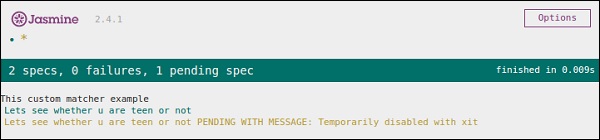
如果我们运行此 JavaScript 代码,我们将在浏览器中收到以下输出结果。Jasmine 本身将使用 "xit" 通知用户特定的 it 块已暂时 禁用。
跳过套件
以同样的方式,我们可以禁用 describe 块以实现 跳过套件 的技术。在下面的示例中,我们将了解跳过套件块的过程。
xdescribe('This custom matcher example ', function() {

   //Skipping the entire describe  block
   beforeEach(function() {

      // 我们应该在 beforeEach() 函数中添加自定义匹配。
      jasmine.addMatchers({
         validateAge: function() {
            return {
               compare: function(actual,expected) {
                 var result = {};
                 result.pass = (actual >=13 && actual<=19);
                 result.message ='sorry u are not a teen ';
                 return result;
               }
            };
         }
      });
   });

   it('Lets see whether u are teen or not', function() {
      var myAge = 14;
      expect(myAge).validateAge();
   });

   it('Lets see whether u are teen or not ', function() {
      var yourAge = 18;
      expect(yourAge).validateAge();
   });
});
上述代码将生成以下屏幕截图作为输出。
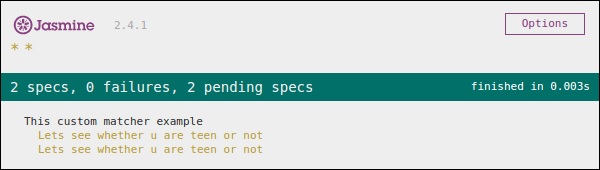
正如我们在消息栏中看到的那样,它显示两个 spec 块处于待处理状态,这意味着这两个 Spec 块已使用 "x" 字符禁用。在下一章中,我们将讨论不同类型的 Jasmine 测试场景。

