
JBoss Fuse - Apache Camel
在本章中,我们将讨论什么是 Apache Camel 以及它如何有效地在端点之间路由数据,并提供一些示例。
什么是 Apache Camel?
Apache Camel 是一个开源集成框架,于 2007 年初启动。
它是一种基于 EIP(企业集成模式)的方法,提供了几种可用于解决企业集成问题的开箱即用模式实现。 EIP 只不过是针对企业集成中记录良好且反复出现的问题的经过验证的解决方案。
Camel 也称为路由和中介引擎,因为它可以有效地在端点之间路由数据,同时承担数据格式转换、端点连接等繁重负载。
基本示例
使用 Apache Camel 的先决条件是 −
- Java
- Maven
- Redhat JBoss Fuse 6.1-GA-379
创建应用程序的基本框架
mvn:archetype generate
–DgroupId = com.tutorialpoint.app
–DartifactId = camel-first-app
–DarchetypeGroupId = org.apache.camel.archetypes
–DarchetypeArtifactId = camel-archetype-spring
–DinteractiveMode = false -X
这应该会生成以下目录结构。
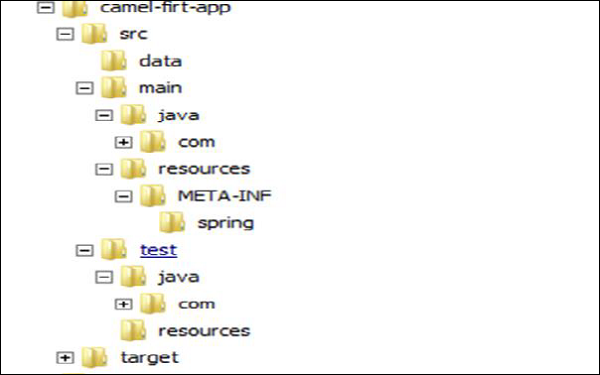
这是我们正在生成的 Camel 应用程序的基本框架。
编辑 camel-context.xml
编辑 camel-first-app → src → main → resources → META-INF\spring\camel-context.xml 以匹配以下内容
<?xml version = "1.0" encoding = "UTF-8"?>
<!-- Configures the Camel Context-->
<beans xmlns = "http://www.springframework.org/schema/beans"
   xmlns:xsi = "http://www.w3.org/2001/XMLSchema-instance"
   xsi:schemaLocation = "http://www.springframework.org/schema/beans
   http://www.springframework.org/schema/beans/spring-beans.xsd
   http://camel.apache.org/schema/spring
   http://camel.apache.org/schema/spring/camel-spring.xsd">

   <camelContext xmlns = "http://camel.apache.org/schema/spring">
      <!-- here is a sample which processes the input file
         (leaving them in place - see the 'noop' flag)
         then performs content based routing on the message using XPath -->

      <route>
         <from uri = "file:///d:/src/data?noop=false"/>
         <choice>
            <when>
               <xpath>/person/city = 'London'</xpath>
               <log message = "UK message"/>
               <to uri = "file:///d:/target/messages/uk"/>
            </when>

            <otherwise>
               <log message = "Other message"/>
               <to uri = "file:///d:/target/messages/others"/>
            </otherwise>

         </choice>

      </route>
   </camelContext>
</beans>
编辑 pom.xml
在 <plugins></plugins> 内添加以下代码
<plugin>
   <groupId>org.apache.felix</groupId>
   <artifactId>maven-bundle-plugin</artifactId>
   <version>2.3.4</version>
   <extensions>true</extensions>

   <configuration>
      <instructions>
         <Bundle-SymbolicName>
            ${project.artifactId}
         </Bundle-SymbolicName>
         <Import-Package>*</Import-Package>
      </instructions>
   </configuration>

</plugin>
从 jar → bundle 更改打包类型。
<packaging>bundle</packaging>
使用以下命令构建项目 −
mvn clean install
将项目安装到 Fuse
使用 Fuse.bat/start.bat 启动 Fuse。如果使用 start.bat 启动 Fuse,请使用 client.bat 连接到 Fuse。您应该获得如以下屏幕截图所示的 UI。
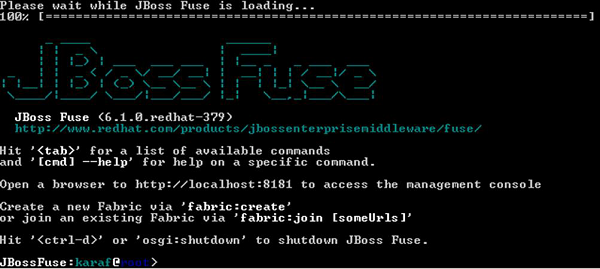
这是用于访问 Karaf 和 Fuse 命令的 CLI。
install –s mvn:com.tutorialpoint.app/camel-firt-app/1.0-SNAPSHOT
测试您的项目是否正在运行
现在您的应用程序应该安装在 Fuse 中。复制 camel-first-app 内的数据目录并将其放置在 D:/src/ 中,它应该将 city = London 的消息复制到 D:/target/merssages/uk 中。
将输入文件放置在 D:/src/data
中输入
Message1.xml
<?xml version = "1.0" encoding = "UTF-8"?>
<person user = "james">
   <firstName>James</firstName>
   <lastName>Strachan</lastName>
   <city>London</city>
</person>
Message2.xml
<?xml version = "1.0" encoding = "UTF-8"?>
<person user = "hiram">
   <firstName>Hiram</firstName>
   <lastName>Chirino</lastName>
   <city>Tampa</city>
</person>
输出
在 D:/target/messages/uk
<?xml version = "1.0" encoding = "UTF-8"?>
<person user = "james">
   <firstName>James</firstName>
   <lastName>Strachan</lastName>
   <city>London</city>
</person>
在 D:/target/messages/others
<?xml version = "1.0" encoding = "UTF-8"?>
<person user = "hiram">
   <firstName>Hiram</firstName>
   <lastName>Chirino</lastName>
   <city>Tampa</city>
</person>

