
JSF - 应用程序事件
JSF 提供系统事件监听器,用于在 JSF 应用程序生命周期内执行特定于应用程序的任务。
| S.No | 系统事件和说明 |
|---|---|
| 1 | PostConstructApplicationEvent 应用程序启动时触发。可用于在应用程序启动后执行初始化任务。 |
| 2 | PreDestroyApplicationEvent 在应用程序即将关闭时触发。可用于在应用程序即将关闭之前执行清理任务。 |
| 3 | PreRenderViewEvent 在显示 JSF 页面之前触发。可用于验证用户身份并提供对 JSF View 的受限访问。 |
系统事件可以按以下方式处理。
| S.No | 技术与描述 |
|---|---|
| 1 | SystemEventListener 实现 SystemEventListener 接口并在 faces-config.xml 中注册 system-event-listener 类 |
| 2 | 方法绑定 在 f:event 的 listener 属性中传递托管 bean 方法的名称。 |
SystemEventListener
实现 SystemEventListener 接口。
public class CustomSystemEventListener implements SystemEventListener {

   @Override
   public void processEvent(SystemEvent event) throws
      AbortProcessingException {

      if(event instanceof PostConstructApplicationEvent) {
         System.out.println("Application Started.
            PostConstructApplicationEvent occurred!");
      }
   }
}
在faces-config.xml中为系统事件注册自定义系统事件监听器。
<system-event-listener>
   <system-event-listener-class>
      com.tutorialspoint.test.CustomSystemEventListener
   </system-event-listener-class>

   <system-event-class>
      javax.faces.event.PostConstructApplicationEvent
   </system-event-class>
</system-event-listener>
Method Binding
Define a method
public void handleEvent(ComponentSystemEvent event) {
   data = "Hello World";
}
使用上述方法。
<f:event listener = "#{user.handleEvent}" type = "preRenderView" />
示例应用程序
让我们创建一个测试 JSF 应用程序来测试 JSF 中的系统事件。
| 步骤 | 描述 |
|---|---|
| 1 | 在 com.tutorialspoint.test 包下创建一个名为 helloworld 的项目,如 JSF - 第一个应用程序 一章中所述。 |
| 2 | 按照说明修改 UserData.java 文件如下。 |
| 3 | 在包 com.tutorialspoint.test 下创建 CustomSystemEventListener.java 文件。按照下面的说明对其进行修改 |
| 4 | 按照下面的说明修改 home.xhtml。 |
| 5 | 在 WEB-INF 文件夹中创建 faces-config.xml。按照下面的说明对其进行修改。保持其余文件不变。 |
| 6 | 编译并运行应用程序以确保业务逻辑按要求运行。 |
| 7 | 最后,以 war 文件的形式构建应用程序并将其部署在 Apache Tomcat Web 服务器中。 |
| 8 | 按照最后一步中的说明,使用适当的 URL 启动您的 Web 应用程序。 |
UserData.java
package com.tutorialspoint.test;

import java.io.Serializable;

import javax.faces.bean.ManagedBean;
import javax.faces.bean.SessionScoped;
import javax.faces.event.ComponentSystemEvent;

@ManagedBean(name = "userData", eager = true)
@SessionScoped
public class UserData implements Serializable {
   private static final long serialVersionUID = 1L;
   private String data = "sample data";

   public void handleEvent(ComponentSystemEvent event) {
      data = "Hello World";
   }

   public String getData() {
      return data;
   }

   public void setData(String data) {
      this.data = data;
   }
}
CustomSystemEventListener.java
package com.tutorialspoint.test;

import javax.faces.application.Application;
import javax.faces.event.AbortProcessingException;
import javax.faces.event.PostConstructApplicationEvent;
import javax.faces.event.PreDestroyApplicationEvent;
import javax.faces.event.SystemEvent;
import javax.faces.event.SystemEventListener;

public class CustomSystemEventListener implements SystemEventListener {

   @Override
   public boolean isListenerForSource(Object value) {

      //only for Application
      return (value instanceof Application);
   }

   @Override
   public void processEvent(SystemEvent event)
      throws AbortProcessingException {

      if(event instanceof PostConstructApplicationEvent) {
         System.out.println("Application Started.
            PostConstructApplicationEvent occurred!");
      }

      if(event instanceof PreDestroyApplicationEvent) {
         System.out.println("PreDestroyApplicationEvent occurred.
            Application is stopping.");
      }
   }
}
home.xhtml
<?xml version = "1.0" encoding = "UTF-8"?>
<!DOCTYPE html PUBLIC "-//W3C//DTD XHTML 1.0 Transitional//EN"
"http://www.w3.org/TR/xhtml1/DTD/xhtml1-transitional.dtd">

<html xmlns = "http://www.w3.org/1999/xhtml"
   xmlns:h = "http://java.sun.com/jsf/html"
   xmlns:f = "http://java.sun.com/jsf/core">

   <h:head>
      <title>JSF tutorial</title>
   </h:head>

   <h:body>
      <h2>Application Events Examples</h2>
      <f:event listener = "#{userData.handleEvent}" type = "preRenderView" />
      #{userData.data}
   </h:body>
</html>
faces-config.xhtml
<?xml version = "1.0" encoding = "UTF-8"?>
<faces-config
   xmlns = "http://java.sun.com/xml/ns/javaee"
   xmlns:xsi = "http://www.w3.org/2001/XMLSchema-instance"
   xsi:schemaLocation = "http://java.sun.com/xml/ns/javaee
   http://java.sun.com/xml/ns/javaee/web-facesconfig_2_0.xsd"
   version = "2.0">

   <application>
      <!-- Application Startup -->
      <system-event-listener>
         <system-event-listener-class>
            com.tutorialspoint.test.CustomSystemEventListener
         </system-event-listener-class>
         <system-event-class>
            javax.faces.event.PostConstructApplicationEvent
         </system-event-class>
      </system-event-listener>

      <!-- Before Application is to shut down -->
      <system-event-listener>
         <system-event-listener-class>
            com.tutorialspoint.test.CustomSystemEventListener
         </system-event-listener-class>
         <system-event-class>
            javax.faces.event.PreDestroyApplicationEvent
         </system-event-class>
      </system-event-listener>
   </application>
</faces-config>
完成所有更改后,让我们像在 JSF - 第一个应用程序章节中一样编译并运行应用程序。如果您的应用程序一切正常,这将产生以下结果。
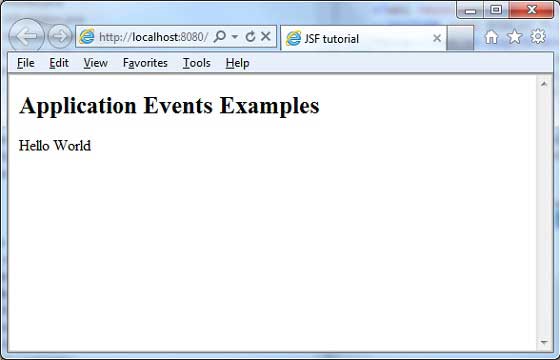
查看您的 Web 服务器控制台输出。您将看到以下结果。
INFO: Deploying web application archive helloworld.war
Dec 6, 2012 8:21:44 AM com.sun.faces.config.ConfigureListener contextInitialized

INFO: Initializing Mojarra 2.1.7 (SNAPSHOT 20120206) for context '/helloworld'
Application Started. PostConstructApplicationEvent occurred!
Dec 6, 2012 8:21:46 AM com.sun.faces.config.ConfigureListener
$WebConfigResourceMonitor$Monitor <init>

INFO: Monitoring jndi:/localhost/helloworld/WEB-INF/faces-config.xml
for modifications
Dec 6, 2012 8:21:46 AM org.apache.coyote.http11.Http11Protocol start

INFO: Starting Coyote HTTP/1.1 on http-8080
Dec 6, 2012 8:21:46 AM org.apache.jk.common.ChannelSocket init
INFO: JK: ajp13 listening on /0.0.0.0:8009

Dec 6, 2012 8:21:46 AM org.apache.jk.server.JkMain start
INFO: Jk running ID = 0 time = 0/24  config = null
Dec 6, 2012 8:21:46 AM org.apache.catalina.startup.Catalina start
INFO: Server startup in 44272 ms
 jsf_event_handling.html
