JSF - 国际化
国际化是一种技术,其中状态消息、GUI 组件标签、货币、日期不在程序中硬编码。相反,它们存储在资源包中的源代码之外并动态检索。JSF 提供了一种非常方便的方法来处理资源包。
需要以下步骤来内部化 JSF 应用程序。
步骤 1:定义属性文件
为每个语言环境创建属性文件。名称应采用 <file-name>_<locale>.properties 格式。
文件名中可以省略默认语言环境。
messages.properties
greeting = Hello World!
messages_fr.properties
greeting = Bonjour tout le monde!
步骤 2:更新 faces-config.xml
faces-config.xml
<application>
   <locale-config>
      <default-locale>en</default-locale>
      <supported-locale>fr</supported-locale>
   </locale-config>

   <resource-bundle>
      <base-name>com.tutorialspoint.messages</base-name>
      <var>msg</var>
   </resource-bundle>
</application>
Step 3: Use resource-bundle var
home.xhtml
<h:outputText value = "#{msg['greeting']}" />
示例应用程序
让我们创建一个测试 JSF 应用程序来测试 JSF 中的国际化。
| 步骤 | 描述 |
|---|---|
| 1 | 在 com.tutorialspoint.test 包下创建一个名为 helloworld 的项目,如 JSF - 第一个应用程序 一章中所述。 |
| 2 | 在 src → 下创建 resources 文件夹mai 文件夹。 |
| 3 | 在 src → main → resources 文件夹下创建 com 文件夹。 |
| 4 | 在 src → main → resources → com 文件夹下创建 tutorialspoint 文件夹。 |
| 5 | 在 src → main → resources → com → 下创建 messages.properties 文件tutorialspoint 文件夹。按照下面的说明进行修改。 |
| 6 | 在 src → main → resources → com → tutorialspoint 文件夹下创建 messages_fr.properties 文件。按照下面的说明进行修改。 |
| 7 | 按照下面的说明在 WEB-INFf 中创建 faces-config.xml。 |
| 8 | 按照下面的说明在 com.tutorialspoint.test 包下创建 UserData.java。 |
| 9 | 按照下面的说明修改 home.xhtml。保持其余文件不变。 |
| 10 | 编译并运行应用程序以确保业务逻辑按要求运行。 |
| 11 | 最后,以 war 文件的形式构建应用程序并将其部署在 Apache Tomcat Web 服务器中。 |
| 12 | 按照最后一步中的说明,使用适当的 URL 启动您的 Web 应用程序。 |
messages.properties
greeting = Hello World!
messages_fr.properties
greeting = Bonjour tout le monde!
faces-config.xml
<?xml version = "1.0" encoding = "UTF-8"?>
<faces-config
   xmlns = "http://java.sun.com/xml/ns/javaee"
   xmlns:xsi = "http://www.w3.org/2001/XMLSchema-instance"
   xsi:schemaLocation = "http://java.sun.com/xml/ns/javaee
   http://java.sun.com/xml/ns/javaee/web-facesconfig_2_0.xsd"
   version = "2.0">

   <application>
      <locale-config>
         <default-locale>en</default-locale>
         <supported-locale>fr</supported-locale>
      </locale-config>

      <resource-bundle>
         <base-name>com.tutorialspoint.messages</base-name>
         <var>msg</var>
      </resource-bundle>
   </application>
</faces-config>
UserData.java
package com.tutorialspoint.test;

import java.io.Serializable;
import java.util.LinkedHashMap;
import java.util.Locale;
import java.util.Map;

import javax.faces.bean.ManagedBean;
import javax.faces.bean.SessionScoped;
import javax.faces.context.FacesContext;
import javax.faces.event.ValueChangeEvent;

@ManagedBean(name = "userData", eager = true)
@SessionScoped
public class UserData implements Serializable {
   private static final long serialVersionUID = 1L;
   private String locale;

   private static Map<String,Object> countries;
      static {

      countries = new LinkedHashMap<String,Object>();
      countries.put("English", Locale.ENGLISH);
      countries.put("French", Locale.FRENCH);
   }

   public Map<String, Object> getCountries() {
      return countries;
   }

   public String getLocale() {
      return locale;
   }

   public void setLocale(String locale) {
      this.locale = locale;
   }

   //value change event listener
   public void localeChanged(ValueChangeEvent e) {
      String newLocaleValue = e.getNewValue().toString();

      for (Map.Entry<String, Object> entry : countries.entrySet()) {

         if(entry.getValue().toString().equals(newLocaleValue)) {
            FacesContext.getCurrentInstance()
               .getViewRoot().setLocale((Locale)entry.getValue());
         }
      }
   }
}
home.xhtml
<?xml version = "1.0" encoding = "UTF-8"?>
<!DOCTYPE html PUBLIC "-//W3C//DTD XHTML 1.0 Transitional//EN"
"http://www.w3.org/TR/xhtml1/DTD/xhtml1-transitional.dtd">

<html xmlns = "http://www.w3.org/1999/xhtml"
xmlns:h = "http://java.sun.com/jsf/html"
xmlns:f = "http://java.sun.com/jsf/core">

   <h:head>
      <title>JSF tutorial</title>
   </h:head>

   <h:body>
      <h2>Internalization Language Example</h2>

      <h:form>
         <h3><h:outputText value = "#{msg['greeting']}" /></h3>

         <h:panelGrid columns = "2">
            Language :
            <h:selectOneMenu value = "#{userData.locale}" onchange = "submit()"
               valueChangeListener = "#{userData.localeChanged}">
               <f:selectItems value = "#{userData.countries}" />
            </h:selectOneMenu>
         </h:panelGrid>

      </h:form>
   </h:body>
</html>
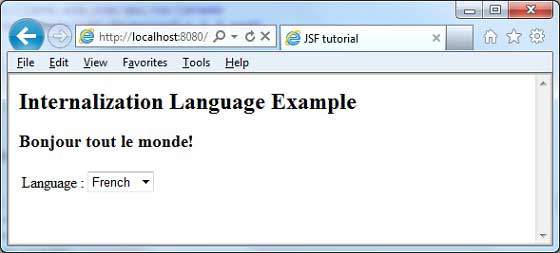
完成所有更改后,让我们像在 JSF - 第一个应用程序章节中一样编译并运行应用程序。如果您的应用程序一切正常,这将产生以下结果。
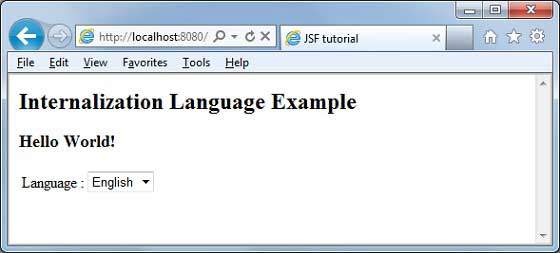
从下拉菜单中更改语言。您将看到以下输出。