
JSF - f:convertNumber
f:convertNumber 标签用于将字符串值转换为所需格式的数字。
JSF 标签
<f:convertNumber minFractionDigits = "2" />
标签属性
| S.No | 属性与描述 |
|---|---|
| 1 | type 数字(默认)、货币或百分比 |
| 2 | pattern 格式化模式,如 java.text.DecimalFormat 中定义 |
| 3 | maxFractionDigits 小数部分的最大位数 |
| 4 | minFractionDigits 小数部分最小位数部分 |
| 5 | maxIntegerDigits 整数部分的最大位数 |
| 6 | minIntegerDigits 整数部分的最小位数 |
| 7 | integerOnly 如果仅解析整数部分,则为 True(默认值: false) |
| 8 | groupingUsed 如果使用分组分隔符,则为 True(默认值:true) |
| 9 | locale 将使用其首选项进行解析和格式化的区域设置 |
| 10 | currencyCode 转换货币值时使用的 ISO 4217 货币代码 |
| 11 | currencySymbol 转换货币值时使用的货币符号 |
示例应用程序
让我们创建一个测试 JSF 应用程序来测试上述标记。
| 步骤 | 描述 |
|---|---|
| 1 | 在 com.tutorialspoint.test 包下创建一个名为 helloworld 的项目,如 JSF - 第一个应用程序 一章中所述。 |
| 2 | 按照以下说明修改 home.xhtml。保持其余文件不变。 |
| 3 | 编译并运行应用程序以确保业务逻辑按要求运行。 |
| 4 | 最后,以 war 文件的形式构建应用程序并将其部署在 Apache Tomcat Web 服务器中。 |
| 5 | 按照最后一步中的说明,使用适当的 URL 启动您的 Web 应用程序。 |
home.xhtml
<?xml version = "1.0" encoding = "UTF-8"?>
<!DOCTYPE html PUBLIC "-//W3C//DTD XHTML 1.0 Transitional//EN"
"http://www.w3.org/TR/xhtml1/DTD/xhtml1-transitional.dtd">

<html xmlns = "http://www.w3.org/1999/xhtml"
   xmlns:h = "http://java.sun.com/jsf/html"
   xmlns:f = "http://java.sun.com/jsf/core">

   <h:head>
      <title>JSF tutorial</title>
   </h:head>

   <h:body>
      <h2>ConvertNumber Example</h2>
      <table border = "1" cellspacing = "2" cellpadding = "2">
         <tr>
            <th>Parameter</th>
            <th>Value Passed</th>
            <th>Output</th>
         </tr>

         <tr>
            <td>minFractionDigits = "2"</td>
            <td>100.12345</td>
            <td>
               <h:outputText value = "100.12345" >
                  <f:convertNumber minFractionDigits = "2" />
               </h:outputText>
            </td>
         </tr>

         <tr>
            <td>pattern = "#000.000"</td>
            <td>100.12345</td>
            <td>
               <h:outputText value = "100.12345" >
                  <f:convertNumber pattern = "#000.000" />
               </h:outputText>
            </td>
         </tr>

         <tr>
            <td>currencySymbol = "$"</td>
            <td>$100</td>
            <td>
               <h:outputText value = "$100">
                  <f:convertNumber currencySymbol = "$" type = "currency" />
               </h:outputText>
            </td>
         </tr>

         <tr>
            <td>type = "percent"</td><td>100.12345%</td>
            <td>
               <h:outputText value = "100.12345%" >
                  <f:convertNumber type = "percent" />
               </h:outputText>
            </td>
         </tr>
      </table>

   </h:body>
</html>
完成所有更改后,让我们像在 JSF - 第一个应用程序章节中一样编译并运行应用程序。如果您的应用程序一切正常,这将产生以下结果。
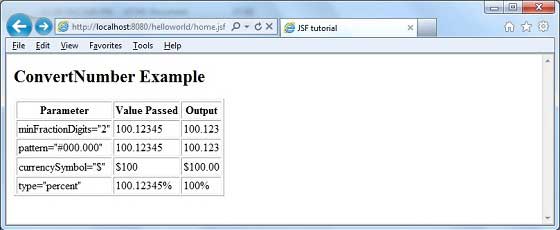
 jsf_convertor_tags.html
