
JSF - 显示数据表
h:dataTable 标签用于以表格形式显示数据。
JSF 标签
<h:dataTable value = "#{userData.employees}" var = "employee"
   styleClass = "employeeTable"
   headerClass = "employeeTableHeader"
   rowClasses = "employeeTableOddRow,employeeTableEvenRow">

   <h:column>
      <f:facet name = "header">Name</f:facet>
      #{employee.name}
   </h:column>

   <h:column>
      <f:facet name = "header">Department</f:facet>
      #{employee.department}
   </h:column>

   <h:column>
      <f:facet name = "header">Age</f:facet>
      #{employee.age}
   </h:column>

   <h:column>
      <f:facet name = "header">Salary</f:facet>
      #{employee.salary}
   </h:column>
</h:dataTable>
渲染输出
<table class = "employeeTable">
   <thead>
      <tr>
         <th class = "employeeTableHeader" scope = "col">Name</th>
         <th class = "employeeTableHeader" scope = "col">Department</th>
         <th class = "employeeTableHeader" scope = "col">Age</th>
         <th class = "employeeTableHeader" scope = "col">Salary</th>
      </tr>
   </thead>

   <tbody>
   <tr class = "employeeTableOddRow">
      <td>John</td>
      <td>Marketing</td>
      <td>30</td>
      <td>2000.0</td>
   </tr>

   <tr class = "employeeTableEvenRow">
      <td>Robert</td>
      <td>Marketing</td>
      <td>35</td>
      <td>3000.0</td>
   </tr>
</table>
标签属性
| S.No | 属性与描述 |
|---|---|
| 1 | id 组件的标识符 |
| 2 | rendered 布尔值;false 表示禁止渲染 |
| 3 | dir 文本的方向。有效值为 ltr(从左到右)和 rtl(从右到左) |
| 4 | styleClass 层叠样式表 (CSS) 类名 |
| 5 | value 组件的值,通常是值绑定 |
| 6 | bgcolor 表格的背景颜色 |
| 7 | border 表格边框的宽度 |
| 8 | cellpadding 表格单元格周围的填充 |
| 9 | cellspacing 表格单元格之间的间距 |
| 10 | columnClasses 以逗号分隔的列 CSS 类列表 |
| 11 | first 表格中显示的第一行的索引 |
| 12 | footerClass 表格页脚的 CSS 类 |
| 13 | frame 应绘制围绕表格的框架边的规范;有效值:none、above、below、hsides、vsides、lhs、rhs、box、border |
| 14 | headerClass 表格标题的 CSS 类 |
| 15 | rowClasses 以逗号分隔的行 CSS 类列表 |
| 16 | rules 单元格之间绘制线条的规范;有效值:组、行、列、全部 |
| 17 | summary 用于语音等非视觉反馈的表格用途和结构摘要 |
| 18 | var 数据表创建的表示值中当前项的变量的名称 |
| 19 | title 用于可访问性的标题,用于描述元素。可视化浏览器通常会为标题的值创建工具提示 |
| 20 | width 元素的宽度 |
| 21 | onblur 元素失去焦点 |
| 22 | onchange 元素的值发生变化 |
| 23 | onclick 鼠标按钮在元素上单击 |
| 24 | ondblclick 鼠标按钮在元素上双击 |
| 25 | onfocus 元素获得焦点 |
| 26 | onkeydown 按下按键 |
| 27 | onkeypress 按下按键后释放 |
| 28 | onkeyup 释放按键 |
| 29 | onmousedown 按下鼠标按钮元素上 |
| 30 | onmousemove 鼠标移动到元素上 |
| 31 | onmouseout 鼠标离开元素区域 |
| 32 | onmouseover 鼠标移动到元素上 |
| 33 | onmouseup 鼠标按钮被释放 |
示例应用程序
让我们创建一个测试 JSF 应用程序来测试上述标记。
| 步骤 | 描述 |
|---|---|
| 1 | 在 com.tutorialspoint.test 包下创建一个名为 helloworld 的项目,如 JSF - 基本标记 章节的 JSF - h:outputStylesheet 子章节中所述。 |
| 2 | 修改styles.css 如下所述。 |
| 3 | 在 com.tutorialspoint.test 包下创建 Employee.java 如下所述。 |
| 4 | 在 com.tutorialspoint.test 包下创建 UserData.java 作为托管 bean 如下所述。 |
| 5 | 修改 home.xhtml 如下所述。保持其余文件不变。 |
| 6 | 编译并运行应用程序以确保业务逻辑按要求运行。 |
| 7 | 最后,以 war 文件的形式构建应用程序并将其部署在 Apache Tomcat Web 服务器中。 |
| 8 | 按照最后一步中的说明,使用适当的 URL 启动您的 Web 应用程序。 |
styles.css
.employeeTable {
   border-collapse:collapse;
   border:1px solid #000000;
}

.employeeTableHeader {
   text-align:center;
   background:none repeat scroll 0 0 #B5B5B5;
   border-bottom:1px solid #000000;
   padding:2px;
}

.employeeTableOddRow {
   text-align:center;
   background:none repeat scroll 0 0 #FFFFFFF;
}

.employeeTableEvenRow {
   text-align:center;
   background:none repeat scroll 0 0 #D3D3D3;
}
Employee.java
package com.tutorialspoint.test;

public class Employee {
   private String name;
   private String department;
   private int age;
   private double salary;
   private boolean canEdit;

   public Employee (String name,String department,int age,double salary) {
      this.name = name;
      this.department = department;
      this.age = age;
      this.salary = salary;
      canEdit = false;
   }

   public String getName() {
      return name;
   }

   public void setName(String name) {
      this.name = name;
   }

   public String getDepartment() {
      return department;
   }

   public void setDepartment(String department) {
      this.department = department;
   }

   public int getAge() {
      return age;
   }

   public void setAge(int age) {
      this.age = age;
   }

   public double getSalary() {
      return salary;
   }

   public void setSalary(double salary) {
      this.salary = salary;
   }

   public boolean isCanEdit() {
      return canEdit;
   }

   public void setCanEdit(boolean canEdit) {
      this.canEdit = canEdit;
   }
}
UserData.java
package com.tutorialspoint.test;

import java.io.Serializable;
import java.util.ArrayList;
import java.util.Arrays;

import javax.faces.bean.ManagedBean;
import javax.faces.bean.SessionScoped;

@ManagedBean(name = "userData", eager = true)
@SessionScoped
public class UserData implements Serializable {
   private static final long serialVersionUID = 1L;
   private String name;
   private String dept;
   private int age;
   private double salary;
   private static final ArrayList<Employee> employees
      = new ArrayList<Employee>(Arrays.asList(
      new Employee("John", "Marketing", 30,2000.00),
      new Employee("Robert", "Marketing", 35,3000.00),
      new Employee("Mark", "Sales", 25,2500.00),
      new Employee("Chris", "Marketing", 33,2500.00),
      new Employee("Peter", "Customer Care", 20,1500.00)
   ));

   public ArrayList<Employee> getEmployees() {
      return employees;
   }

   public String addEmployee() {
      Employee employee = new Employee(name,dept,age,salary);
      employees.add(employee);
      return null;
   }

   public String deleteEmployee(Employee employee) {
      employees.remove(employee);
      return null;
   }

   public String editEmployee(Employee employee) {
      employee.setCanEdit(true);
      return null;
   }

   public String saveEmployees() {

      //set "canEdit" of all employees to false

      for (Employee employee : employees) {
         employee.setCanEdit(false);
      }
      return null;
   }

   public String getName() {
      return name;
   }

   public void setName(String name) {
      this.name = name;
   }

   public String getDepartment() {
      return department;
   }

   public void setDepartment(String department) {
      this.department = department;
   }

   public int getAge() {
      return age;
   }

   public void setAge(int age) {
      this.age = age;
   }

   public double getSalary() {
      return salary;
   }

   public void setSalary(double salary) {
      this.salary = salary;
   }
}
home.xhtml
<?xml version = "1.0" encoding = "UTF-8"?>
<!DOCTYPE html PUBLIC "-//W3C//DTD XHTML 1.0 Transitional//EN"
"http://www.w3.org/TR/xhtml1/DTD/xhtml1-transitional.dtd">

<html xmlns = "http://www.w3.org/1999/xhtml"
xmlns:h = "http://java.sun.com/jsf/html"
xmlns:f = "http://java.sun.com/jsf/core">

   <h:head>
      <title>JSF tutorial</title>
      <h:outputStylesheet library = "css" name = "styles.css"  />
   </h:head>

   <h:body>
      <h2>DataTable Example</h2>

      <h:form>
         <h:dataTable value = "#{userData.employees}" var = "employee"
            styleClass = "employeeTable"
            headerClass = "employeeTableHeader"
            rowClasses = "employeeTableOddRow,employeeTableEvenRow">

            <h:column>
               <f:facet name = "header">Name</f:facet>
               #{employee.name}
            </h:column>

            <h:column>
               <f:facet name = "header">Department</f:facet>
               #{employee.department}
            </h:column>

            <h:column>
               <f:facet name = "header">Age</f:facet>
               #{employee.age}
            </h:column>

            <h:column>
               <f:facet name = "header">Salary</f:facet>
               #{employee.salary}
            </h:column>
         </h:dataTable>
      </h:form>

   </h:body>
</html>
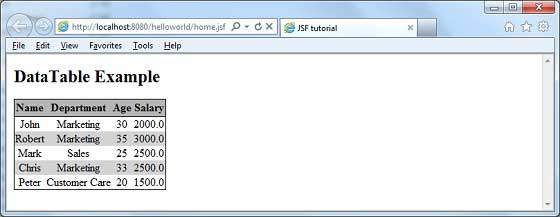
完成所有更改后,让我们像在 JSF - 第一个应用程序章节中一样编译并运行应用程序。如果您的应用程序一切正常,这将产生以下结果。
 jsf_data_tables.html
