HTML
CSS
JAVASCRIPT
JQUERY
AI
PHP
SQL
EXCEL
LINUX
C#
C++
C
PYTHON
JAVA
教程库
参考手册
技术文章
测验
练习
HOWTO
FAQ
Jupyter 教程
Jupyter 主页
IPython
IPython 简介
IPython 下载安装和环境配置
IPython 使用入门
IPython 运行和编辑Python脚本
IPython 历史命令
IPython 系统命令
IPython 命令行选项
IPython 动态对象自省
IPython IO 缓存
IPython 设置Python环境
IPython 导入Python Shell代码
IPython 嵌入 IPython
IPython 魔术命令
Jupyter
Jupyter 项目概述
Jupyter Notebook 简介
Jupyter 在线使用
Jupyter 安装和入门
Jupyter 仪表板
Jupyter 用户界面
Jupyter 单元格类型
Jupyter 编辑
Jupyter Markdown 单元格
Jupyter 单元格魔术函数
Jupyter 绘图
Jupyter 转换 Notebook
Jupyter IPyWidgets
QtConsole
QtConsole 入门
QtConsole 多行编辑
QtConsole 内联图形
QtConsole 保存到 Html
QtConsole 多控制台
QtConsole 连接到Jupyter Notebook
QtConsole 使用github和nbviewer
JupyterLab
JupyterLab 概述
QtConsole 安装 & 使用入门
JupyterLab 界面
JupyterLab 安装 R 内核
❮ Jupyter QtConsole 内联图形
Jupyter QtConsole 多个Consoles控制台 ❯
Jupyter QtConsole - 保存到 HTML
更新于 2024/2/2 4:56:00
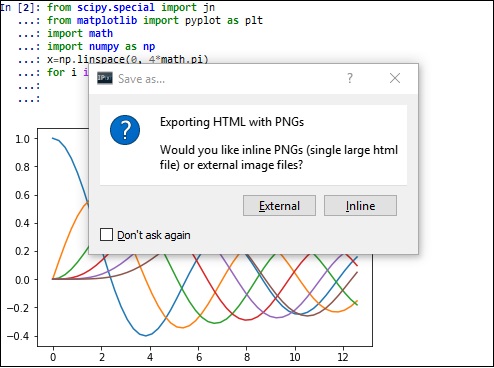
此选项可将 QtConsole 输出保存为 HTML 文件,可在"文件"菜单中找到。 您可以选择在相邻文件夹(命名为 qt_files)中创建带有内联图像或绘制图形的文件作为外部 png 文件。
❮ Jupyter QtConsole 内联图形
Jupyter QtConsole 多个Consoles控制台 ❯
颜色选择器
读后有收获微信请站长喝咖啡