Jython - 菜单
大多数基于 GUI 的应用程序在顶部都有一个菜单栏。 它位于顶层窗口标题栏的正下方。javax.swing 包具有构建高效菜单系统的精巧工具。 它是在 JMenuBar、JMenu 和 JMenuItem 类的帮助下构建的。
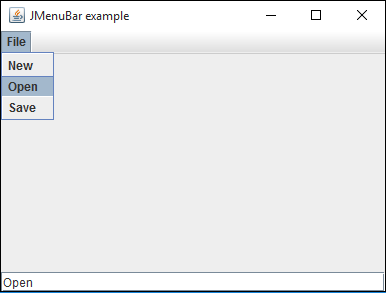
在下面的例子中,在顶层窗口中提供了一个菜单栏。 菜单栏中添加了一个由三个菜单项按钮组成的文件菜单。 现在让我们准备一个布局设置为 BorderLayout 的 JFrame 对象。
frame = JFrame("JMenuBar example")
frame.setDefaultCloseOperation(JFrame.EXIT_ON_CLOSE)
frame.setLocation(100,100)
frame.setSize(400,300)
frame.setLayout(BorderLayout())
Now, a JMenuBar object is activated by the SetJMenuBar() method.
bar = JMenuBar()
frame.setJMenuBar(bar)
接下来,声明一个带有"File"标题的 JMenu 对象。 文件菜单中添加了三个 JMenuItem 按钮。 单击任何菜单项时,将执行 ActionEvent 处理程序 OnClick() 函数。 它是用 actionPerformed 属性定义的。
file = JMenu("File")
newfile = JMenuItem("New",actionPerformed = OnClick)
openfile = JMenuItem("Open",actionPerformed = OnClick)
savefile = JMenuItem("Save",actionPerformed = OnClick)
file.add(newfile)
file.add(openfile)
file.add(savefile)
bar.add(file)
OnClick() 事件处理程序通过 gwtActionCommand() 函数检索 JMenuItem 按钮的名称,并将其显示在窗口底部的文本框中。
def OnClick(event):
   txt.text = event.getActionCommand()
File 文件菜单对象添加到菜单栏。 最后,在 JFrame 对象的底部添加了一个 JTextField 控件。
txt = JTextField(10)
frame.add(txt, BorderLayout.SOUTH)
menu.py的全部代码如下 −
from javax.swing import JFrame, JMenuBar, JMenu, JMenuItem, JTextField
from java.awt import BorderLayout

frame = JFrame("JMenuBar example")
frame.setDefaultCloseOperation(JFrame.EXIT_ON_CLOSE)
frame.setLocation(100,100)
frame.setSize(400,300)
frame.setLayout(BorderLayout())

def OnClick(event):
   txt.text = event.getActionCommand()

bar = JMenuBar()
frame.setJMenuBar(bar)

file = JMenu("File")
newfile = JMenuItem("New",actionPerformed = OnClick)
openfile = JMenuItem("Open",actionPerformed = OnClick)
savefile = JMenuItem("Save",actionPerformed = OnClick)
file.add(newfile)
file.add(openfile)
file.add(savefile)
bar.add(file)

txt = JTextField(10)
frame.add(txt, BorderLayout.SOUTH)

frame.setVisible(True)
当使用 Jython 解释器执行上述脚本时,会出现一个带有"File"文件菜单的窗口。 单击它,它的三个菜单项将下拉。 如果单击任何按钮,其名称将显示在文本框控件中。