
LESS - Combinatorial Explosion
描述
& 可以生成以逗号分隔的列表中选择器的所有可能排列。
示例
以下示例演示了如何使用 & 生成 LESS 文件中选择器的所有可能排列 −
<html>
   <head>
      <link rel = "stylesheet" href = "style.css" type = "text/css" />
      <title>Combinatorial Explosion</title>
   </head>

   <body>
      <p>This is first paragraph.</p>
      <p>This is second paragraph which is adjecent to first paragraph ( i.e. p + p ). This will be highlighted.</p>
      <div>
         This div is adjecent to second paragraph ( i.e. p + div ). This will be highlighted.
      </div>

      <p>This is third paragraph adjecent to div ( i.e. p + div ). This will be highlighted.</p>
      <i>This is italic. This will not be highlighted since there is no (p + i) in CSS</i>
      <div>This is second div</div>
      <div>This is div adjecent to second div ( i.e. div + div ). This will be highlighted</div>
   </body>
</html>
接下来,创建 style.less 文件。
style.less
p, div {
   color : red;
   font-family:Lucida Console;
   & + & {
      color : green;
      background-color: yellow;
      font-family: "Comic Sans MS";
   }
}
您可以使用以下命令将 style.less 编译为 style.css −
lessc style.less style.css
执行上述命令;它将使用以下代码自动创建 style.css 文件 −
style.css
p,
div {
   color: red;
   font-family: Lucida Console;
}

p + p,
p + div,
div + p,
div + div {
   color: green;
   background-color: yellow;
   font-family: "Comic Sans MS";
}
输出
按照以下步骤查看上述代码的工作原理 −
将上述 html 代码保存在 combinatorial_explosion.html 文件中。
在浏览器中打开此 HTML 文件,将显示以下输出。
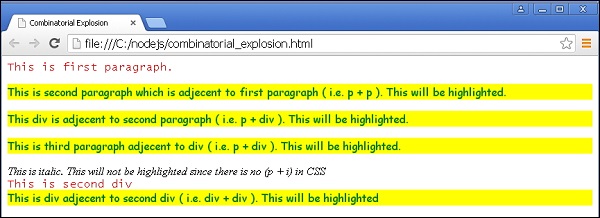
 less_parent_selectors.html
