LESS - 导入
描述
用于导入 LESS 或 CSS 文件的内容。
示例
以下示例演示了在 LESS 文件中使用导入 −
<html>
   <head>
      <title>Less Importing</title>
      <link rel = "stylesheet" type = "text/css" href = "style.css" />
   </head>

   <body>
      <h1>Example using Importing</h1>
      <p class = "myclass">LESS enables customizable,
      manageable and reusable style sheet for web site.</p>
      <p class = "myclass1">It allows reusing CSS code and
      writing LESS code with same semantics.</p>
      <p class = "myclass2">LESS supports creating cleaner,
      cross-browser friendly CSS faster and easier.</p>
   </body>
</html>
现在创建 myfile.less 文件。
myfile.less
.myclass {
   color: #FF8000;
}

.myclass1 {
   color: #5882FA;
}
现在创建 style.less 文件。
style.less
@import "http://www.tutorialspoint.com/less/myfile.less";
.myclass2 {
   color: #FF0000;
}
The myfile.less file which will be imported into style.less from the path https://www.tutorialspoint.com/less/myfile.less
您可以使用以下命令将 style.less 文件编译为 style.css −
lessc style.less style.css
执行上述命令;它将使用以下代码自动创建 style.css 文件 −
style.css
.myclass {
   color: #FF8000;
}

.myclass1 {
   color: #5882FA;
}

.myclass2 {
   color: #FF0000;
}
输出
按照以下步骤查看上述代码的工作原理 −
将上述 html 代码保存在 importing.html 文件中。
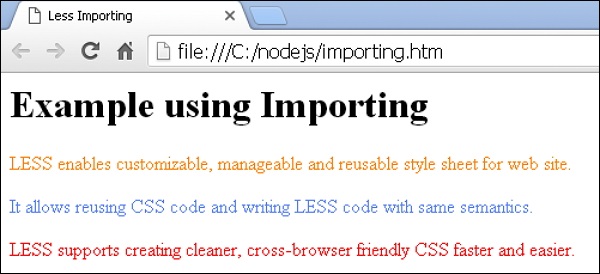
在浏览器中打开此 HTML 文件,将显示以下输出。