
LESS - Contrast 对比度
描述
它设置元素中颜色的对比度,并改变明暗值之间的差异。它具有以下参数 −
color − 它表示一个颜色对象。
dark − 它是一个可选参数,用于设置深色。
light − 它是一个可选参数,用于设置浅色。
threshold − 它是一个可选参数,包含 0 - 100% 之间的百分比,并指定从暗到亮的过渡。
示例
以下示例演示了在 LESS 文件中使用对比度颜色操作 −
<html>
   <head>
      <title>Contrast</title>
      <link rel = "stylesheet" type = "text/css" href = "style.css"/>
   </head>

   <body>
      <h2>Example of Contrast Color Operation</h2>
      <div class = "myclass1">
         <p>color :<br>#426105</p>
      </div><br>

      <div class = "myclass2">
         <p>result :<br>#81F79F</p>
      </div>
   </body>
</html>
接下来,创建 style.less 文件。
style.less
.myclass1 {
   height:100px;
   width:100px;
   padding: 30px 0px 0px 25px;
   background-color: hsl(80, 90%, 20%);
   color:white;
}

.myclass2 {
   height:100px;
   width:100px;
   padding: 30px 0px 0px 25px;
   background-color: contrast(hsl(80, 90%, 20%), #81F79F, #01DFA5, 30%);
   color:white;
}
您可以使用以下命令将 style.less 编译为 style.css −
lessc style.less style.css
执行上述命令,它将自动使用以下代码创建 style.css 文件 −
style.css
.myclass1 {
   height: 100px;
   width: 100px;
   padding: 30px 0px 0px 25px;
   background-color: #426105;
   color: white;
}

.myclass2 {
   height: 100px;
   width: 100px;
   padding: 30px 0px 0px 25px;
   background-color: #81F79F;
   color: white;
}
输出
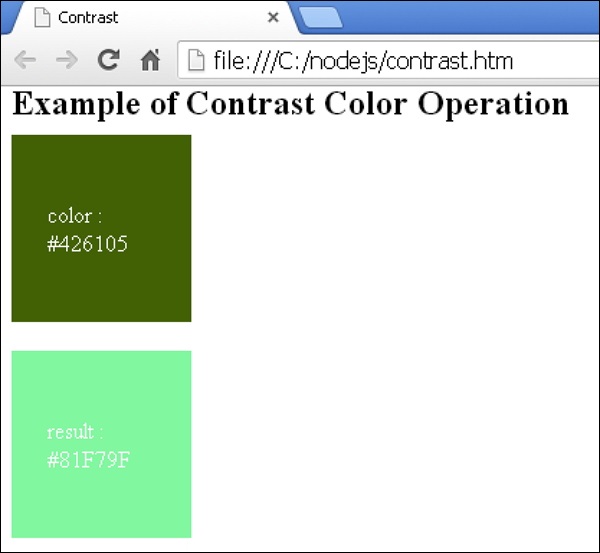
按照以下步骤查看上述代码的工作原理 −
将上述 html 代码保存在 contrast.html 文件中。
在浏览器中打开此 HTML 文件,将显示以下输出。
 less_color_operation.html
