
Maven - 构建自动化
构建自动化定义了项目构建成功完成后依赖项目构建过程开始的场景,以确保依赖项目稳定。
示例
假设一个团队正在开发一个项目 bus-core-api,另外两个项目 app-web-ui 和 app-desktop-ui 正在开发中 依赖。
app-web-ui 项目正在使用 bus-core-api 项目的 1.0-SNAPSHOT。
<project xmlns = "http://maven.apache.org/POM/4.0.0"
   xmlns:xsi = "http://www.w3.org/2001/XMLSchema-instance"
   xsi:schemaLocation = "http://maven.apache.org/POM/4.0.0
   http://maven.apache.org/xsd/maven-4.0.0.xsd">
   <modelVersion>4.0.0</modelVersion>
   <groupId>app-web-ui</groupId>
   <artifactId>app-web-ui</artifactId>
   <version>1.0</version>
   <packaging>jar</packaging>
   <dependencies>
      <dependency>
         <groupId>bus-core-api</groupId>
            <artifactId>bus-core-api</artifactId>
            <version>1.0-SNAPSHOT</version>
      </dependency>
   </dependencies>
</project>
app-desktop-ui 项目正在使用 bus-core-api 项目的 1.0-SNAPSHOT。
<project xmlns = "http://maven.apache.org/POM/4.0.0"
   xmlns:xsi = "http://www.w3.org/2001/XMLSchema-instance"
   xsi:schemaLocation = "http://maven.apache.org/POM/4.0.0
   http://maven.apache.org/xsd/maven-4.0.0.xsd">
   <modelVersion>4.0.0</modelVersion>
   <groupId>app_desktop_ui</groupId>
   <artifactId>app_desktop_ui</artifactId>
   <version>1.0</version>
   <packaging>jar</packaging>
   <name>app_desktop_ui</name>
   <url>http://maven.apache.org</url>
   <properties>
      <project.build.sourceEncoding>UTF-8</project.build.sourceEncoding>
   </properties>
   <dependencies>
      <dependency>
         <groupId>junit</groupId>
         <artifactId>junit</artifactId>
         <version>3.8.1</version>
         <scope>test</scope>
      </dependency>
      <dependency>
         <groupId>bus_core_api</groupId>
         <artifactId>bus_core_api</artifactId>
         <version>1.0-SNAPSHOT</version>
         <scope>system</scope>
         <systemPath>C:\MVN\bus_core_api\target\bus_core_api-1.0-SNAPSHOT.jar</systemPath>
      </dependency>
   </dependencies>
</project>
bus-core-api 项目 −
<project xmlns = "http://maven.apache.org/POM/4.0.0"
   xmlns:xsi = "http://www.w3.org/2001/XMLSchema-instance"
   xsi:schemaLocation = "http://maven.apache.org/POM/4.0.0
   http://maven.apache.org/xsd/maven-4.0.0.xsd">
   <modelVersion>4.0.0</modelVersion>
   <groupId>bus_core_api</groupId>
   <artifactId>bus_core_api</artifactId>
   <version>1.0-SNAPSHOT</version>
   <packaging>jar</packaging>
</project>
现在,app-web-ui 和 app-desktop-ui 项目的团队要求他们的构建过程应该在 bus-core-api 项目变更。
使用快照,确保应该使用最新的 bus-core-api 项目,但为了满足上述要求,我们需要做一些额外的事情。
我们可以通过以下两种方式进行 −
在 bus-core-api pom 中添加构建后目标以启动 app-web-ui 和 app-desktop-ui 构建。
使用像 Hudson 这样的持续集成 (CI) 服务器来自动管理构建自动化。
使用 Maven
更新 bus-core-api 项目 pom.xml。
<project xmlns = "http://maven.apache.org/POM/4.0.0"
   xmlns:xsi = "http://www.w3.org/2001/XMLSchema-instance"
   xsi:schemaLocation = "http://maven.apache.org/POM/4.0.0
   http://maven.apache.org/xsd/maven-4.0.0.xsd">
   <modelVersion>4.0.0</modelVersion>
   <groupId>bus-core-api</groupId>
   <artifactId>bus-core-api</artifactId>
   <version>1.0-SNAPSHOT</version>
   <packaging>jar</packaging>
   <build>
      <plugins>
         <plugin>
         <artifactId>maven-invoker-plugin</artifactId>
         <version>1.6</version>
         <configuration>
            <debug>true</debug>
            <pomIncludes>
               <pomInclude>app-web-ui/pom.xml</pomInclude>
               <pomInclude>app-desktop-ui/pom.xml</pomInclude>
            </pomIncludes>
         </configuration>
         <executions>
            <execution>
               <id>build</id>
               <goals>
                  <goal>run</goal>
               </goals>
            </execution>
         </executions>
         </plugin>
      </plugins>
   <build>
</project>
让我们打开命令控制台,进入 C:\ > MVN > bus-core-api 目录,执行下面的 mvn 命令。
>mvn clean package -U
Maven will start building the project bus-core-api.
[INFO] Scanning for projects...
[INFO] ------------------------------------------------------------------
[INFO] Building bus-core-api
[INFO] task-segment: [clean, package]
[INFO] ------------------------------------------------------------------
...
[INFO] [jar:jar {execution: default-jar}]
[INFO] Building jar: C:\MVN\bus-core-ui\target\
bus-core-ui-1.0-SNAPSHOT.jar
[INFO] ------------------------------------------------------------------
[INFO] BUILD SUCCESSFUL
[INFO] ------------------------------------------------------------------
一旦 bus-core-api 构建成功,Maven 将开始构建 app-web-ui 项目。
[INFO] ------------------------------------------------------------------
[INFO] Building app-web-ui
[INFO] task-segment: [package]
[INFO] ------------------------------------------------------------------
...
[INFO] [jar:jar {execution: default-jar}]
[INFO] Building jar: C:\MVN\app-web-ui\target\
app-web-ui-1.0-SNAPSHOT.jar
[INFO] ------------------------------------------------------------------
[INFO] BUILD SUCCESSFUL
[INFO] ------------------------------------------------------------------
一旦 app-web-ui 构建成功,Maven 将开始构建 app-desktop-ui 项目。
[INFO] ------------------------------------------------------------------
[INFO] Building app-desktop-ui
[INFO] task-segment: [package]
[INFO] ------------------------------------------------------------------
...
[INFO] [jar:jar {execution: default-jar}]
[INFO] Building jar: C:\MVN\app-desktop-ui\target\
app-desktop-ui-1.0-SNAPSHOT.jar
[INFO] -------------------------------------------------------------------
[INFO] BUILD SUCCESSFUL
[INFO] -------------------------------------------------------------------
在 Maven 中使用持续集成服务
使用 CI 服务器更适合开发人员。 不需要更新 bus-core-api 项目,每次添加一个新项目(例如,app-mobile-ui),作为 bus-core- 的依赖项目 api 项目。 Hudsion 是一个用java 编写的持续集成工具,它位于一个servlet 容器中,例如Apache tomcat 和glassfish 应用服务器。 Hudson 使用 Maven 依赖管理自动管理构建自动化。 以下快照将定义 Hudson 工具的作用。
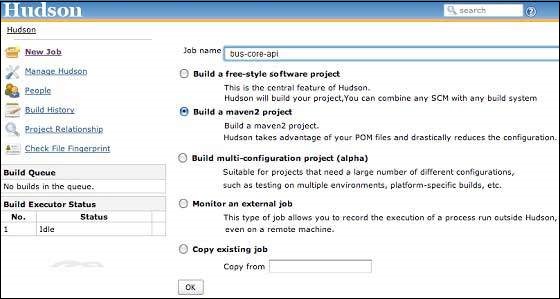
Hudson 将每个项目构建视为工作。 一旦项目代码签入到 SVN(或任何映射到 Hudson 的源管理工具),Hudson 就会开始其构建作业,一旦该作业完成,它会自动启动其他相关作业(其他相关项目)。
在上面的例子中,当 bus-core-ui 源代码在 SVN 中更新时,Hudson 开始构建。 构建成功后,Hudson 会自动查找依赖项目,并开始构建 app-web-ui 和 app-desktop-ui 项目。

