
Python - 图表
图表是一组对象的图形表示,其中一些对象对通过边连接。 相互连接的对象由称为顶点的点表示,连接顶点的链接称为边。 我们的教程在这里详细描述了与图表相关的各种术语和功能。
在本章中,我们将了解如何使用 Python 程序创建图表并向其中添加各种数据元素。 以下是我们在图表上执行的基本操作。
- 显示图的顶点
- 显示图的边
- 添加一个顶点
- 添加一条边
- 创建图表
可以使用 python 字典数据类型轻松呈现图表。 我们将顶点表示为字典的键,顶点之间的连接也称为边,作为字典中的值。
请看下图 −
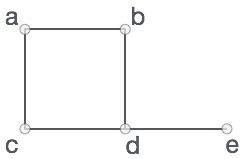
在上图中,
V = {a, b, c, d, e}
E = {ab, ac, bd, cd, de}
示例
我们可以在 python 程序中显示此图,如下所示 −
# Create the dictionary with graph elements
graph = {
   "a" : ["b","c"],
   "b" : ["a", "d"],
   "c" : ["a", "d"],
   "d" : ["e"],
   "e" : ["d"]
}
# Print the graph
print(graph)
输出
当上面的代码执行时,会产生如下结果 −
{'c': ['a', 'd'], 'a': ['b', 'c'], 'e': ['d'], 'd': ['e'], 'b': ['a', 'd']}
显示图的顶点
要显示图的顶点,我们只需找到图字典的键即可。 我们使用 keys() 方法。
class graph:
   def __init__(self,gdict=None):
      if gdict is None:
         gdict = []
      self.gdict = gdict
# Get the keys of the dictionary
   def getVertices(self):
      return list(self.gdict.keys())
# Create the dictionary with graph elements
graph_elements = {
   "a" : ["b","c"],
   "b" : ["a", "d"],
   "c" : ["a", "d"],
   "d" : ["e"],
   "e" : ["d"]
}
g = graph(graph_elements)
print(g.getVertices())
输出
当上面的代码执行时,会产生如下结果 −
['d', 'b', 'e', 'c', 'a']
显示图的边
寻找图的边比寻找顶点要复杂一些,因为我们必须找到在它们之间有一条边的每一对顶点。 所以我们创建一个空的边列表,然后遍历与每个顶点关联的边值。 形成一个列表,其中包含从顶点找到的不同边组。
class graph:
   def __init__(self,gdict=None):
      if gdict is None:
         gdict = {}
      self.gdict = gdict

   def edges(self):
      return self.findedges()
# Find the distinct list of edges
   def findedges(self):
      edgename = []
      for vrtx in self.gdict:
         for nxtvrtx in self.gdict[vrtx]:
            if {nxtvrtx, vrtx} not in edgename:
               edgename.append({vrtx, nxtvrtx})
      return edgename
# Create the dictionary with graph elements
graph_elements = {
   "a" : ["b","c"],
   "b" : ["a", "d"],
   "c" : ["a", "d"],
   "d" : ["e"],
   "e" : ["d"]
}
g = graph(graph_elements)
print(g.edges())
输出
当上面的代码执行时,会产生如下结果 −
[{'b', 'a'}, {'b', 'd'}, {'e', 'd'}, {'a', 'c'}, {'c', 'd'}]
添加一个顶点
添加一个顶点很简单,我们将另一个附加键添加到图字典中。
示例
class graph:
   def __init__(self,gdict=None):
      if gdict is None:
         gdict = {}
      self.gdict = gdict
   def getVertices(self):
      return list(self.gdict.keys())
# Add the vertex as a key
   def addVertex(self, vrtx):
      if vrtx not in self.gdict:
         self.gdict[vrtx] = []
# Create the dictionary with graph elements
graph_elements = {
   "a" : ["b","c"],
   "b" : ["a", "d"],
   "c" : ["a", "d"],
   "d" : ["e"],
   "e" : ["d"]
}
g = graph(graph_elements)
g.addVertex("f")
print(g.getVertices())
输出
当上面的代码执行时,会产生如下结果 −
['a', 'b', 'c', 'd', 'e','f']
添加一条边
向现有图表添加边涉及将新顶点视为元组并验证边是否已存在。 如果没有,则添加边。
class graph:
   def __init__(self,gdict=None):
      if gdict is None:
         gdict = {}
      self.gdict = gdict
   def edges(self):
      return self.findedges()
# Add the new edge
   def AddEdge(self, edge):
      edge = set(edge)
      (vrtx1, vrtx2) = tuple(edge)
      if vrtx1 in self.gdict:
         self.gdict[vrtx1].append(vrtx2)
      else:
         self.gdict[vrtx1] = [vrtx2]
# List the edge names
   def findedges(self):
      edgename = []
      for vrtx in self.gdict:
         for nxtvrtx in self.gdict[vrtx]:
            if {nxtvrtx, vrtx} not in edgename:
               edgename.append({vrtx, nxtvrtx})
        return edgename
# Create the dictionary with graph elements
graph_elements = {
   "a" : ["b","c"],
   "b" : ["a", "d"],
   "c" : ["a", "d"],
   "d" : ["e"],
   "e" : ["d"]
}
g = graph(graph_elements)
g.AddEdge({'a','e'})
g.AddEdge({'a','c'})
print(g.edges())
输出
当上面的代码执行时,会产生如下结果 −
[{'e', 'd'}, {'b', 'a'}, {'b', 'd'}, {'a', 'c'}, {'a', 'e'}, {'c', 'd'}]

