Silverlight - 数据绑定
数据绑定是Silverlight应用程序中的一种机制,它为使用部分类的Windows运行时应用程序提供了一种简单易用的方法来显示数据并与数据交互。 数据的管理与该机制中数据的显示方式完全分离。 数据绑定允许 UI 元素和用户界面上的数据对象之间的数据流。 当建立绑定并且数据或业务模型发生变化时,它将自动将更新反映到 UI 元素,反之亦然。 也可以不绑定到标准数据源,而是绑定到页面上的另一个元素。
数据绑定有以下两种类型 −
- 单向数据绑定
- 双向数据绑定
单向数据绑定
在单向数据绑定中,数据从其源(即保存数据的对象)绑定到其目标(即显示数据的对象)。
让我们看一个单向数据绑定的简单示例。
下面给出的是 XAML 代码,其中使用一些属性创建了两个标签、两个文本框和一个按钮。
<UserControl x:Class = "DataBinding.MainPage"
   xmlns = "http://schemas.microsoft.com/winfx/2006/xaml/presentation"
   xmlns:x = "http://schemas.microsoft.com/winfx/2006/xaml"
   xmlns:d = "http://schemas.microsoft.com/expression/blend/2008"
   xmlns:mc = "http://schemas.openxmlformats.org/markup-compatibility/2006"
   mc:Ignorable = "d"
   d:DesignHeight = "300" d:DesignWidth = "400">

   <Grid x:Name = "LayoutRoot" Background = "White">

      <Grid.RowDefinitions>
         <RowDefinition Height = "Auto" />
         <RowDefinition Height = "Auto" />
         <RowDefinition Height = "*" />
      </Grid.RowDefinitions>

      <Grid.ColumnDefinitions>
         <ColumnDefinition Width = "Auto" />
         <ColumnDefinition Width = "200" />
      </Grid.ColumnDefinitions>

      <TextBlock Name = "nameLabel" Margin = "2">Name:</TextBlock>
      <TextBox Name = "nameText" Grid.Column = "1" Margin = "2"
         Text = "{Binding Name, Mode=OneWay}"/>

      <TextBlock Name = "ageLabel" Margin = "2" Grid.Row = "1">Age:</TextBlock>

      <TextBox Name = "ageText" Grid.Column = "1" Grid.Row = "1" Margin="2"
         Text = "{Binding Age, Mode = OneWay}"/>

      <StackPanel Grid.Row = "2" Grid.ColumnSpan = "2">
         <Button Content = "_Show..." Click = "Button_Click" />
      </StackPanel>

   </Grid>

</UserControl>
我们观察到以下事情 −
两个文本框的文本属性均绑定到"Name"和"Age", 这是 Person 类的类变量,如下所示。
在Person类中,我们只有两个变量Name和Age, 其对象在 MainPage 类中初始化。
在 XAML 代码中,我们绑定到属性 Name 和 Age,但我们尚未选择哪个属性属于该对象。
一种简单的方法是将一个对象分配给 DataContext,我们在 MainPage 构造函数的 C# 代码中绑定其属性,如下所示。
using System.Windows;
using System.Windows.Controls;

namespace DataBinding {

   public partial class MainPage : UserControl {
      Person person = new Person { Name = "Salman", Age = 26 };

      public MainPage() {
         InitializeComponent();
         this.DataContext = person;
      }

      private void Button_Click(object sender, RoutedEventArgs e) {
         string message = person.Name + " is " + person.Age;
         MessageBox.Show(message);
      }
   }

   public class Person {
      private string nameValue;

      public string Name {
         get { return nameValue; }
         set { nameValue = value; }
      }

      private double ageValue;

      public double Age {
         get { return ageValue; }

         set {
            if (value != ageValue) {
               ageValue = value;
            }
         }
      }
   }
}
让我们运行此应用程序,您可以立即在网页中看到我们已成功绑定到该 Person 对象的姓名和年龄。
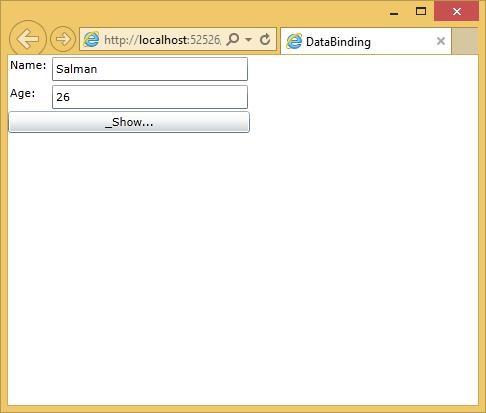
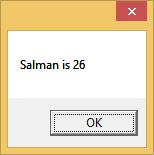
当您按下显示按钮时,它将在消息框中显示姓名和年龄。
让我们在上面的对话框中更改Name和Age。
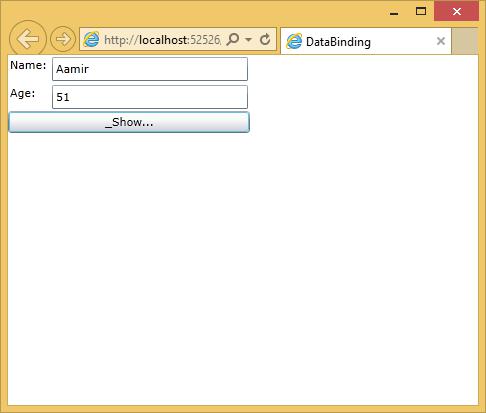
现在,如果您单击显示按钮,它将再次显示相同的消息。
这是因为 XAML 代码中的数据绑定模式被设置为 oneway。 要显示更新的消息,您需要了解双向数据绑定。
双向数据绑定
在双向绑定中,用户能够通过用户界面修改数据并在源中更新该数据。 如果在用户查看视图时源发生更改,您希望更新视图。
让我们看一下相同的示例,但仅将 XAML 代码中的绑定模式从单向绑定更改为双向绑定,如下所示。
<UserControl x:Class = "DataBinding.MainPage"
   xmlns = "http://schemas.microsoft.com/winfx/2006/xaml/presentation"
   xmlns:x = "http://schemas.microsoft.com/winfx/2006/xaml"
   xmlns:d = "http://schemas.microsoft.com/expression/blend/2008"
   xmlns:mc = "http://schemas.openxmlformats.org/markup-compatibility/2006"
   mc:Ignorable = "d"
   d:DesignHeight = "300" d:DesignWidth = "400">

   <Grid x:Name = "LayoutRoot" Background = "White">

      <Grid.RowDefinitions>
         <RowDefinition Height = "Auto" />
         <RowDefinition Height = "Auto" />
         <RowDefinition Height = "*" />
      </Grid.RowDefinitions>

      <Grid.ColumnDefinitions>
         <ColumnDefinition Width = "Auto" />
         <ColumnDefinition Width = "200" />
      </Grid.ColumnDefinitions>

      <TextBlock Name = "nameLabel" Margin = "2">_Name:</TextBlock>

      <TextBox Name = "nameText" Grid.Column = "1" Margin = "2"
         Text = "{Binding Name, Mode=TwoWay}"/>

      <TextBlock Name = "ageLabel" Margin = "2" Grid.Row = "1">_Age:</TextBlock>

      <TextBox Name = "ageText" Grid.Column = "1" Grid.Row = "1" Margin = "2"
         Text = "{Binding Age, Mode = TwoWay}"/>

      <StackPanel Grid.Row = "2" Grid.ColumnSpan = "2">
         <Button Content = "_Show..." Click = "Button_Click" />
      </StackPanel>

   </Grid>

</UserControl>
让我们再次运行该应用程序,您可以看到相同的输出。
让我们在上面的对话框中更改Name和Age。
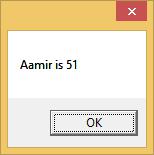
现在,如果您单击显示按钮,它将显示更新的消息。