
Silverlight - Popup 类
此类在应用程序窗口的范围内将内容显示在现有内容之上。 它是暂时显示在其他内容上。 Popup类的层次继承如下−
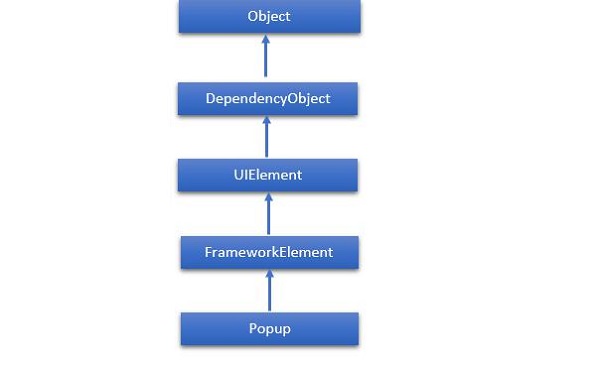
下面给出了Popup类的常用属性。
| Sr. No. | 属性和描述 |
|---|---|
| 1 | Child 获取或设置要在弹出窗口中托管的内容。 |
| 2 | ChildProperty 获取 Child 依赖属性的标识符。 |
| 3 | ChildTransitions 获取或设置应用于 Popup 子内容的 Transition 样式元素的集合。 |
| 4 | ChildTransitionsProperty 标识 ChildTransitions 依赖属性。 |
| 5 | HorizontalOffset 获取或设置应用程序窗口左侧与弹出窗口左侧之间的距离。 |
| 6 | HorizontalOffsetProperty 获取 HorizontalOffset 依赖属性的标识符。 |
| 7 | IsLightDismissEnabled 获取或设置一个值,该值确定如何关闭 Popup。 |
| 8 | IsLightDismissEnabledProperty 标识 IsLightDismissEnabled 依赖属性。 |
| 9 | IsOpen 获取或设置当前是否在屏幕上显示弹出窗口。 |
| 10 | IsOpenProperty 获取 IsOpen 依赖属性的标识符。 |
| 11 | VerticalOffset 获取或设置应用程序窗口顶部与弹出窗口顶部之间的距离。 |
| 12 | VerticalOffsetProperty 获取 VerticalOffset 依赖项属性的标识符。 |
Popup 类具有以下事件。
| Sr. No. | 事件和描述 |
|---|---|
| 1 | Closed 当 IsOpen 属性设置为 false 时触发。 |
| 2 | Opened 当 IsOpen 属性设置为 true 时触发。 |
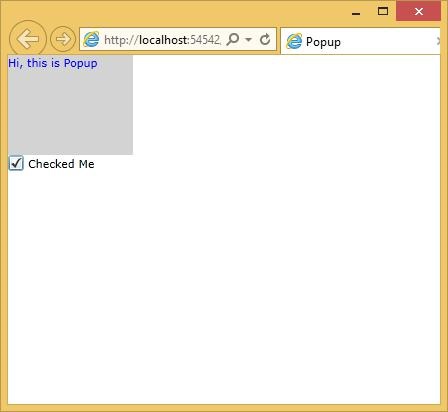
下面给出一个简单的示例,其中创建并初始化了 Popup 控件和 CheckBox。 当用户选中 CheckBox 时,它会显示一个 Popup。
<UserControl x:Class = "Popup.MainPage"
   xmlns = "http://schemas.microsoft.com/winfx/2006/xaml/presentation"
   xmlns:x = "http://schemas.microsoft.com/winfx/2006/xaml"
   xmlns:d = "http://schemas.microsoft.com/expression/blend/2008"
   xmlns:mc = "http://schemas.openxmlformats.org/markup-compatibility/2006"
   mc:Ignorable = "d"
   d:DesignHeight = "300" d:DesignWidth = "400">

   <Grid x:Name = "LayoutRoot" Background = "White">

      <CheckBox Name = "PCheckBox" Margin = "0,100,296,172" Content = "Checked Me"/>

      <Popup IsOpen = "{Binding ElementName = PCheckBox,Path = IsChecked}">

         <Canvas Width = "125" Height = "100" Background = "LightGray">
            <Canvas.RenderTransform>
               <RotateTransform x:Name = "theTransform" />
            </Canvas.RenderTransform>

            <TextBlock TextWrapping = "Wrap" Foreground = "Blue" Text = "Hi,
               this is Popup"/>
         </Canvas>

      </Popup>

   </Grid>

</UserControl>
编译并执行上述代码后,您将看到以下输出。 当您选中复选框框时,它将显示弹出窗口。
 silverlight_listbox.html
