
Struts 2 - Action 动作
Action(动作)是 Struts2 框架的核心,就像任何 MVC(模型视图控制器)框架一样。每个 URL 都映射到特定动作,该动作提供处理逻辑,而处理逻辑对于处理来自用户的请求必不可少。
但动作还具有另外两个重要功能。首先,动作在将数据从请求传输到视图(无论是 JSP 还是其他类型的结果)中起着重要作用。其次,动作必须协助框架确定哪个结果应呈现将在请求响应中返回的视图。
创建动作
Struts2 中对动作的唯一要求是必须有一个无参数方法,该方法返回 String 或 Result 对象,并且必须是 POJO。如果未指定无参数方法,则默认行为是使用 execute() 方法。
您可以选择扩展 ActionSupport 类,该类实现六个接口,包括 Action 接口。Action 接口如下 −
public interface Action {
   public static final String SUCCESS = "success";
   public static final String NONE = "none";
   public static final String ERROR = "error";
   public static final String INPUT = "input";
   public static final String LOGIN = "login";
   public String execute() throws Exception;
}
让我们看一下 Hello World 示例中的操作方法 −
package com.tutorialspoint.struts2;

public class HelloWorldAction {
   private String name;

   public String execute() throws Exception {
      return "success";
   }

   public String getName() {
      return name;
   }

   public void setName(String name) {
      this.name = name;
   }
}
为了说明操作方法控制视图这一点,让我们对 execute 方法进行以下更改,并扩展 ActionSupport 类,如下所示 −
package com.tutorialspoint.struts2;

import com.opensymphony.xwork2.ActionSupport;

public class HelloWorldAction extends ActionSupport {
   private String name;

   public String execute() throws Exception {
      if ("SECRET".equals(name)) {
         return SUCCESS;
      } else {
         return ERROR;
      }
   }

   public String getName() {
      return name;
   }

   public void setName(String name) {
      this.name = name;
   }
}
在此示例中,我们在 execute 方法中有一些逻辑来查看 name 属性。如果该属性等于字符串 "SECRET",则返回 SUCCESS 作为结果,否则返回 ERROR 作为结果。因为我们已经扩展了 ActionSupport,所以我们可以使用字符串常量 SUCCESS 和 ERROR。现在,让我们按如下方式修改 struts.xml 文件 −
<?xml version = "1.0" Encoding = "UTF-8"?>
<!DOCTYPE struts PUBLIC
   "-//Apache Software Foundation//DTD Struts Configuration 2.0//EN"
   "http://struts.apache.org/dtds/struts-2.0.dtd">

<struts>
   <constant name = "struts.devMode" value = "true" />
   <package name = "helloworld" extends = "struts-default">
      <action name = "hello"
         class = "com.tutorialspoint.struts2.HelloWorldAction"
         method = "execute">
         <result name = "success">/HelloWorld.jsp</result>
         <result name = "error">/AccessDenied.jsp</result>
      </action>
   </package>
</struts>
创建视图
让我们在 eclipse 项目的 WebContent 文件夹中创建以下 jsp 文件 HelloWorld.jsp。为此,右键单击项目资源管理器中的 WebContent 文件夹并选择 New >JSP File。如果返回结果为 SUCCESS(即 Action 接口中定义的字符串常量"success"),则将调用此文件 −
<%@ page contentType = "text/html; charset = UTF-8" %>
<%@ taglib prefix = "s" uri = "/struts-tags" %>

<html>
   <head>
      <title>Hello World</title>
   </head>

   <body>
      Hello World, <s:property value = "name"/>
   </body>
</html>
以下是当操作结果为 ERROR(等于字符串常量"error")时框架将调用的文件。以下是 AccessDenied.jsp
的内容
<%@ page contentType = "text/html; charset = UTF-8" %>
<%@ taglib prefix = "s" uri = "/struts-tags" %>

<html>
   <head>
      <title>Access Denied</title>
   </head>

   <body>
      You are not authorized to view this page.
   </body>
</html>
我们还需要在 WebContent 文件夹中创建 index.jsp。此文件将用作初始操作 URL,用户可以单击此 URL 来告诉 Struts 2 框架调用 HelloWorldAction 类的 execute 方法并呈现 HelloWorld.jsp 视图。
<%@ page language = "java" contentType = "text/html; charset = ISO-8859-1"
   pageEncoding = "ISO-8859-1"%>
<%@ taglib prefix = "s" uri = "/struts-tags"%>
   <!DOCTYPE html PUBLIC "-//W3C//DTD HTML 4.01 Transitional//EN"
   "http://www.w3.org/TR/html4/loose.dtd">

<html>
   <head>
      <title>Hello World</title>
   </head>

   <body>
      <h1>Hello World From Struts2</h1>
      <form action = "hello">
         <label for = "name">Please enter your name</label><br/>
         <input type = "text" name = "name"/>
         <input type = "submit" value = "Say Hello"/>
      </form>
   </body>
</html>
就是这样,web.xml 文件不需要更改,因此让我们使用在示例一章中创建的相同 web.xml。现在,我们准备使用 Struts 2 框架运行我们的 Hello World 应用程序。
执行应用程序
右键单击项目名称,然后单击导出 > WAR 文件以创建 War 文件。然后将此 WAR 部署到 Tomcat 的 webapps 目录中。最后,启动 Tomcat 服务器并尝试访问 URL http://localhost:8080/HelloWorldStruts2/index.jsp。这将为您提供以下屏幕 −
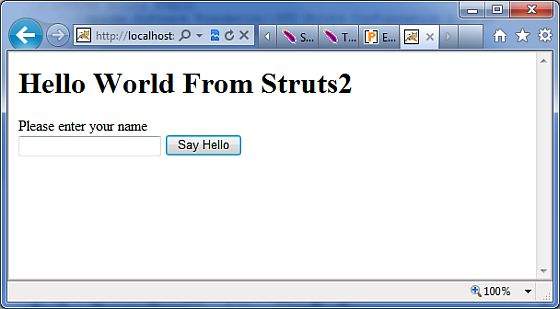
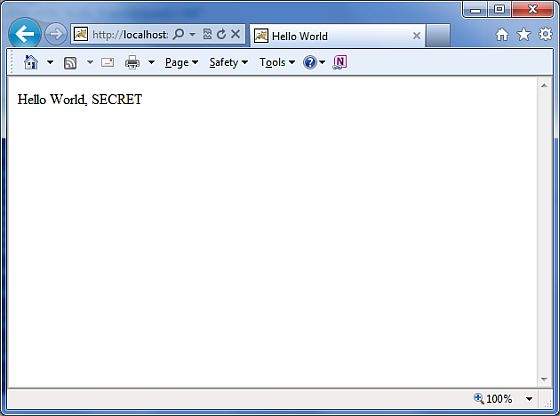
让我们输入一个单词"SECRET",您应该会看到以下页面 −
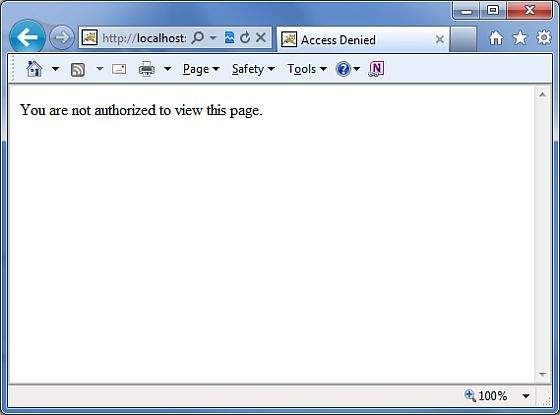
现在输入除"SECRET"之外的任何单词,您应该会看到以下页面 −
创建多个操作
您经常会定义多个操作来处理不同的请求并向用户提供不同的 URL,因此您将定义不同的类,如下所示 −
package com.tutorialspoint.struts2;
import com.opensymphony.xwork2.ActionSupport;

class MyAction extends ActionSupport {
   public static String GOOD = SUCCESS;
   public static String BAD = ERROR;
}

public class HelloWorld extends ActionSupport {
   ...
   public String execute() {
      if ("SECRET".equals(name)) return MyAction.GOOD;
      return MyAction.BAD;
   }
   ...
}

public class SomeOtherClass extends ActionSupport {
   ...
   public String execute() {
      return MyAction.GOOD;
   }
   ...
}
您将在 struts.xml 文件中配置这些操作,如下所示 −
<?xml version = "1.0" Encoding = "UTF-8"?>
<!DOCTYPE struts PUBLIC
   "-//Apache Software Foundation//DTD Struts Configuration 2.0//EN"
   "http://struts.apache.org/dtds/struts-2.0.dtd">

<struts>
   <constant name = "struts.devMode" value = "true" />

   <package name = "helloworld" extends = "struts-default">
      <action name = "hello"
         class = "com.tutorialspoint.struts2.HelloWorld"
         method = "execute">
         <result name = "success">/HelloWorld.jsp</result>
         <result name = "error">/AccessDenied.jsp</result>
      </action>

      <action name = "something"
         class = "com.tutorialspoint.struts2.SomeOtherClass"
         method = "execute">
         <result name = "success">/Something.jsp</result>
         <result name = "error">/AccessDenied.jsp</result>
      </action>
   </package>
</struts>
如您在上面的假设示例中所见,操作结果 SUCCESS 和 ERROR 是重复的。
为了解决这个问题,建议您创建一个包含结果的类。

