
Struts 2 - Append 附加标签
假设您有两个列表 A 和 B,其值为 A1、A2 和 B1、B2。合并列表将得到 A1、B1、A2、B2,而附加列表将得到 A1、A2、B1、B2。
创建操作类
首先让我们创建一个名为 Employee.java 的简单类,它看起来像 −
package com.tutorialspoint.struts2;

import java.util.ArrayList;
import java.util.List;

import org.apache.struts2.util.SubsetIteratorFilter.Decider;

public class Employee {
   private String name;
   private String department;

   public Employee(){}
   public Employee(String name,String department) {
      this.name = name;
      this.department = department;
   }
   private List employees;
   private List contractors;

   public String execute() {
      employees = new ArrayList();
      employees.add(new Employee("George","Recruitment"));
      employees.add(new Employee("Danielle","Accounts"));
      employees.add(new Employee("Melissa","Recruitment"));
      employees.add(new Employee("Rose","Accounts"));

      contractors = new ArrayList();
      contractors.add(new Employee("Mindy","Database"));
      contractors.add(new Employee("Vanessa","Network"));
      return "success";
   }

   public Decider getRecruitmentDecider() {
      return new Decider() {
         public boolean decide(Object element) throws Exception {
            Employee employee = (Employee)element;
            return employee.getDepartment().equals("Recruitment");
         }
      };
   }

   public String getName() {
      return name;
   }

   public void setName(String name) {
      this.name = name;
   }

   public String getDepartment() {
      return department;
   }

   public void setDepartment(String department) {
      this.department = department;
   }

   public List getEmployees() {
      return employees;
   }

   public void setEmployees(List employees) {
      this.employees = employees;
   }

   public List getContractors() {
      return contractors;
   }

   public void setContractors(List contractors) {
      this.contractors = contractors;
   }

}
Employee 类有两个属性 - name 和 department,我们还有两个员工列表 - 永久 employees 和 contractors。我们有一个名为 getRecruitmentDecider 的方法,它返回一个 Decider 对象。如果员工在 recruitment 部门工作,则 Decider 实现返回 true,否则返回 false。
接下来,让我们创建一个 DepartmentComparator 来比较 Employee 对象 −
package com.tutorialspoint.struts2;

import java.util.Comparator;

public class DepartmentComparator implements Comparator {
   public int compare(Employee e1, Employee e2) {
      return e1.getDepartment().compareTo(e2.getDepartment());
   }

   @Override
   public int compare(Object arg0, Object arg1) {
      return 0;
   }
}
如上例所示,部门经理按部门字母顺序比较员工。
创建视图
创建一个名为employee.jsp的文件,内容如下−
<%@ page contentType = "text/html; charset = UTF-8"%>
<%@ taglib prefix = "s" uri = "/struts-tags"%>

<html>
   <head>
      <title>Employees</title>
   </head>

   <body>
      <b>Employees and Contractors Merged together</b>

      <br />

      <s:append  id = "allemployees">
         <s:param value = "employees" />
         <s:param value = "contractors" />
      </s:append >

      <s:iterator value = "allemployees">
         <s:property value = "name"/>,
         <s:property value = "department"/><br/>
      </s:iterator>
   </body>
</html>
append 标记接受两个或更多列表作为参数。我们需要为附加标记提供一个 id,以便以后可以重复使用它。在此示例中,我们将雇员和承包商作为参数提供给附加标记。然后,我们使用"allemployees"id 遍历附加列表并打印雇员详细信息。
配置文件
您的 struts.xml 应如下所示 −
<?xml version = "1.0" Encoding = "UTF-8"?>
<!DOCTYPE struts PUBLIC
   "-//Apache Software Foundation//DTD Struts Configuration 2.0//EN"
   "http://struts.apache.org/dtds/struts-2.0.dtd">

<struts>
   <constant name = "struts.devMode" value = "true" />
   <package name = "helloworld" extends = "struts-default">
      <action name = "employee"
         class = "com.tutorialspoint.struts2.Employee"
         method = "execute">
         <result name = "success">/employee.jsp</result>
      </action>
   </package>
</struts>
文件 web.xml 应类似于 −
<?xml version = "1.0" Encoding = "UTF-8"?>
<web-app xmlns:xsi = "http://www.w3.org/2001/XMLSchema-instance"
   xmlns = "http://java.sun.com/xml/ns/javaee"
   xmlns:web = "http://java.sun.com/xml/ns/javaee/web-app_2_5.xsd"
   xsi:schemaLocation = "http://java.sun.com/xml/ns/javaee
   http://java.sun.com/xml/ns/javaee/web-app_3_0.xsd"
   id = "WebApp_ID" version = "3.0">

   <display-name>Struts 2</display-name>

   <welcome-file-list>
      <welcome-file>index.jsp</welcome-file>
   </welcome-file-list>

   <filter>
      <filter-name>struts2</filter-name>
      <filter-class>
         org.apache.struts2.dispatcher.FilterDispatcher
      </filter-class>
   </filter>

   <filter-mapping>
      <filter-name>struts2</filter-name>
      <url-pattern>/*</url-pattern>
   </filter-mapping>
</web-app>
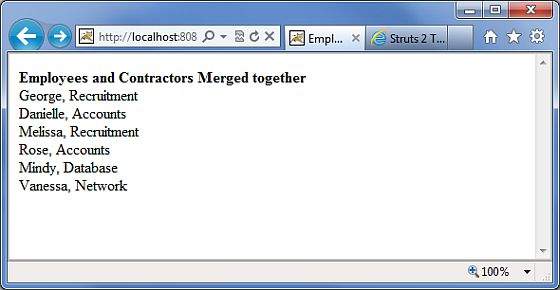
右键单击项目名称,然后单击导出 > WAR 文件以创建 War 文件。然后将此 WAR 部署到 Tomcat 的 webapps 目录中。最后,启动 Tomcat 服务器并尝试访问 URL http://localhost:8080/HelloWorldStruts2/employee.action。这将产生以下屏幕 −
 struts_control_tags.html
