
Struts 2 - Include 包含标签
Struts include 标签与 jsp include 标签非常相似,很少使用。我们已经了解了如何使用 <s:action> 标签将 struts 操作的输出包含到 jsp 中。<s:include> 标签略有不同。它允许您将 jsp、servlet 或任何其他资源(struts 操作以外的内容)的输出包含到 jsp 中。在后台,它与 <jsp:include> 完全相似,但它允许您将参数传递给包含的文件,它也是 Struts 框架的一部分。
以下示例显示了我们如何将 HelloWorld.jsp 的输出包含到 employee.jsp 中。在这种情况下,HelloWorldAction.java 中的操作方法将不会被调用,因为我们直接包含 jsp。
创建操作类
package com.tutorialspoint.struts2;

public class HelloWorldAction {
   private String name;

   public String execute() throws Exception {
      return "success";
   }

   public String getName() {
      return name;
   }

   public void setName(String name) {
      this.name = name;
   }
}
创建视图
让我们拥有包含以下内容的 HelloWorld.jsp −
<%@ page contentType = "text/html; charset = UTF-8" %>
<%@ taglib prefix = "s" uri = "/struts-tags" %>

<html>
   <head>
      <title>Hello World</title>
   </head>

   <body>
      <h2>Example of Generator Tag</h2>
      <h3>The colours of rainbow:</h3>

      <s:generator val = "%{'Violet,Indigo,Blue,
         Green,Yellow,Orange,Red '}" count = "7" separator = ",">

         <s:iterator>
            <s:property /><br/>
         </s:iterator>
      </s:generator>

   </body>
</html>
接下来让我们使用 employees.jsp 来制作以下内容 −
<%@ page contentType = "text/html; charset = UTF-8"%>
<%@ taglib prefix = "s" uri = "/struts-tags"%>

<html>
   <head>
      <title>Employees</title>
   </head>

   <body>
      <p>An example of the include tag: </p>
      <s:include value = "HelloWorld.jsp"/>
   </body>
</html>
配置文件
您的 struts.xml 应如下所示 −
<?xml version = "1.0" Encoding = "UTF-8"?>
<!DOCTYPE struts PUBLIC
   "-//Apache Software Foundation//DTD Struts Configuration 2.0//EN"
   "http://struts.apache.org/dtds/struts-2.0.dtd">
<struts>
   <constant name = "struts.devMode" value = "true" />
   <package name = "helloworld" extends = "struts-default">

      <action name = "hello"
         class = "com.tutorialspoint.struts2.HelloWorldAction"
         method = "execute">
         <result name = "success">/HelloWorld.jsp</result>
      </action>

      <action name = "employee"
         class = "com.tutorialspoint.struts2.Employee"
         method = "execute">
         <result name = "success">/employee.jsp</result>
      </action>

   </package>
</struts>
文件 web.xml 应类似于 −
<?xml version = "1.0" Encoding = "UTF-8"?>
<web-app xmlns:xsi = "http://www.w3.org/2001/XMLSchema-instance"
   xmlns = "http://java.sun.com/xml/ns/javaee"
   xmlns:web = "http://java.sun.com/xml/ns/javaee/web-app_2_5.xsd"
   xsi:schemaLocation = "http://java.sun.com/xml/ns/javaee
   http://java.sun.com/xml/ns/javaee/web-app_3_0.xsd"
   id = "WebApp_ID" version = "3.0">

   <display-name>Struts 2</display-name>

   <welcome-file-list>
      <welcome-file>index.jsp</welcome-file>
   </welcome-file-list>

   <filter>
      <filter-name>struts2</filter-name>
      <filter-class>
         org.apache.struts2.dispatcher.FilterDispatcher
      </filter-class>
   </filter>

   <filter-mapping>
      <filter-name>struts2</filter-name>
      <url-pattern>/*</url-pattern>
   </filter-mapping>
</web-app>
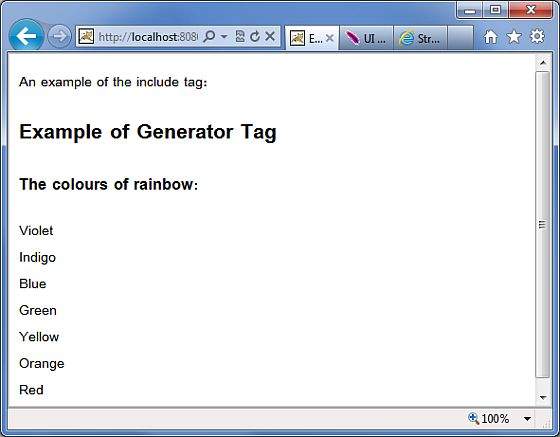
右键单击项目名称,然后单击导出 > WAR 文件以创建 War 文件。然后将此 WAR 部署到 Tomcat 的 webapps 目录中。最后,启动 Tomcat 服务器并尝试访问 URL http://localhost:8080/HelloWorldStruts2/employee.action。这将产生以下屏幕 −
 struts_data_tags.html
