
在 HTML 网页上添加 YouTube 视频
htmlweb developmentfront end technology更新于 2025/4/4 17:16:17
您可以轻松地将 YouTube 视频添加到您的网页中。您只需嵌入视频即可。
首先,获取视频 ID −
步骤 1:找到视频并右键点击。选择"Stats for nerds" −
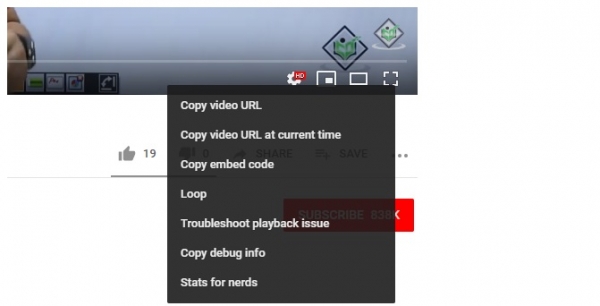
点击后,您将看到以下对话框,其中显示统计数据 −
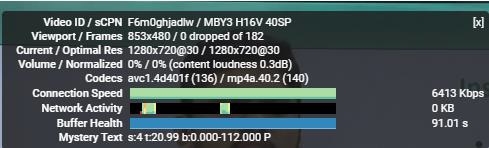
从上图可以看出,视频 ID 为 F6m0ghjadlw。现在,我们将使用该 ID 嵌入同一个视频。 −
示例
<!DOCTYPE html>
<html>
<head>
   <title>Learn WordPress</title>
</head>
<body>
   <h1>WordPress Installation</h1>
   <p>Following is the video demonstrating how to install WordPress on localhost using
   XAMPP Server:</p>
   <iframe height="350" width="600"
      src="https://www.youtube.com/embed/F6m0ghjadlw">
   </iframe>
</body>
</html>
输出
以下输出显示我们已成功将 YouTube 视频嵌入网页 −

您也可以使用 <embed> 标签实现相同的效果。以下是 HTML 代码 −
示例
<!DOCTYPE html>
<html>
<head>
   <title>Learn WordPress</title>
</head>
<body>
   <h1>WordPress Installation</h1>
   <p>Following is the video demonstrating how to install WordPress on localhost using
   XAMPP Server (video uploaded using embed element):</p>
   <embed height="350" width="600" src="https://www.youtube.com/embed/F6m0ghjadlw">
</body>
</html>
输出
输出显示视频成功嵌入−

相关文章
有用资源
html 参考教程 - 该教程包含有关 html 的更多信息:https://www.cainiaomax.com/html/

