
在 ReactJS 中使用 Recharts 创建散点图
react jsjavascript libraryfront end technology更新于 2024/11/23 1:48:17
本文将探索 Rechart JS 库,并将其应用于 React 应用程序中,以了解其使用方法。Rechart 库专门用于在 React 应用程序中创建不同类型的图表。可以使用此库构建的图表包括折线图、条形图、饼图、散点图等。
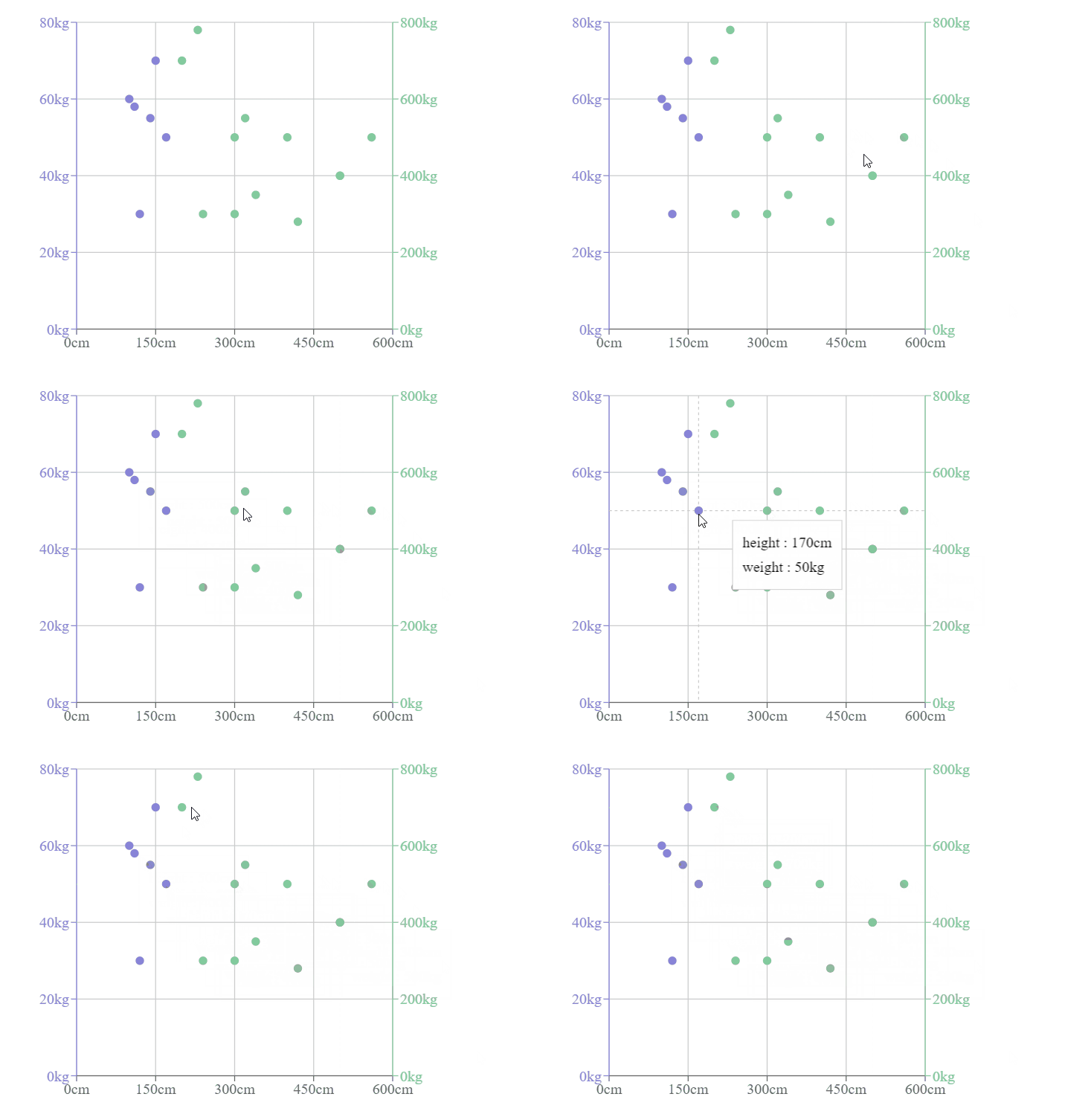
在本教程中,我们将创建一个包含所需数据点的散点图并将其显示给用户。散点图的数据集将包含 x 和 y 坐标信息。然后,借助笛卡尔积,我们将在两个轴上创建一个网格。最后,散点将绘制在笛卡尔网格上。
创建 React 应用程序
1.使用以下命令创建一个简单的 React 应用 −
npx create-react-app myApp
2. 创建应用后,导航到其应用文件夹。
cd myApp
3. 现在,使用以下命令安装要在 ReactJS 应用中使用的 recharts 模块。
npm install --save recharts
添加库后,我们可以使用此库创建饼图。
示例 1
在此示例中,我们使用 Recharts 依赖项创建一个简单的散点图。请在您的 app.js 文件中添加以下代码,以便在您的 React 应用中配置饼图。
# app.js
import React from "react";
import {
   ScatterChart,
   Scatter,
   XAxis,
   YAxis,
   CartesianGrid,
   Tooltip
} from "recharts";

const data01 = [
   { x: 100, y: 60, z: 200 },
   { x: 120, y: 30, z: 260 },
   { x: 170, y: 50, z: 400 },
   { x: 140, y: 55, z: 280 },
   { x: 150, y: 70, z: 500 },
   { x: 110, y: 58, z: 200 }
];

const data02 = [
   { x: 300, y: 300, z: 200 },
   { x: 400, y: 500, z: 260 },
   { x: 200, y: 700, z: 400 },
   { x: 340, y: 350, z: 280 },
   { x: 560, y: 500, z: 500 },
   { x: 230, y: 780, z: 200 },
   { x: 500, y: 400, z: 200 },
   { x: 300, y: 500, z: 260 },
   { x: 240, y: 300, z: 400 },
   { x: 320, y: 550, z: 280 },
   { x: 500, y: 400, z: 500 },
   { x: 420, y: 280, z: 200 }
];
export default class Example extends React.Component {
   render() {
      return (
         <ScatterChart
            width={500}
            height={400}
            margin={{
               top: 20,
               right: 20,
               bottom: 20,
               left: 20
            }} >
         <CartesianGrid />
         <XAxis type="number" dataKey="x" name="height" unit="cm" />
            <YAxis
            yAxisId="left"
            type="number"
            dataKey="y"
            name="weight"
            unit="kg"
            stroke="#8884d8"/>
         <YAxis
            yAxisId="right"
            type="number"
            dataKey="y"
            name="weight"
            unit="kg"
            orientation="right"
            stroke="#82ca9d"/>
         <Tooltip cursor={{ strokeDasharray: "3 3" }} />
         <Scatter yAxisId="left" name="A school" data={data01} fill="#8884d8" />
         <Scatter yAxisId="right" name="A school" data={data02} fill="#82ca9d" />
         </ScatterChart>
      );
   }
}
输出
成功执行上述程序后,将生成一个散点图。将鼠标悬停在点上时,它会显示身高(以厘米为单位)和体重(以公斤为单位)。
相关文章
有用资源
javascript 参考教程 - 该教程包含有关 javascript 的更多信息:https://www.cainiaomax.com/javascript/

