
如何在 Android 中清除单例实例?
androidmobile developmentapps/applications
在开始示例之前,我们应该了解什么是单例设计模式。单例是一种将类的实例化限制为仅一个的设计模式。其显著用途包括控制并发性以及为应用程序创建访问其数据存储的中心访问点。
此示例演示了如何在 Android 中清除单例实例
步骤 1 − 在 Android Studio 中创建一个新项目,转到"文件"->"新建项目",并填写所有必需的详细信息以创建新项目。
步骤 2 − 将以下代码添加到 res/layout/activity_main.xml。
<?xml version = "1.0" encoding = "utf-8"?>
<LinearLayout xmlns:android = "http://schemas.android.com/apk/res/android"
   xmlns:tools = "http://schemas.android.com/tools"
   android:layout_width = "match_parent"
   android:layout_height = "match_parent"
   tools:context = ".MainActivity"
   android:orientation = "vertical">
   <Button
      android:id = "@+id/show"
      android:text = "Clear instance in singleTone"
      android:layout_width = "wrap_content"
      android:layout_height = "wrap_content" />
</LinearLayout>
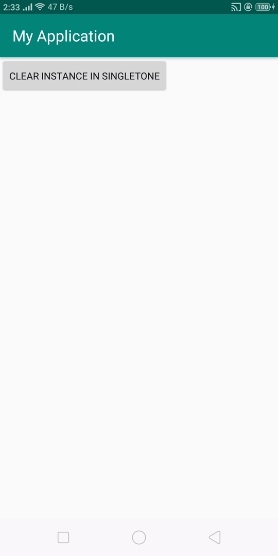
在上面的代码中,我们获取了一个按钮。当用户点击"显示"按钮时,它将清除单例实例。
步骤 3 − 将以下代码添加到 src/MainActivity.java
package com.example.andy.myapplication;

import android.os.Bundle;
import android.support.v7.app.AppCompatActivity;
import android.view.View;
import android.widget.Button;
import android.widget.Toast;
import org.json.JSONException;
import org.json.JSONObject;

public class MainActivity extends AppCompatActivity {
   Button show;
   JSONObject jsonObject;
   singleTonExample singletonexample;
   @Override
   protected void onCreate(Bundle savedInstanceState) {
      super.onCreate(savedInstanceState);
      setContentView(R.layout.activity_main);
      show = findViewById(R.id.show);
      singletonexample = singleTonExample.getInstance();
      singletonexample.init(getApplicationContext());
      show.setOnClickListener(new View.OnClickListener() {
      @Override
         public void onClick(View v) {
            singletonexample.clearInstance();
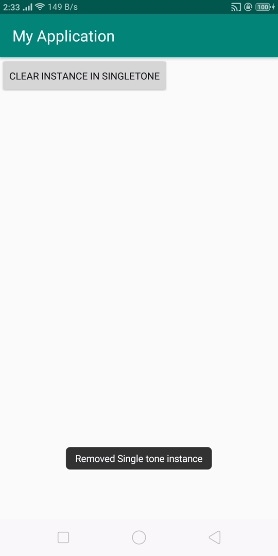
            Toast.makeText(MainActivity.this, "Removed Single tone instance", Toast.LENGTH_LONG).show();
         }
      });
   }
}
在上面的代码中,我们使用 singleTonExample 作为单例类,因此创建一个作为 singleTonExample.java 的调用并添加以下代码-
package com.example.andy.myapplication;
import android.app.Dialog;
import android.content.Context;
import android.view.Window;
import org.json.JSONObject;
import java.util.Arrays;
public class singleTonExample {
   private Context appContext;
   private Dialog dialog;
   JSONObject i1;
   private static singleTonExample ourInstance = new singleTonExample();
   public void init(Context context) {
      if(appContext == null) {
         this.appContext = context;
      }
   }
   private Context getContext() {
      return appContext;
   }
   public static Context get() {
      return getInstance().getContext();
   }
   public static synchronized singleTonExample getInstance() {
      return ourInstance;
   }
   private singleTonExample() { }
   public void clearInstance() {
      ourInstance = null;
   }
}
让我们尝试运行您的应用程序。假设您已将实际的 Android 移动设备连接到电脑。要从 Android Studio 运行该应用程序,请打开项目的某个活动文件,然后点击工具栏上的"运行"图标  。选择您的移动设备作为选项,然后勾选将显示默认屏幕的移动设备 –
现在点击上面的按钮,它将清除如下所示的实例 -
点击此处下载项目代码

