
如何在 ReactJS 中创建 refs?
在 ReactJS 中,refs 用于引用文档中的任何节点。通常,我们可以将 props 传递给子元素,以便与父元素状态中的子元素进行交互。然而,有时子组件的数据流会超出组件的典型数据流。例如,我们有四个组件,数据流是第二个组件是第一个组件的子元素,第三个组件是第二个组件的子元素,第四个组件是第三个组件的子元素。要从第一个组件与第四个组件进行交互,从每个组件传递 props 并不是好的做法。因此,我们可以使用 refs 直接从第一个组件与第四个组件进行交互。
在本教程中,我们将学习两种使用 refs 引用 DOM 元素的方法。
通过 React.createRef() 和 useRef() hooks 创建 refs
在 ReactJs 中,创建 refs 的第一种方法是针对类组件使用 React.CreateRef() 钩子,针对函数组件使用 useRef() hooks。在组件中创建 ref 变量后,我们可以将其赋值给任何 HTML 元素的 ref 属性。因此,它可以包含该元素的引用。
语法
用户可以按照以下语法使用 React.Createref() 在类组件中创建 ref。
this.InputElement = React.createRef();
<input type = "text" ref = {this.InputElement} id = "text" />
在上述语法中,我们创建了 InputElement ref 并将其赋值给输入元素。
用户可以按照以下语法使用 useRef() 钩子在函数式组件中创建 ref。
const input = useRef(null);
<input type = "text" ref = {input} />
在上述语法中,我们使用 useRef() 创建了输入 ref,并引用了文本输入。
示例
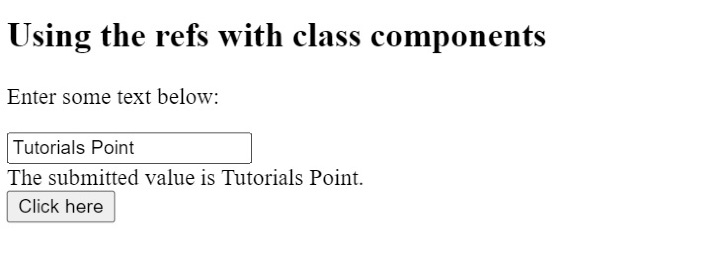
在下面的示例中,我们创建了包含文本输入的类组件。在该类组件的构造函数中,我们创建了 InputElement ref 和状态对象。
之后,当用户点击按钮时,它会执行 getInputValue() 方法,该方法使用 ref 获取输入的值。
import React from "react";
class App extends React.Component {
   constructor(props) {
      super(props);

      //创建 refs 来访问输入元素
      this.InputElement = React.createRef();
      this.getInputValue = this.getInputValue.bind(this);
      this.state = {
         text: "",
      };
   }

   // 从输入中获取文本的方法
      getInputValue(e) {
         e.preventDefault();
         this.setState({ text: this.InputElement.current.value });
      }
      render() {
         return (
            <div>
               {/* use the ref attribute */}
               <h2> Using the refs with class components </h2>
               <p>Enter some text below:</p>
               <input type = "text" ref = {this.InputElement} id = "text" />
               <br></br>
               <div> The submitted value is {this.state.text}. </div>
               <button onClick = {this.getInputValue}> Click here </button>
            </div>
         );
      }
}
export default App;
输出
示例
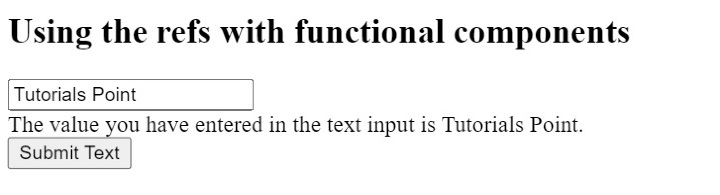
在下面的示例中,我们将 refs 与函数式组件结合使用。这里,我们使用 userRef() 钩子创建了一个输入引用。之后,我们将 ref 属性与 HTML 输入框结合使用,并将输入引用指向它。
接下来,我们使用 ref 获取输入框的值,就像第一个示例一样。
import { useState } from "react";
import { useRef } from "react";
export default function App() {
   const input = useRef(null);
   const [value, setValue] = useState("");
   function handleClick() {
      let value = input.current.value;
      setValue(value);
   }
   return (
      <div>
         <h2>
            {" "}
            Using the refs with functional components
         </h2>
         <input type = "text" ref = {input} />
         <br></br>
         <div> The value you have entered in the text input is {value}.</div>
         <input type = "button" value = "Submit Text" onClick = {handleClick} />
      </div>
   );
}
输出
通过回调函数创建 refs
作为开发者,如果您想在创建 refs 时编写更易读、更清晰的代码,您应该使用回调 refs。元素的 refs 属性接受一个回调函数作为值,而不是 ref 变量。之后,我们可以将元素作为回调函数的第一个参数获取,并使用它来设置元素的焦点或执行其他操作。
语法
用户可以按照以下语法通过回调函数创建 refs。
input type = "text" ref = {(ele) => {
    this.input = ele;
};
} />
在上述语法中,input 是组件中声明的变量,而 ele 指的是输入元素本身。
示例
在下面的示例中,我们可以使用回调函数创建 refs。首先,我们在构造函数中创建了 input 变量,并将其初始化为 null 值。之后,我们将 setRef 回调函数作为 input 元素 refs 属性的值传递。
"refs"属性会调用 setRef() 函数,该函数将 input 元素的引用存储到 input 变量中,然后我们在 getTextInput() 方法中访问 input 变量的值。
import React from "react";
class App extends React.Component {
   constructor(props) {
      super(props);
      this.state = {
         text: "",
      };
      this.input = null;
      this.setRef = (ele) => {
         this.input = ele;
      };
      this.getTextValue = () => {
         this.setState({ text: this.input.value });
      };
   }
   render() {
      return (
         <div>
            {/* use the ref attribute */}
            <h2> Using the callback refs in ReactJS </h2>
            <input type = "text" ref = {this.setRef} id = "text" />
            <br></br>
            <div> The submitted value is {this.state.text}. </div>
            <button onClick = {this.getTextValue}> Click here </button>
         </div>
      );
   }
}
export default App;
输出

使用 ref 与子组件交互
引入 ref 是为了从子组件与父组件交互。在这里,我们将在子组件和父组件中创建 ref,并通过父组件与子组件的元素交互。
语法
用户可以按照以下语法使用 ref 从父组件与子组件交互。
// 访问子组件的 ref

this.childClassRef.current.testRef.current.focus();
return <Child ref={this.childClassRef} />;
在上述语法中,我们将 ref 传递给子组件,并访问了子组件的 ref。
示例
文件名 - App.js
在 App.js 文件中,我们导入了子组件,并将 ref 作为 prop 传递。childClassRef 指向子组件。此外,用户可以看到我们如何在 componentDidMount() 方法中访问子组件的 ref。
testRef ref 在子组件中声明,这样我们就可以从父组件访问子组件的 ref。
import React from "react";
import Child from "./Child";
class App extends React.Component {
   constructor(props) {
      super(props);
      this.childClassRef = React.createRef();
   }
   componentDidMount() {
      this.childClassRef.current.testRef.current.focus();
   }
   render() {
      return <Child ref = {this.childClassRef} />;
   }
}
export default App;
文件名 – Child.js
在 Child.js 文件中,我们使用 React.createRef() 创建了 testRef 引用,并引用了输入元素。
import React from "react";
import { Component } from "react";
class Child extends Component {
   constructor(props) {
      super(props);
      this.testRef = React.createRef();
   }
   render() {
      return (
         <div>
            <h3> This is a child component. </h3>
            <input type = "text" ref = {this.testRef} />
         </div>
      );
   }
}
export default Child;
输出

在上面的输出中,用户可以观察到,每当我们刷新页面时,应用程序都会从父组件聚焦到子组件的输入元素。
相关文章
有用资源
javascript 参考教程 - 该教程包含有关 javascript 的更多信息:https://www.cainiaomax.com/javascript/

