
如何在 Android 中获取视图的绝对坐标?
androidapps/applicationsmobile development
在开始示例之前,我们应该了解什么是绝对坐标。它指的是视图在窗口管理器上的绝对位置 (x,y)。本示例演示了如何获取视图的绝对坐标。
步骤 1 − 在 Android Studio 中创建一个新项目,前往"文件"->"新建项目",并填写所有必填信息以创建新项目。
步骤 2 − 将以下代码添加到 res/layout/activity_main.xml。
<?xml version = "1.0" encoding = "utf-8"?>
<RelativeLayout
   xmlns:android = "http://schemas.android.com/apk/res/android"
   xmlns:tools = "http://schemas.android.com/tools"
   android:layout_width = "match_parent"
   android:layout_height = "match_parent"
   android:padding = "16dp"
   tools:context = ".MainActivity"
   android:background = "#dde4dd">
   <TextView
      android:id = "@+id/text"
      android:layout_marginLeft = "100dp"
      android:layout_width = "wrap_content"
      android:layout_height = "wrap_content"
      android:text = "Hello World!" />
</RelativeLayout>
在上面的xml中,我们给出了一个Textview,当用户点击textview时,它会在Toast上显示该view的位置。
步骤 3 − 将以下代码添加到 src/MainActivity.java
package com.example.andy.myapplication;

import android.graphics.Point;
import android.support.v7.app.AppCompatActivity;
import android.os.Bundle;
import android.view.TextureView;
import android.view.View;
import android.widget.TextView;
import android.widget.Toast;

public class MainActivity extends AppCompatActivity {
   TextView textView;
   @Override
   protected void onCreate(Bundle savedInstanceState) {
      super.onCreate(savedInstanceState);
      setContentView(R.layout.activity_main);
      textView = findViewById(R.id.text);
      textView.setOnClickListener(new View.OnClickListener() {
         @Override
         public void onClick(View v) {
            int[] location = new int[2];
            textView.getLocationOnScreen(location);
            Toast.makeText(MainActivity.this,"X axis is "+location[0] +"and Y axis is "+location[1],Toast.LENGTH_LONG).show();
         }
      });
   }
   public static Point getLocationOnScreen(View view) {
      int[] location = new int[2];
      view.getLocationOnScreen(location);
      return new Point(location[0], location[1]);
   }
}
在上面的代码中,当用户点击文本视图时,它将在屏幕上显示绝对坐标。让我们尝试运行您的应用程序。假设您已将实际的 Android 移动设备连接到电脑。要从 Android Studio 运行该应用程序,请打开项目的某个 Activity 文件,然后点击工具栏上的"运行" 图标。选择您的移动设备作为选项,然后勾选将显示默认屏幕的移动设备。
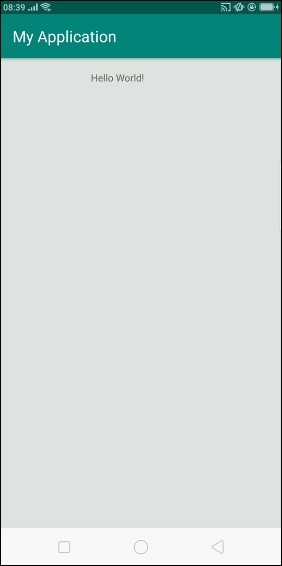
以上结果为初始屏幕,当用户点击 textview 时,将显示如下所示的结果 -
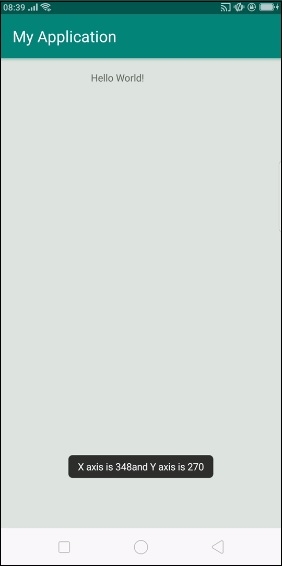
点击此处下载项目代码

