
如何设置表格列宽,而不考虑单元格中的文本量?
HTML table 标签以表格格式(行 * 列)显示数据。一行可以包含多列。使用 <table> 元素以及 <tr>、<td> 和 <th> 元素,我们可以创建一个表格,以表格形式显示数据。每个表格的行、标题和数据分别由 <tr>、<th> 和 <td> 标签指定。页面的布局由 HTML 表格管理。
示例
以下示例演示了表格列的默认width设置。
<!DOCTYPE html>
<html>
<head>
    <title> An example of a table in HTML </title>
    <style>
        table, td, th{
            border: 1px solid darkgray;
            border-spacing: 0;
            border-collapse: collapse;
        }
    </style>
</head>
<body>
    <table>
        <tr>
            <th> Heading 1 </th>
            <th> Heading 2 </th>
            <th> Heading 3 </th>
        </tr>
        <tr>
            <td> Sample text </td>
            <td> Sample text </td>
            <td> Sample text </td>
        </tr>
        <tr>
            <td> Sample text </td>
            <td> Sample text </td>
            <td> Sample text </td>
        </tr>
        <tr>
            <td> Sample text </td>
            <td> Sample text </td>
            <td> Sample text </td>
        </tr>
    </table>
</body>
</html>
输出
让我们看看如果我们改变其中一个单元格的文本量会发生什么。
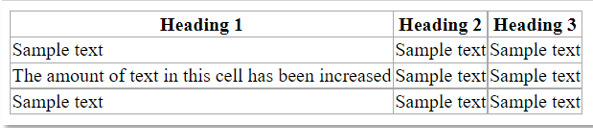
正如我们所观察到的,由于一个单元格的内容量增加,整列的宽度也随之增加,这会破坏表格的布局。在本文中,我们将讨论如何通过固定列宽而不考虑文本量来解决这个问题。
使用"width"和"table-layout"属性
表格单元格的宽度使用 HTML
语法
<td width="pixels 或 %">
属性值
pixels: 以像素为单位指定表格单元格的宽度。
%: 以百分比 (%) 为单位指定表格单元格的宽度。
table-layout 属性指定浏览器布局表格行、单元格和列时应使用的算法。它用于显示表格的布局。
语法
table-layout:auto | Fixed |继承;
auto:这是默认值。浏览器的自动算法用于定义表格的行、单元格和列的布局。最终的表格布局通常由表格的内容决定。
fixed:表格的布局忽略内容,而是使用表格的宽度、任何指定的列宽以及边框和单元格间距值。使用的列值由表格第一行中列或单元格上定义的宽度决定。
inherit: 表示该值源自其父级的表格布局值。
表格的宽度必须设置为 auto 以外的值,固定值才会产生影响。
示例
以下示例通过使用 <th> 和 <td> 的 width 属性并将表格布局属性设置为固定值,使表格列宽无论文本量多少都保持不变。
<!DOCTYPE html>
<html>
<head>
    <title>
        How to Set the Table Column Width Regardless of the Text Amount in its Cells?
    </title>
    <style>
        body{
            margin: 30px;
            background-color: floralwhite;
        }
        table{
            border: 2px solid darkcyan;
            border-spacing: 0;
            border-collapse: collapse;
            width: 360px;
            table-layout: fixed;
        }
        td, th {
        background-color: cornsilk;
        border: 1px solid darkcyan;
        color: darkslateblue;
        width: 120px;
        text-align: center;
        overflow: hidden;
      }
      h3{
          color: darkslateblue;
          margin: 10px;
      }
    </style>
</head>
<body>
    <h3> Class toppers for the current academic year </h3>
    <table>
        <tr>
            <th> Student name </th>
            <th> Roll number </th>
            <th> CGPA </th>
        </tr>
        <tr>
            <td> Krish </td>
            <td> 17 </td>
            <td> 9.8 </td>
        </tr>
        <tr>
            <td> Simran </td>
            <td> 45 </td>
            <td> 9.72 </td>
        </tr>
        <tr>
            <td> Namrata </td>
            <td> 23 </td>
            <td> 9.61 </td>
        </tr>
    </table>
</body>
</html>
输出
现在,如果我们将一个或多个单元格中的文本增加到超出单元格边界的程度,列宽将不会改变以容纳额外的内容。
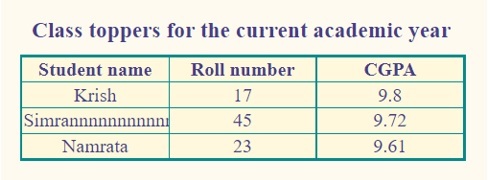
我们可以看到,列宽没有变化。文本没有溢出,而是被截断在单元格末尾,因为我们使用了 overflow 属性中的 hidden 属性。
相关文章
有用资源
html 参考教程 - 该教程包含有关 html 的更多信息:https://www.cainiaomax.com/html/

