
HTML area download 属性
htmlweb developmentfront end technology更新于 2025/7/16 3:56:17
<area> 元素的 download 属性用于设置待下载文件的名称,当用户点击超链接时,文件将被下载。
以下是语法 −
<area download="file">
file 是设置为下载的文件的名称。
现在让我们看一个实现 <area> 元素下载属性的示例 −
示例
<!DOCTYPE html>
<html>
<body>
<h2>Learning</h2>
<p>Learn these technologies with ease....</p>
<img src = /images/usemap.gif alt = "usemap" border = "0" usemap = "#tutorials"/>
<map name = "tutorials">
   <area shape = "poly" coords = "74,0,113,29,98,72,52,72,38,27"
   href = "/perl/index.htm" alt = "Perl Tutorial" download="perl" />
   <area shape = "rect" coords = "22,83,126,125" alt = "HTML Tutorial"
   href = "/html/index.htm" target = "_blank" download="html" />
   <area shape = "circle" coords = "73,168,32" alt = "PHP Tutorial"
   href = "/php/index.htm" target = "_blank" download="php" />
</map>
</body>
</html>
输出

现在,当您点击"PERL"时,文件将下载,如下所示 −
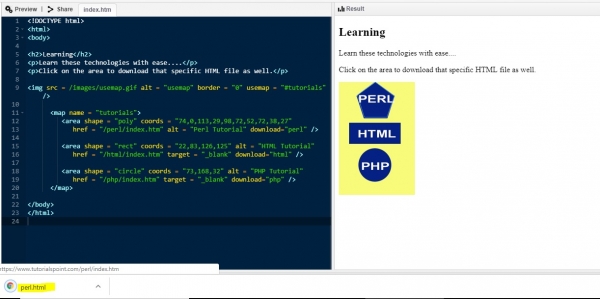
以上,我们使用 <area> 的下载属性启用了下载选项 −
<area shape = "poly" coords = "74,0,113,29,98,72,52,72,38,27"
href = "/perl/index.htm" alt = "Perl Tutorial" download="perl" />
download 属性设置为名称"perl"。这也应该是文件的名称 −
download="perl"
相关文章
有用资源
html 参考教程 - 该教程包含有关 html 的更多信息:https://www.cainiaomax.com/html/

