
HTML button 标签
htmlweb developmentfront end technology更新于 2025/3/20 13:00:17
HTML 中的 button 标签用于创建按钮。此按钮可点击。您可能也见过使用输入类型创建的按钮。使用 button 标签可以添加图片,而使用输入类型 submit 则无法添加图片。
以下是属性 −
| 属性 |
值 |
描述 |
|---|---|---|
| autofocus |
autofocus |
页面加载时获取焦点的按钮 |
| disabled |
disabled |
Disable a button |
| form |
form_id |
按钮所属的一个或多个表单 |
| formaction |
URL |
对于 type="submit"。提交表单时,表单数据发送到哪里。 |
| formenctype |
application/x-www-form-urlencoded multipart/form-data text/plain |
对于 type="submit",表单数据在发送到服务器之前应如何编码。 |
| formmethod |
get post |
对于 type="submit" 的表单数据如何发送 |
| formnovalidate |
formnovalidate |
对于 type="submit",提交时不应验证表单数据。 |
| formtarget |
_blank _self _parent _top framename |
对于 type="submit",提交表单后显示响应的位置。 |
| name |
name |
指定按钮的名称 |
| type |
button reset submit |
指定按钮的类型 |
| value |
text |
指定按钮的初始值 |
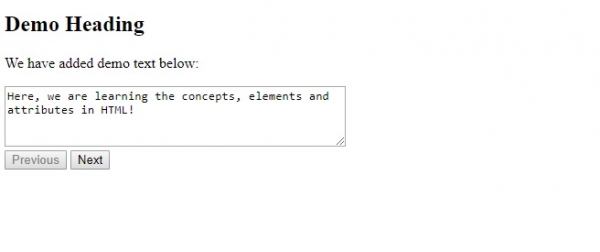
现在让我们看一个在 HTML 中实现按钮标签的示例 −
示例
<!DOCTYPE html>
<html>
<body>
   <h2>Demo Heading</h2>
   <p>We have added demo text below:<p>
   <textarea rows="4" cols="50">
      Here, we are learning the concepts, elements and attributes in HTML!
   </textarea><br>
   <button type="button" disabled>Previous</button>
   <button type="button">Next</button>
</body>
</html>
输出
相关文章
有用资源
html 参考教程 - 该教程包含有关 html 的更多信息:https://www.cainiaomax.com/html/

