
HTML canvas rect() 方法
htmlweb developmentfront end technology更新于 2025/8/28 15:08:17
HTML canvas 的 rect() 方法用于创建矩形。<canvas> 元素允许您使用 JavaScript 在网页上绘制图形。每个画布都有两个元素,分别描述画布的高度和宽度。
以下是语法 −
context.fillRect(p,q,width,height);
如上
- p:矩形左上角的 x 坐标
- q:矩形左上角的 y 坐标
- width:矩形的宽度
- height:矩形的高度
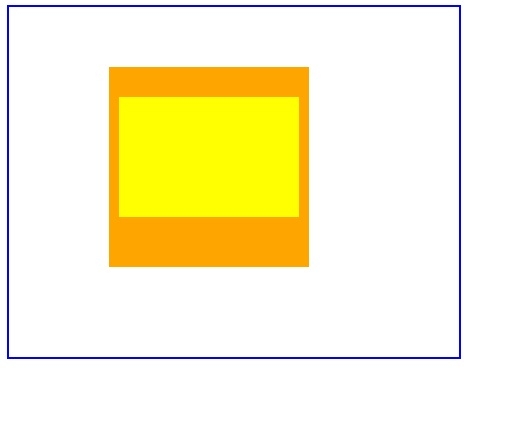
现在让我们看一个实现 Canvas 的 rect() 方法的示例 −
示例
<!DOCTYPE html>
<html>
<body>
<canvas id="myCanvas" width="450" height="350" style="border:2px solid blue;">
Your browser does not support the HTML5 canvas tag.</canvas>
<script>
   var c = document.getElementById("myCanvas");
   var ctx = c.getContext("2d");
   ctx.beginPath();
   ctx.rect(100, 60, 200, 200);
   ctx.fillStyle = "orange";
   ctx.fill();
   ctx.beginPath();
   ctx.rect(110, 90, 180, 120);
   ctx.fillStyle = "yellow";
   ctx.fill();
</script>
</body>
</html>
输出
相关文章
有用资源
html 参考教程 - 该教程包含有关 html 的更多信息:https://www.cainiaomax.com/html/

