
HTML canvas 标签
htmlweb developmentfront end technology更新于 2025/6/22 15:40:17
HTML 中的 canvas 标签用于绘制图形。要绘制图形,您需要使用脚本。此标签于 HTML5 中引入。每个画布都有两个元素,分别描述画布的高度和宽度,即 height 和 width。
以下是属性 −
- height − 画布的高度(以像素为单位)
- width − 画布的宽度(以像素为单位)
现在让我们看一个在 HTML 中实现 canvas 标签的示例 −
示例
<!DOCTYPE html>
<html>
<body>
<canvas id="newCanvas" width="600" height="350" style="border −2px solid orange;">
</canvas>
<script>
   var c = document.getElementById("newCanvas");
   var ctx = c.getContext("2d");
   ctx.shadowBlur = 20;
   ctx.shadowColor = "black";
   ctx.fillStyle = "green";
   ctx.fillRect(40, 40, 100, 250);
   ctx.shadowBlur = 30;
   ctx.shadowColor = "blue";
   ctx.fillStyle = "orange";
   ctx.fillRect(200, 40, 200, 150);
</script>
</body>
</html>
输出
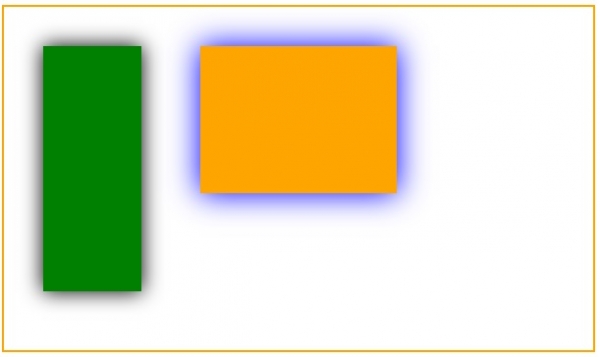
让我们看另一个在 HTML5 中绘制二次曲线的示例 −
示例
<!DOCTYPE HTML>
<html>
<head>
<style>
#test {
   width − 100px;
   height −100px;
   margin − 0px auto;
}
</style>
<script type>
   function drawShape() {
      // 使用 DOM 获取 Canvas 元素
      var canvas = document.getElementById('mycanvas');
      // 确保在 Canvas 不受支持时不会执行此操作
      if (canvas.getContext) {
         // 使用 getContext 使用 Canvas 进行绘图
         var ctx = canvas.getContext('2d');
         // 绘制形状
         ctx.beginPath();
         ctx.moveTo(75,25);
         ctx.quadraticCurveTo(25,25,25,62.5);
         ctx.quadraticCurveTo(25,100,50,100);
         ctx.quadraticCurveTo(50,120,30,125);
         ctx.quadraticCurveTo(60,120,65,100);
         ctx.quadraticCurveTo(125,100,125,62.5);
         ctx.quadraticCurveTo(125,25,75,25);
         ctx.stroke();
      } else {
         alert('You need Safari or Firefox 1.5+ to see this demo.');
      }
   }
</script>
</head>
<body id = "test" onload = "drawShape();">
<canvas id = "mycanvas"></canvas>
</body>
</html>
输出

相关文章
有用资源
html 参考教程 - 该教程包含有关 html 的更多信息:https://www.cainiaomax.com/html/

