
HTML 标题标签
htmlweb developmentfront end technology更新于 2025/6/22 21:32:17
HTML 中的标题标签用于为表格创建标题。一个表格只能定义一个标题。默认标题位于表格上方居中对齐。现在让我们看一个在 HTML 中实现标题标签的示例 −
示例
<!DOCTYPE html>
<html>
<head>
<style>
   table, th, td {
      border − 2px solid blue;
   }
</style>
</head>
<body>
<table>
   <caption>Expenses</caption>
   <tr>
      <th>Domains</th>
      <th>Cost</th>
   </tr>
   <tr>
      <td>Product Development</td>
      <td>500000</td>
   </tr>
   <tr>
      <td>Marketing</td>
      <td>500000</td>
   </tr>
   <tr>
      <td>Services</td>
      <td>100000</td>
   </tr>
   <tr>
      <td>Support</td>
      <td>100000</td>
   </tr>
   <tr>
      <td>Maintenance</td>
      <td>100000</td>
   </tr>
   <tr>
      <td colspan="2">Total Budget = INR 1300000</td>
   </tr>
</table>
</body>
</html>
输出
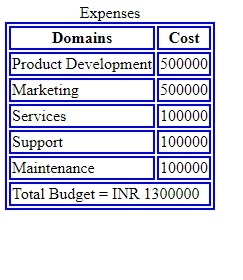
在上面的例子中,我们创建了一个包含列的表格。标题是使用 <caption> 标签设置的 −
<caption>Expenses</caption>
相关文章
有用资源
html 参考教程 - 该教程包含有关 html 的更多信息:https://www.cainiaomax.com/html/

