
HTML disabled 属性
htmlweb developmentfront end technology更新于 2025/3/22 9:16:17
HTML 中的 disabled 属性用于禁用元素。请在以下元素上使用此属性 −
<button>、<textarea>、<optgroup>、<select>、<fieldset>、<input> 和 <option>。
以下是语法 −
<element disabled>
由于我们已将上述元素设置为禁用,因此该元素将被禁用。
现在让我们看一个在 HTML 中实现 <input> 元素的 disabled 属性的示例。
<input> 的 disabled 属性元素用于禁用 <input> 元素。当元素被禁用时,它将变得不可点击。由于显而易见的原因,被禁用的输入元素将不会被提交。
以下是语法 −
<input disabled>
现在让我们看一个实现 <input> 元素的 disabled 属性的示例 −
示例
<!DOCTYPE html>
<html>
<body>
   <h2>Details</h2>
   <form>
      <p>These are the new details...</p>
      <fieldset>
         <legend>New Details:</legend>
         Player: <input type="text" disabled><br>
         Rank: <input type="number"><br>
         Email: <input type="email"><br>
         Reporting Time: <input type="time">
      </fieldset>
   </form>
</body>
</html>
输出
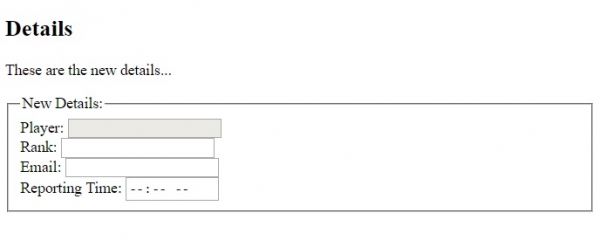
这将产生以下输出,其中我们已禁用输入元素之一"Player" −
相关文章
有用资源
html 参考教程 - 该教程包含有关 html 的更多信息:https://www.cainiaomax.com/html/

