
HTML DOM ColumnGroup span 属性
htmlweb developmentfront end technology更新于 2025/9/23 15:40:17
HTML DOM ColumnGroup span 属性与 HTML <colgroup> 元素的 span 属性相关联。ColumnGroup span 属性设置或返回列组 span 属性的值。span 属性用于定义 <colgroup> 元素应跨越的列数。
语法
以下是语法 −
设置 ColumnGroup span 属性 −
columngroupObject.span = number
此处,number 指定 <colgroup> 元素应跨越的列数。
示例
让我们看一个 ColumnGroup span 属性的示例 −
<!DOCTYPE html>
<html>
<head>
<style>
   table, th, td {
      border: 1px solid blue;
   }
</style>
</head>
<body>
<table>
<colgroup id="Colgroup1"></colgroup>
<tr>
<th>Fruit</th>
<th>COLOR</th>
<th>Price</th>
</tr>
<tr>
<td>watermelon</td>
<td>dark green</td>
<td>40Rs</td>
</tr>
<tr>
<td>papaya</td>
<td>yellow</td>
<td>30Rs</td>
</tr>
</table>
<p>lick the button to change the background color of the first two columns.
<button onclick="changeColor()">CHANGE</button>
<script>
   function changeColor() {
      document.getElementById("Colgroup1").span = "2";
      document.getElementById("Colgroup1").style.backgroundColor = "lightgreen";
   }
</script>
</body>
</html>
输出
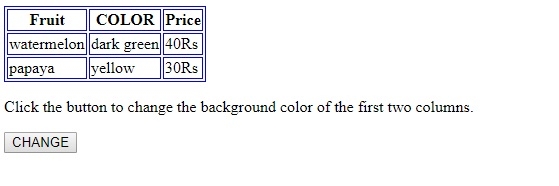
这将产生以下输出 −
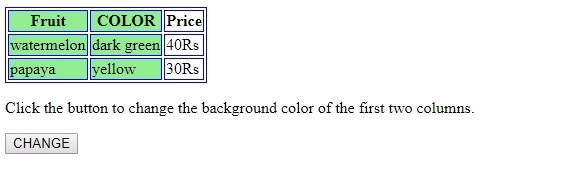
点击"更改"按钮时 −
在上面的例子中 −
我们创建了一个包含两行三列的表格。此外,我们还对表格、th 和 td 元素应用了一些样式 −
table, th, td {
   border: 1px solid blue;
}
<table>
<colgroup id="Colgroup1"></colgroup>
<tr>
<th>Fruit</th>
<th>COLOR</th>
<th>Price</th>
</tr>
<tr>
<td>watermelon</td>
<td>dark green</td>
<td>40Rs</td>
</tr>
<tr>
<td>papaya</td>
<td>yellow</td>
<td>30Rs</td>
</tr>
</table>
然后,我们创建了一个按钮"CHANGE",当用户点击该按钮时,它将执行 changeColor() 方法。
<button onclick="changeColor()>CHANGE</button>
changeColor() 函数使用 getElementById() 方法获取 <colgroup> 元素,并将 <colgroup> 元素 ID 作为参数。然后,它将 <colgroup> 元素的 span 设置为 2,并将其背景颜色更改为绿色。这将使左侧前两列变为绿色,正如 <colgroup> 元素的 span 属性所指定的那样:
function changeColor() {
   document.getElementById("Colgroup1").span = "2";
   document.getElementById("Colgroup1").style.backgroundColor = "lightgreen";
}
相关文章
有用资源
html 参考教程 - 该教程包含有关 html 的更多信息:https://www.cainiaomax.com/html/

