
HTML DOM console.groupEnd() 方法
htmlweb developmentfront end technology更新于 2025/9/24 0:12:17
HTML DOM console.groupEnd() 方法用于指示消息组的结束。它会退出控制台中的当前消息组。
语法
以下是 console.groupEnd() 方法的语法 −
console.groupEnd()
示例
让我们看一个 HTML DOM console.groupEnd() 方法的示例 −
<!DOCTYPE html>
<html>
<body>
<h1>console.groupEnd() Method</h1>
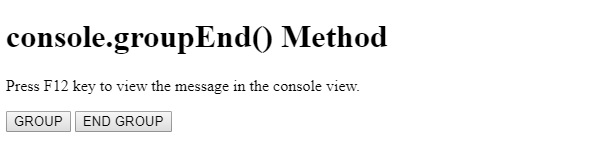
<p>Press F12 key to view the message in the console view.</p>
<button type="button" onclick="groupMessage()">GROUP</button>
<button type="button" onclick="EndGroup()">END GROUP</button>
<script>
   function groupMessage(){
      console.group();
      console.log("This message will be inside a group!");
      console.log("This message will also be inside a group!");
   }
   function EndGroup(){
      console.groupEnd();
      console.log("We are now outside the group");
      console.log("This message will be outside the group!");
   }
</script>
</body>
</html>
输出
这将产生以下输出 −
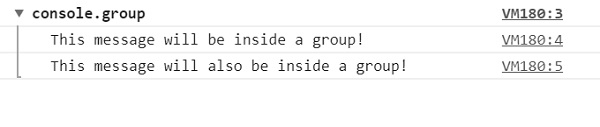
点击"分组"按钮并在开发者选项中查看控制台视图 −
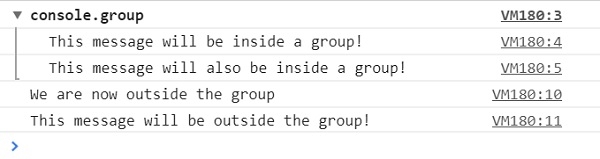
点击"结束分组"按钮并在开发者选项中查看控制台视图 −
在上面的例子中 −
我们创建了两个按钮 GROUP 和 END GROUP,当用户点击它们时,它们会执行 groupMessage() 和 EndGroup () 方法 −
<button type="button" onclick="groupMessage()">GROUP</button>
<button type="button" onclick="EndGroup()">END GROUP</button>
groupMessage() 方法内部包含 console.group() 方法,用于指定在此之后写入的所有消息都将显示在消息组中 −
function groupMessage(){
   console.group();
   console.log("This message will be inside a group!");
   console.log("This message will also be inside a group!");
}
The EndGroup() method has the console.groupEnd() method inside it stating all of the messages written after this point will be displayed outside the message group. It won’t throw an error if no message group existed before −
function EndGroup(){
   console.groupEnd();
   console.log("We are now outside the group");
   console.log("This message will be outside the group!");
}
相关文章
有用资源
html 参考教程 - 该教程包含有关 html 的更多信息:https://www.cainiaomax.com/html/

