
HTML DOM 地理位置坐标属性
htmlweb developmentfront end technology更新于 2025/9/29 15:08:17
HTML DOM 地理位置坐标属性用于获取用户设备在地球上的位置和海拔高度。用户必须同意提供坐标后,此属性才能生效。这样做是为了不泄露用户的隐私。此属性可用于追踪各种设备的位置。
属性
以下是坐标属性 −
注意 − 所有这些属性都是只读的,并且它们的返回类型为 double。
| Sr.No | 属性 &说明 |
|---|---|
| 1 | coordinates.latitude 以十进制度数返回设备位置的纬度。 |
| 2 | coordinates.longitude 以十进制度数返回设备位置的经度。 |
| 3 | coordinates.altitude 以米为单位返回该位置相对于海平面的高度。如果设备中没有 GPS,则可能返回 null。 |
| 4 | coordinates.accuracy 返回纬度和经度属性的精度(以米为单位) |
| 5 | coordinates.altitudeAccuracy 返回海拔属性的精度(以米为单位) |
| 6 | coordinates.heading 返回设备行进的方向。该值以度为单位,表示设备与正北方向的偏差。0 度代表正北,方向按顺时针方向确定(东经 90 度,西经 270 度)。如果速度为 0,则航向为 NaN。如果设备无法提供航向信息,则此值为 null。 |
| 7 | coordinates.speed 返回设备的速度(以米/秒为单位)。此值可以为 null。 |
语法
以下是 GeoLocation 坐标属性 − 的语法。
coordinates.property
"property"可以是表格中提到的上述属性之一。
示例
让我们看一个 GeoLocation 坐标属性的示例 −
<!DOCTYPE html>
<html>
<body>
<h1>Geolocation coordinates property</h1>
<p>Get you coordinates by clicking the below button</p>
<button onclick="getCoords()">COORDINATES</button>
<p id="Sample">Your coordinates are:</p>
<script>
   var p = document.getElementById("Sample");
   function getCoords() {
      if (navigator.geolocation) {
         navigator.geolocation.getCurrentPosition(showCoords);
      } else {
         p.innerHTML ="This browser doesn't support geolocation.";
      }
   }
   function showCoords(position) {
      p.innerHTML = "Longitude:" + position.coords.longitude + "<br>Latitude: " + position.coords.latitude+"<br>Accuracy: "+ position.coords.accuracy;
   }
</script>
</body>
</html>
输出
这将产生以下输出 −
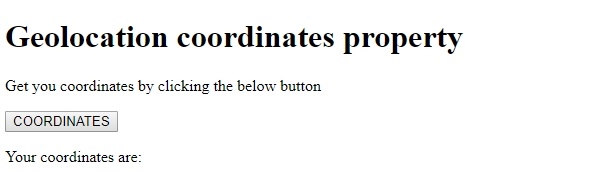
点击 COORDINATES 按钮,并在"了解您的位置"弹出窗口中点击"允许" −
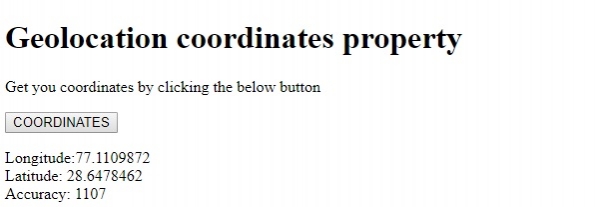
在上面的例子中 −
我们首先创建了一个按钮 COORDINATES,当用户点击该按钮时,它将执行 getCoords() 方法 −
<button onclick="getCoords()">COORDINATES</button>
getCoords() 函数获取导航器对象的 geolocation 属性,以检查浏览器是否支持地理定位。如果浏览器支持地理定位,它将返回一个 Geolocation 对象。使用导航器 geolocation 属性的 getCurrentPosition() 方法,我们可以获取设备的当前位置。getCurrentPosition() 方法是一个回调函数,它接受一个函数作为其参数,因为 JavaScript 中的每个函数都是一个对象。
在这里,我们将 showCoords() 方法传递给它。showCoords() 方法接受一个位置接口作为参数,并使用它来在 ID 为"Sample"的段落内显示经度、纬度和精度。它使用段落的 innerHTML 属性将文本附加到段落中。−
function getCoords() {
   if (navigator.geolocation) {
      navigator.geolocation.getCurrentPosition(showCoords);
   } else {
      p.innerHTML ="This browser doesn't support geolocation.";
   }
}
function showCoords(position) {
   p.innerHTML = "Longitude:" + position.coords.longitude + "<br>Latitude: " + position.coords.latitude+"<br>Accuracy: "+ position.coords.accuracy;
}
相关文章
有用资源
html 参考教程 - 该教程包含有关 html 的更多信息:https://www.cainiaomax.com/html/

