
HTML DOM getElementsByClassName() 方法
htmlweb developmentfront end technology更新于 2025/9/24 6:04:17
HTML DOM getElementsByClassName() 方法用于获取文档中所有具有指定类名的元素的集合。它将所有给定元素作为 NodeList 对象返回。您可以使用索引号访问返回对象中的任何元素。可以对任何单个元素调用此方法,使其后代子元素具有给定的类名。
语法
以下是 getElementsByClassName() 方法的语法 −
document.getElementsByClassName(classname)
此处,classname 为字符串类型,表示要访问的元素的类名。也可以通过空格分隔多个类名来搜索。
示例
让我们看一个 getElementsByClassName() 方法的示例 −
<!DOCTYPE html>
<html>
<head>
<script>
   function changePara() {
      var p = document.getElementsByClassName("PARA1");
      p[0].innerHTML = "This text has been changed";
      p[1].style.color = "red";
      p[1].style.backgroundColor = "yellow";
   }
</script>
</head>
<body>
<h1>getElementsByClassName() example</h1>
<p class="PARA1">Lorem ipsum dolor sit amet, consectetur adipiscing elit,
sed do eiusmod tempor incididunt ut labore et dolore magna aliqua</p>
<p class="PARA1"> Ut enim ad minim veniam, quis nostrud exercitation
ullamco laboris nisi ut aliquip ex ea commodo consequat</p>
<button onclick="changePara()">CHANGE</button>
</body>
</html>
输出
这将产生以下输出 −
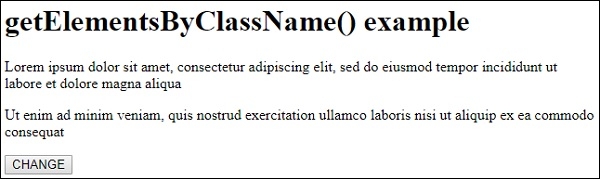
单击"更改"按钮时+减号;
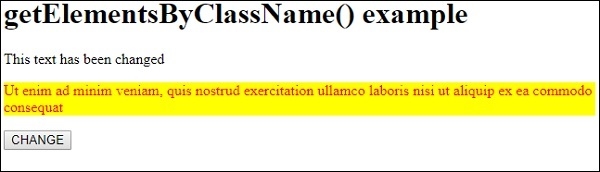
在上面的例子中−
我们创建了两个段落,其中 classname=”PARA1”与他们相关。
<p class="PARA1">Lorem ipsum dolor sat amet,consectetur adipiscing elit,sed do eiusmod tempor incididunt ut Labore et dolore magna aliqua</p>

<p class="PARA1> Ut enim ad minim veniam, quis nostrud exercitation ullamco laboris nisi ut aliquip ex ea commodo consequat</p>
然后我们创建了一个按钮 CHANGE,当用户点击该按钮时,它将执行 changePara() −
<button onclick="changePara()">CHANGE</button>
changePara() 方法使用 document 对象上的 getElementsByClassName() 方法获取两个 <p> 元素作为 nodeListObject,并将其赋值给变量 p。使用索引号,我们更改了第一段的文本,并对第二段应用了一些样式 −
function changePara() {
   var p = document.getElementsByClassName("PARA1");
   p[0].innerHTML = "This text has been changed";
   p[1].style.color = "red";
   p[1].style.backgroundColor = "yellow";
}
相关文章
有用资源
html 参考教程 - 该教程包含有关 html 的更多信息:https://www.cainiaomax.com/html/

